Jeroen Zijp
Participant
May 7, 2026
Question

Bug - Text Tool does not show correct font information when applying Paragraph/Character style

  • May 7, 2026
  • 1 reply
  • 12 views

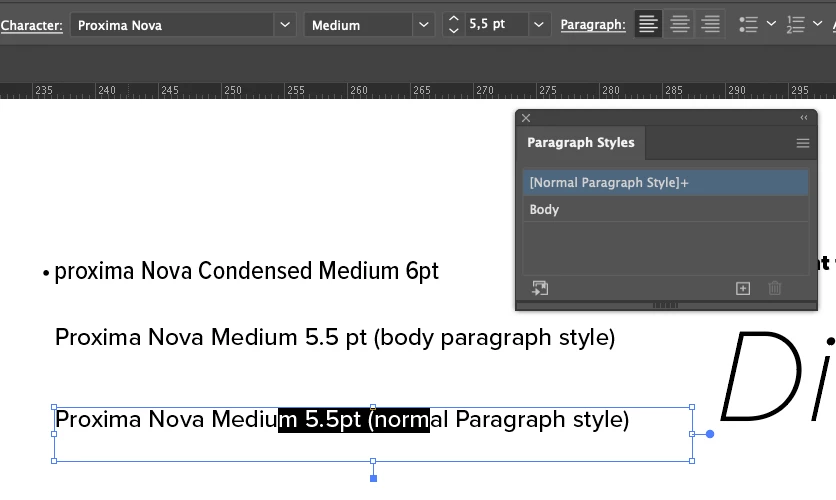
For a long time I have had an occasional problem where the character menu shows different font/weight/size information than what is actually used. For example, I have a text that uses Proxima Nova Medium, 5 pts. But the character menu says the selected text is Myriad Pro Regular 12pt. 

I did a little experimenting and it seems to be tied to the use of paragraph and/or character styles. It doesn’t seem to matter whether I clear overrides or not, as long as there is a paragraph style involved. Sometimes manually changing the affected text or clicking between different text boxes temporarily fixes the issue, but only for a short time. 
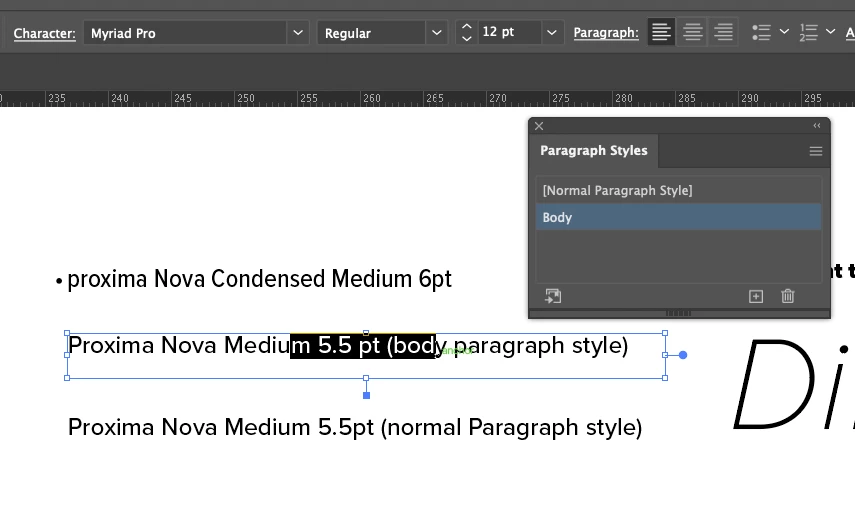
 

Is this a known bug and if so, are there any solutions to this? Currently using AI 30.4 and on MacOS 15.7.4. 

    1 reply

    Abhishek Rao
    Community Manager
    Community Manager
    May 7, 2026

    Hi @Jeroen Zijp,


    Thanks for sharing the detailed observations and screenshots and sorry to hear you experience this. I tested this on Illustrator 30.4 on both Windows 11 and macOS 26.4.1, but I was not able to reproduce the same behavior on my end.

    Could you please try isolating this a bit further and check whether the issue is limited to this specific file or if it also happens in a newly created Illustrator file with fresh Paragraph and Character Styles?

    If you're able to reproduce it in a newly created file as well, please try manually resetting the Illustrator preferences using the steps shown in this video and then test again:
    https://adobe.ly/4uEDwXg


    Please let me know how it goes after trying this. Looking forward to update.
    Abhishek