zephuros
Participant
June 26, 2022
Question

BUG: Transform Effects Vertical Values Reversed

  • June 26, 2022
  • 3 replies
  • 262 views

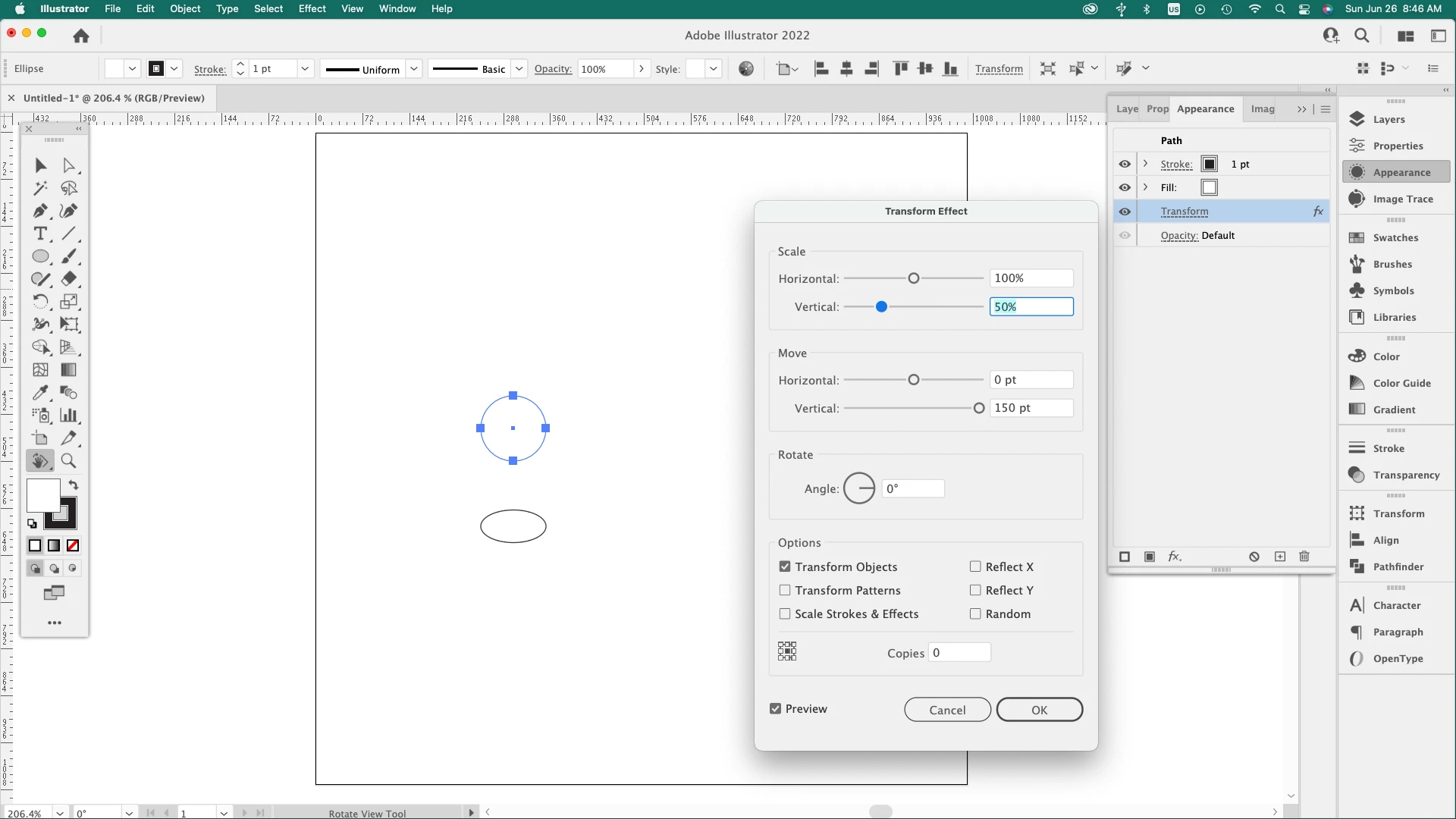
I am reposting this as my previous post was not addressed to my satisfaction concerning what I believe to be a bug in Transform Effects. In the attached image you can see that the value in the Vertical Move section indicates a positive number (150 pts.), yet the object is below its original position. When I press the up arrow key to increase the value the object moves further down from its original position. In older versions of Illustrator this was not an issue. I have and use Illustrator CS4 on an older Mac and this is not a problem.
This topic has been closed for replies.

3 replies

Jacob Bugge
Community Expert
Community Expert
June 26, 2022

zephuros,


Here is a link to a(n ir)relevant thread that I really enjoy because of its exquisite ending,

https://community.adobe.com/t5/illustrator-discussions/how-to-change-the-quot-y-quot-coordinate-from-positive-to-negative-when-moving-down/m-p/11079681#M174269


zephuros
zephurosAuthor
Participant
June 26, 2022

I prefer NOT to make code changes if that is the solution to my query and would prefer that this be a preference that one can change with the click of a button. However, if there is a specific, overarching reason for this rediculous change in the Illy product I will leave this issue behind with no further action on my part and hope it is addressed in future versions.

Kurt Gold
Community Expert
Community Expert
June 26, 2022

A preference setting would certainly be ideal, though it may cause other unforeseeable issues.


The "overarching" reasons for the change, by the way, were many user requests complaining that Illustrator should work like InDesign in this respect.


I didn't vote for the change and I'm not going to sanctify it, but it happened anyway.


Kurt Gold
Community Expert
Community Expert
June 26, 2022

Well, strictly speaking, you would then also have to vote for the ability to do horizontal movements with the left or right arrow key if the corresponding field is in focus …


zephuros
zephurosAuthor
Participant
June 26, 2022

The Horisontal Move function is not an issue as the object moves left or right in conjunction with the key pressed when changing the values in that field.

Kurt Gold
Community Expert
Community Expert
June 26, 2022

It's because in older versions of Illustrator the y direction was based on the traditional Cartesian coordinate system.


This has been changed a couple of Illustrator versions ago and since then the y direction worked the opposite way around.


It's not a bug.


zephuros
zephurosAuthor
Participant
June 26, 2022
Whichever “coordinate” system is used, it seems inconsistent and counterintuitive to use the directional (up and down) keys to add or subtract values where the object moves in the OPPOSITE direction of the key pressed.