julioc4816867
Known Participant
August 10, 2015
Question

Button.onClick does not work when I renamed

  • August 10, 2015
  • 1 reply
  • 529 views

Hello, I have a little Script, when I renowned "Ok" to "Aceptar" and does not work, I pressed click, Enter, Spacebar, and Does not work

I have Adobe Illustrator CC2015


var button = new Window('dialog', ''); 

btnName = button.add('button',undefined,'Ok');  //btnName = button.add('button',undefined,'Aceptar');  //

btnName.onClick = function() {

alert ("Works!")

    }

button.show();

    Run Script:
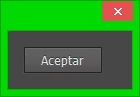
when I click in "aceptar", Alert does not show and "aceptar" button shows an orange edge

Help me Pls , Sorry my bad english


This topic has been closed for replies.

1 reply

Qwertyfly___
Legend
August 10, 2015

this worked fine for me.

double check your code for any spelling mistakes.

copy this and see if it works for you. just to make sure its not just a missing semicolon or something

var button = new Window('dialog', ''); 

var btnName = button.add('button',undefined,'Aceptar'); 

btnName.onClick = function() {

alert ("Works!");

    }

button.show();

edit. you could try restarting illustrator just to make sure the JS engine is clean.

julioc4816867
Known Participant
August 10, 2015

no, it does not work, look thats scripts by Carlos

   ////// LINE  54

win.g100.bu2 = win.g100.add('button',undefined,'Cancel'); /////////////////////////////////////////  Please, try to rename "cancel" to "Cancelar"

to "cancel"

works perfect with "cancel", but rename to "cancelar", click does works :S


Run first with "cancel", second close that script, third, renown "Cancelar" and run script, click does not work , I've tried on another computer :S


#target illustrator

main();

function main(){

    if(!documents.length) return;

    //var allLayers = app.activeDocument.layers;

    var win = new Window( 'dialog', '' );

    g = win.graphics;

    //  var myBrush = g.newBrush(g.BrushType.SOLID_COLOR, [0.99, 0.99, 0.99, 1]); // CS5

    var myBrush = g.newBrush(g.BrushType.SOLID_COLOR, [0.50, 0.50, 0.50, 1]); // CS6

    g.backgroundColor = myBrush;

    win.orientation='stack';

    win.p1= win.add("panel", undefined, undefined, {borderStyle:"black"});

    win.g1 = win.p1.add('group');

    win.g1.orientation = "row";

    win.title = win.g1.add('statictext',undefined,'Rename Visible Layers or Sublayers');

    win.title.alignment="fill";

    var g = win.title.graphics;

    g.font = ScriptUI.newFont("Georgia","BOLDITALIC",22);

    win.g5 =win.p1.add('group');

    win.g5.orientation = "column";

    win.g5.alignChildren='left';

    win.g5.spacing=10;

    win.g5.st1 = win.g5.add('statictext',undefined,'New layer name');

    win.g5.et1 = win.g5.add('edittext');

    win.g5.et1.preferredSize=[250,20];

    win.g10 =win.p1.add('group');

    win.g10.orientation = "row";

    win.g10.alignment='fill';

    win.g10.spacing=10;

    win.g10.st1 = win.g10.add('statictext',undefined,'Serial Number');

    win.g10.et1 = win.g10.add('edittext',undefined,'1');

    win.g10.et1.preferredSize=[50,20];

    win.g10.et1.onChanging = function() {

      if (this.text.match(/[^\-\.\d]/)) {

        this.text = this.text.replace(/[^\-\.\d]/g, '');

      }

    };

    win.g10.st1 = win.g10.add('statictext',undefined,'Length');

    var nums=[2,3,4,5];

    win.g10.dl1 = win.g10.add('dropdownlist',undefined,nums);

    win.g10.dl1.selection=0;

    win.g15 =win.p1.add('group');

    win.g15.orientation = "row";

    win.g15.alignment='fill';

    win.g15.cb1 = win.g15.add('checkbox',undefined,'Reverse layer order');

    win.g15.cb2 = win.g15.add('checkbox',undefined,'Rename Sublayers Only');

    win.g100 =win.p1.add('group');

    win.g100.orientation = "row";

    win.g100.alignment='center';

    win.g100.spacing=10;

    win.g100.bu1 = win.g100.add('button',undefined,'Rename');

    win.g100.bu1.preferredSize=[120,30];

    win.g100.bu2 = win.g100.add('button',undefined,'Cancel'); /////////////////////////////////////////  Please, try to rename "cancel" to "cancel"

    win.g100.bu2.preferredSize=[120,30];

    win.g100.bu1.onClick=function(){

        if(win.g5.et1.text == ''){

            alert("No layer name has been entered!");

            return;

        }

        win.close(0);


        var sublayersOnly = win.g15.cb2.value;

        var visibleLayers = [];

        getVisibleLayers (app.activeDocument, visibleLayers, sublayersOnly);

        if(win.g15.cb1.value) visibleLayers.reverse();

        for(b=0; b<visibleLayers.length; b++){

            var LayerName = win.g5.et1.text + zeroPad((Number(win.g10.et1.text)+Number(b)), Number(win.g10.dl1.selection.text));

            visibleLayers.name = LayerName;

        }

    }

    win.center();

    win.show();

    function getVisibleLayers(container, visibleLayers, sublayersOnly) {

        for(var a=0; a<container.layers.length; a++){

            var ilayer = container.layers;

            if (ilayer.visible) {

                if (sublayersOnly) {

                    getVisibleLayers (ilayer, visibleLayers, false); // false to process only 1 sublayer depth

                }

                else

                visibleLayers.push(ilayer);

            }

        }

    }

}

function zeroPad(n, s) {

    n = n.toString();

    while (n.length < s) n = '0' + n;

    return n;

};

Qwertyfly___
Legend
August 10, 2015

in the script by carlos there is no function for the Cancel button.

and if I rename it nothing happens as you say.

so I added a function for it and it works fine.

win.g100.bu2 = win.g100.add('button',undefined,'Cancelar');

    win.g100.bu2.preferredSize=[120,30];

    win.g100.bu2.onClick=function(){

       win.close(0);

    }