
Eric_The_Sign_Guy
Participant
February 8, 2019
Question

CADtools panels too small to read in AI2019

  • February 8, 2019
  • 3 replies
  • 1712 views

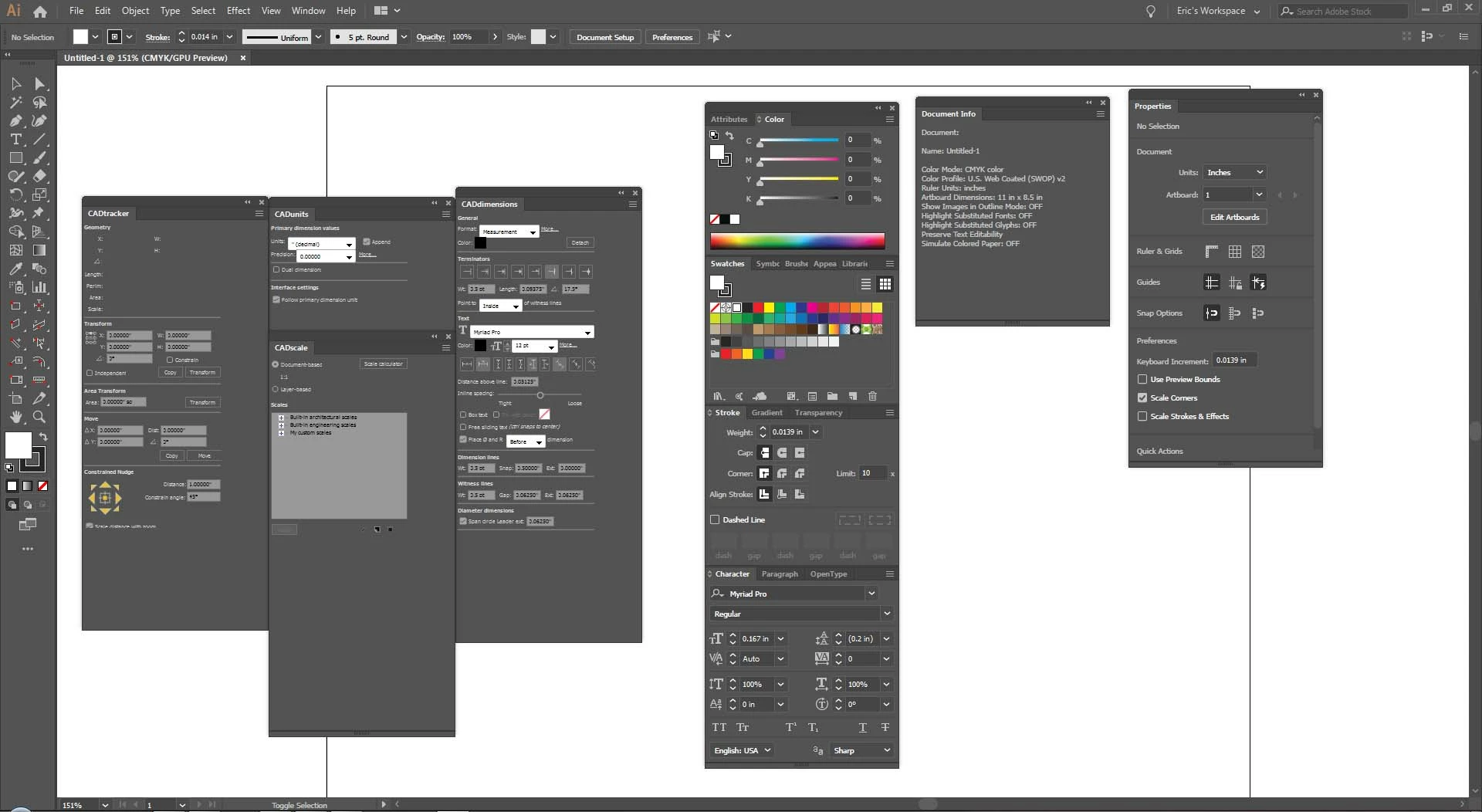
For some reason, all of the contents in the CADtools panels are scaled down in AI2019.  I've contacted Hot Door, but despite them trying, they had no solution.  In the attached image, you can see the CADtools panels next to some normal sized panels.  It displays normal in my 2018 install, but its too small to comfortable read in 2019.  Anybody ever run into this, or have a possible solution?

I'm running Windows 7 on dual 1920x1080 monitors. 
This topic has been closed for replies.

3 replies

hotdoorsupport
Participating Frequently
June 4, 2019

To those having issues here, it is an issue with Windows 7 only. On CC 2019, Adobe added a feature allowing users to adjust the size of the User Interface. This dialog is available on Mac by clicking in the Illustrator menu on:

Illustrator CC > Preferences > User Interface

and on Windows, by clicking in the Illustrator menu on:

Edit > Preferences > User Interface.

Here is what the dialog looks like, except on Windows 7:

But on Windows 7, the slider identified in the screen capture above doesn't exist. As I have explained to those who have contacted me at Hot Door Support, part of the issue is that Windows 7 is a nine and a half year old operating system, and programming changes in newer software cause compatibility issues.  The solution is to move to a more recent operating system.

There are also a few workarounds that may adjust the sizing slightly, but is not a perfect solution, by any means. If anyone needs

that, contact me at support@hotdoor.com. Some of the people here have contacted me, and I have shared that settings adjustment with them. Yet, like I said, the only full solution is to move to Windows 10!

Garry

MSLdesigner
Participant
April 1, 2019

I have the same exact problem. After trying several options suggested by Hot Door (developer of CADtools) nothing has worked. According to Hot Door it is Adobe's problem because of how they changed interface scaling for AI 2019. The problem is how this relates to Windows 7 which it appears Adobe is leaving behind, focusing on having the suite work on Windows 10. I have yet to try this myself but I would really be interested in knowing if this is a problem for Illustrator and CADTools users on Windows 10. If not, upgrading to Windows 10 may solve the problem.

Daniel E Lane
Inspiring
February 8, 2019

Have you tried going in to Preferences > User Interface and scaling up the size of the user interface there? Also, since they are a plug-in from a third party, have you seen if there is an update for them for CC 2019? Maybe something they addressed in an update or something...?

Eric_The_Sign_Guy
Participant
February 8, 2019

I've tried that, but it didn't work.  It was also updated this morning before I made this post.  Still didn't help.  I previously tried deleting some preference files, which got it to the correct size, but as soon as Illustrator is closed and reopened, the panels are scaled back down.