Participating Frequently
August 1, 2022
Answered

Calcul d'aires complexe dans Illustrator

  • August 1, 2022
  • 3 replies
  • 1353 views

Bonjour !

J'ai besoins de pouvoir connaitre facilement l'aire d'un objet complexe sélectionné dans mon plan de travail
J'ai déja trouvé le script Surface4 qui est déja très performant mais qui prends en compte que des formes pleines, par exemple si ma forme ressmenble à un O il ne vas pas me calculer l'aire en noire mais l'aire du contour noire PLUS l'aire de la fore vide formant le centre du O .... (voir image jointe pour que ça soit plus clair)
Existe t'il une solution à ce problème ? 

Merci d'avance pour vos retours !

This topic has been closed for replies.
Correct answer m1b

Hi @YannickB833 and @Jacob Bugge, this is a new topic for me so forgive me if I am going over old ground. I wrote a quick function getItemArea to attempt to do this.


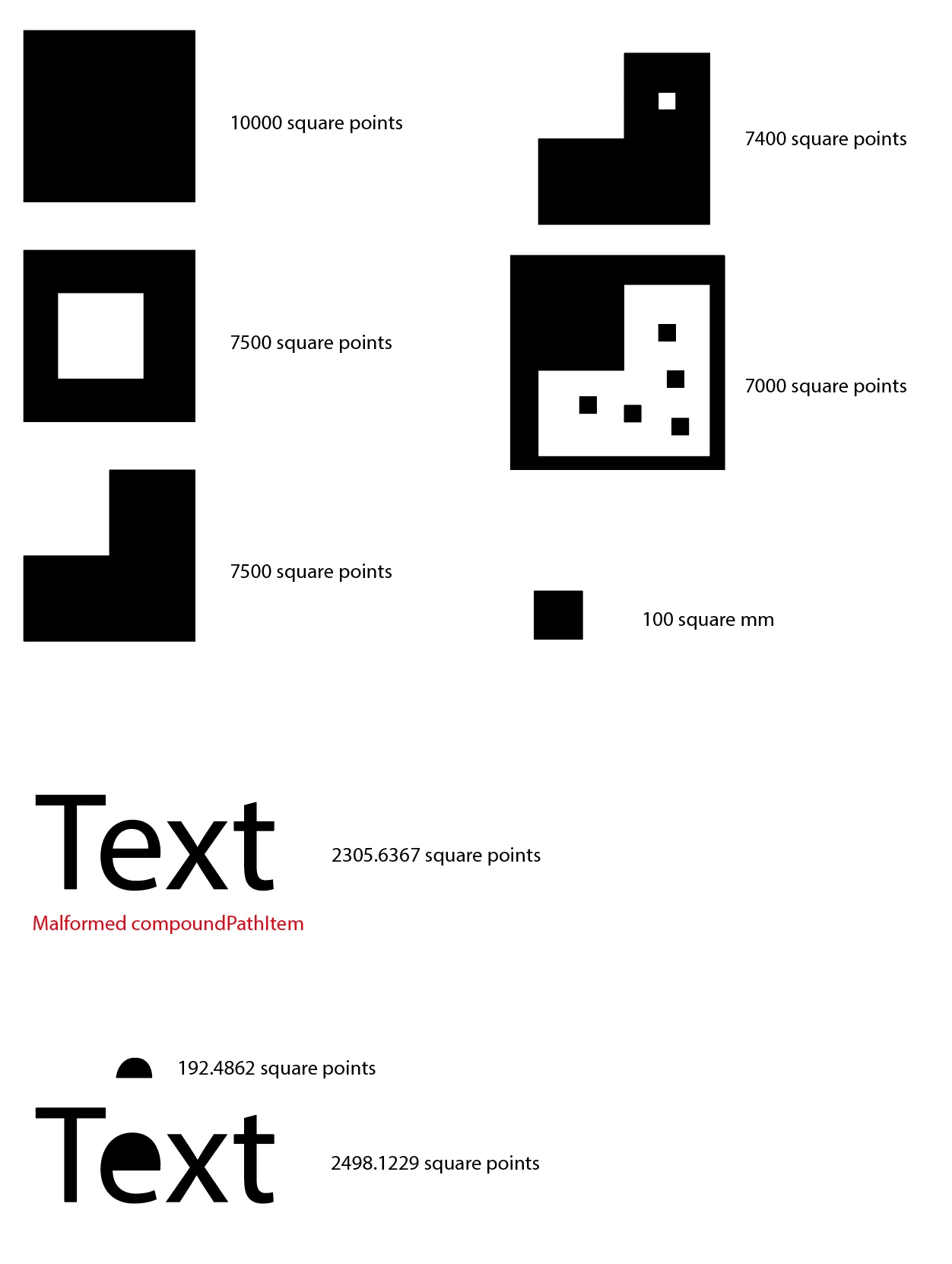
I have tested on some basic cases (see attached sample file) but I am guessing by your post that it is more complicated than I can see. You can specify the units as 'mm', 'cm', 'inch' or 'pt' (default).


One complicated example I did find was that a compoundPath may be malformed quite easily: if you create a compoundPath out of grouped compoundPaths (for example if you outline text and then, without ungrouping, create compoundPath of it—as I did in the attached sample doc) then it will have zero pathItems. The script makes an attempt to fix this—but see caveats in script listing.


@YannickB833,  please let me know how it works in your case, and post example .ai file that shows unexpected result.

- Mark


// make a selection first and run script

(function () {

    // choose unit: pt, mm, cm, inch
    const unit = 'mm';

    if (
        app.documents.length == 0
        || app.activeDocument.selection.length == 0
    ) {
        alert('Please select a page item and try again.');
        return;
    }

    var doc = app.activeDocument,
        item = doc.selection[0],
        itemArea = getItemArea(item, unit);

    if (itemArea > 0)
        alert('selected item area = ' + itemArea + '\u00A0sq.\u00A0' + unit + '.');

    else
        alert('Did not calculate area for this item.');


    /**
     * Returns area of a PathItem or CompoundPathItem.
     * @author m1b
     * @version 2022-08-02
     * @discussion https://community.adobe.com/t5/illustrator-discussions/calcul-d-aires-complexe-dans-illustrator/m-p/13106830
     * @param {PageItem} item - an Illustrator PathItem or CompoundPathItem.
     * @param {String} unit - 'pt', 'mm', 'cm', 'inch'.
     * @returns {Number} - the item area in square points.
     */
    function getItemArea(item, unit) {

        unit = {
            mm: 2.834645,
            cm: 28.34645,
            inch: 72,
            pt: 1
        }[unit || 'pt'];

        var itemArea = 0;

        if (item == undefined)
            return 0;

        else if (item.hasOwnProperty('pathItems')) {

            // compoundPathItem
            if (item.pathItems.length == 0) {
                
                // attempt to fix malformed compoundPathItem

                // WARNING: this will alter the
                // compoundPathItem by uncompounding,
                // ungrouping and re-compounding it.
                // It will lose some properties, eg. name
                // and you should check that path winding
                // is correct afterwards.

                // store the selection
                var selectedItems = [],
                    itemIsSelected = item.selected;
                for (var i = 0; i < app.selection.length; i++)
                    if (app.selection[i] !== item)
                        selectedItems.push(app.selection[i]);

                // work on a copy
                var temp = item.duplicate();
                app.selection = [temp];

                // fix bad compoundPathItem
                app.executeMenuCommand('noCompoundPath');
                app.executeMenuCommand('ungroup');
                app.executeMenuCommand('compoundPath');

                // get fresh reference to item
                // and remove the malformed item
                for (var i = 1; i < item.layer.compoundPathItems.length; i++) {
                    if (item.layer.compoundPathItems[i].uuid == item.uuid) {
                        temp = item.layer.compoundPathItems[i - 1];
                        item.remove();
                        item = temp;
                        break;
                    }
                }

                // reinstate selection
                item.selected = itemIsSelected;
                for (var i = 0; i < selectedItems.length; i++)
                    selectedItems[i].selected = true;

            }

            for (var i = 0; i < item.pathItems.length; i++)
                // add together the pathItems' areas
                itemArea += item.pathItems[i].area;

        }

        else if (item.hasOwnProperty('area'))

            // pathItem
            itemArea = item.area;

        else

            // didn't calculate area for this item
            return -1;

        // area can be negative, and also
        // it is good to round to 4 decimals
        // due to expected tiny rounding errors
        return round(Math.abs(itemArea / (unit * unit)), 4);

    }


    /**
     * Rounds a number to `places` decimal places.
     * @author m1b
     * @version 2022-08-02
     * @param {Number} num - the Number to round.
     * @param {Number} [places] - round to this many decimal places.
     * @return {Number} - the rounded Number.
     */
    function round(num, places) {

        places = Math.pow(10, places || 1);
        return Math.round(num * places) / places;

    }


})();



3 replies

m1b
Community Expert
m1bCommunity ExpertCorrect answer
Community Expert
August 1, 2022

Hi @YannickB833 and @Jacob Bugge, this is a new topic for me so forgive me if I am going over old ground. I wrote a quick function getItemArea to attempt to do this.


I have tested on some basic cases (see attached sample file) but I am guessing by your post that it is more complicated than I can see. You can specify the units as 'mm', 'cm', 'inch' or 'pt' (default).


One complicated example I did find was that a compoundPath may be malformed quite easily: if you create a compoundPath out of grouped compoundPaths (for example if you outline text and then, without ungrouping, create compoundPath of it—as I did in the attached sample doc) then it will have zero pathItems. The script makes an attempt to fix this—but see caveats in script listing.


@YannickB833,  please let me know how it works in your case, and post example .ai file that shows unexpected result.

- Mark


// make a selection first and run script

(function () {

    // choose unit: pt, mm, cm, inch
    const unit = 'mm';

    if (
        app.documents.length == 0
        || app.activeDocument.selection.length == 0
    ) {
        alert('Please select a page item and try again.');
        return;
    }

    var doc = app.activeDocument,
        item = doc.selection[0],
        itemArea = getItemArea(item, unit);

    if (itemArea > 0)
        alert('selected item area = ' + itemArea + '\u00A0sq.\u00A0' + unit + '.');

    else
        alert('Did not calculate area for this item.');


    /**
     * Returns area of a PathItem or CompoundPathItem.
     * @author m1b
     * @version 2022-08-02
     * @discussion https://community.adobe.com/t5/illustrator-discussions/calcul-d-aires-complexe-dans-illustrator/m-p/13106830
     * @param {PageItem} item - an Illustrator PathItem or CompoundPathItem.
     * @param {String} unit - 'pt', 'mm', 'cm', 'inch'.
     * @returns {Number} - the item area in square points.
     */
    function getItemArea(item, unit) {

        unit = {
            mm: 2.834645,
            cm: 28.34645,
            inch: 72,
            pt: 1
        }[unit || 'pt'];

        var itemArea = 0;

        if (item == undefined)
            return 0;

        else if (item.hasOwnProperty('pathItems')) {

            // compoundPathItem
            if (item.pathItems.length == 0) {
                
                // attempt to fix malformed compoundPathItem

                // WARNING: this will alter the
                // compoundPathItem by uncompounding,
                // ungrouping and re-compounding it.
                // It will lose some properties, eg. name
                // and you should check that path winding
                // is correct afterwards.

                // store the selection
                var selectedItems = [],
                    itemIsSelected = item.selected;
                for (var i = 0; i < app.selection.length; i++)
                    if (app.selection[i] !== item)
                        selectedItems.push(app.selection[i]);

                // work on a copy
                var temp = item.duplicate();
                app.selection = [temp];

                // fix bad compoundPathItem
                app.executeMenuCommand('noCompoundPath');
                app.executeMenuCommand('ungroup');
                app.executeMenuCommand('compoundPath');

                // get fresh reference to item
                // and remove the malformed item
                for (var i = 1; i < item.layer.compoundPathItems.length; i++) {
                    if (item.layer.compoundPathItems[i].uuid == item.uuid) {
                        temp = item.layer.compoundPathItems[i - 1];
                        item.remove();
                        item = temp;
                        break;
                    }
                }

                // reinstate selection
                item.selected = itemIsSelected;
                for (var i = 0; i < selectedItems.length; i++)
                    selectedItems[i].selected = true;

            }

            for (var i = 0; i < item.pathItems.length; i++)
                // add together the pathItems' areas
                itemArea += item.pathItems[i].area;

        }

        else if (item.hasOwnProperty('area'))

            // pathItem
            itemArea = item.area;

        else

            // didn't calculate area for this item
            return -1;

        // area can be negative, and also
        // it is good to round to 4 decimals
        // due to expected tiny rounding errors
        return round(Math.abs(itemArea / (unit * unit)), 4);

    }


    /**
     * Rounds a number to `places` decimal places.
     * @author m1b
     * @version 2022-08-02
     * @param {Number} num - the Number to round.
     * @param {Number} [places] - round to this many decimal places.
     * @return {Number} - the rounded Number.
     */
    function round(num, places) {

        places = Math.pow(10, places || 1);
        return Math.round(num * places) / places;

    }


})();


Participating Frequently
August 4, 2022

Hello, 
After some test i don't really understand how to prepare my illustration for having a reliable result, can you explain me what you call a malformed compoundPath please ? 

Second, if a have a logo with some unrelated elements (for exemple in Apple logo there is 2 objects : the apple and the leaf), it look like when i select both item, the script return me only the area of first element, i have to create acompoundPath in this case ?

Thanks !

Participating Frequently
August 1, 2022

Thanks for your answer, 

If you look at the second result we have the area of first shape ADDED to the area of the white shape (i add that in reallity there is no white shape it's a Compound Path), but what i want is only the BLACK surface of the second shape : 542-179=363 millimeters

It's easy in this case, but with a lot of more objects it become less funny .... 

the goal is to be able to determinate the black surface, with this data i can calculate a production time 
But it's currently flawed cause of this king of situation


Is it more clear ? 
Sorry for my bad explanations !


m1b
Community Expert
Community Expert
August 1, 2022

Hi @YannickB833, can you explain how it isn't working? When I look at your screen shot, it looks okay. The top case item 0 is the uppercase O. In the bottom case item 0 is the numeral 1 and item 1 is the uppercase O. The area values match up.


I can suggest a test case: compare the uppercase O, with just the outside path of the uppercase O.


Sorry if I have misunderstood. 

- Mark

Jacob Bugge
Community Expert
Community Expert
August 1, 2022

Mark,


It is an old issue waiting for the right solution:


You have a (number of) Compound Path(s) and you wish to have the actual area without the counter(s)/hole(s) = the filled area in case of (a set of) filled path(s) as in this case presented by Yannick.


In other words: Area of outer path(s) - area of inner path(s)


Just about every script wrongly adds the area(s) of the counter(s)/hole(s), in other words the inner path(s), to that of the outer path(s), and instead of subtracting the counter(s)/hole(s).


In other words: Area of outer path(s) + area of inner path(s)


And the script needs to give the option of selecting all relevant units.


I have seen a script on Github which more or less seems to make the right calculation, but the only unit options are cm and inches, not mm, and not points/pixels.