
Participant
August 15, 2017
Answered

Can I fill an irregular shape with an image?

  • August 15, 2017
  • 4 replies
  • 8764 views

I've transformed a rectangle to create an irregular shape in illustrator. I need to fill that new shape with an image, but when I create a mask it reverts back to it's original rectangle shape. Is it possible to keep the shape I need and fill with an image?
This topic has been closed for replies.
Correct answer Mike_Gondek10189183

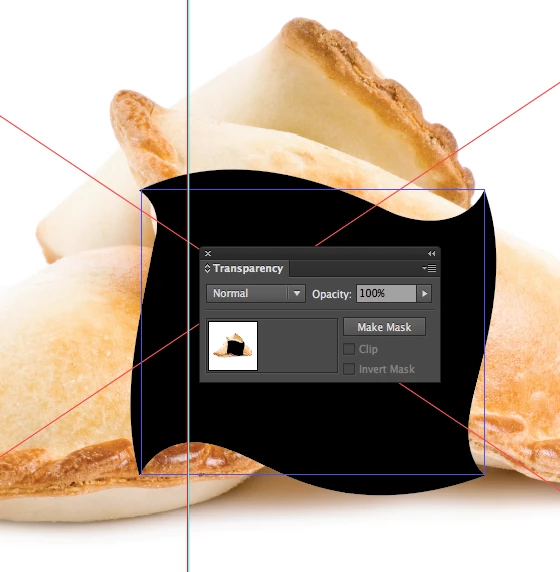
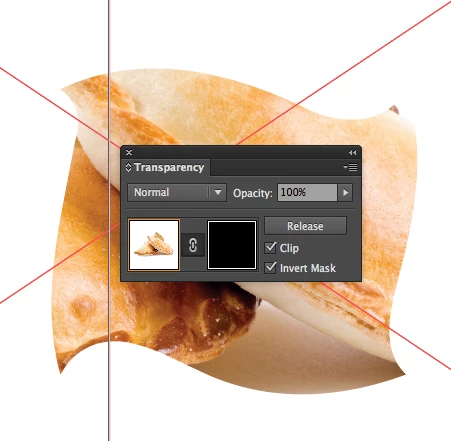
If you want to keep this a live effect you can use the transparency palette >> Make Mask

Just adjust the checkmark settings as the defaults are never what you want.

4 replies

rcraighead
Legend
August 15, 2017

Or drag your image to the Swatch Panel, making it a repeatable pattern, then assign it as a fill pattern to any shape. With the "Move" tool active, hold the "~" key and drag only the pattern until it is placed correctly.

Mike_Gondek10189183
Community Expert
Mike_Gondek10189183Community ExpertCorrect answer
Community Expert
August 15, 2017

If you want to keep this a live effect you can use the transparency palette >> Make Mask

Just adjust the checkmark settings as the defaults are never what you want.

Jacob Bugge
Community Expert
Community Expert
August 15, 2017

aimee,

You may expand the appearance of the shape and then apply as a Clipping Mask, but you may also keep it (a)live and reversible and use it as an Opacity Mask, giving it a white fill (and no stroke), then in the Transparency palette flyout click Make Opacity Mask with Clip unticked and Invert Mask ticked.

Mylenium
Legend
August 15, 2017

You may need to expand the sahpe and then can assign it as a clipping mask to whatever image you want.

Mylenium