Known Participant
October 18, 2018
Answered

Can I hide the units in Transform panel?

  • October 18, 2018
  • 2 replies
  • 575 views

Does the Illustrator can hide the units in Transform panel, to can see only numbers without units?
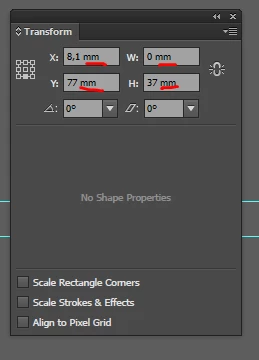
    This topic has been closed for replies.
    Correct answer Jacob Bugge

    славишап52914384,

    I am afraid it is unavoidable; but if there were option, there might be some strange errors with unintended switches.

    Apart from that, unless you change unit, if you change values you can just ignore/delete the unit in the process, with no errors unless there is a partial unit (if pt becomes only p the value will change to picas, otherwise there will be an error message).

    2 replies

    Anna Lander
    Inspiring
    October 18, 2018

    no, and this has a reason. You cfn enter the values with any units (e.g. 15pt having the main unit set as mm), and the program will automatically re-count it into used units. Besides that, you vcan control in any moment, what units are your sizes in.

    Known Participant
    October 18, 2018

    Thanks for your answers!

    Jacob Bugge
    Community Expert
    Community Expert
    October 18, 2018

    For my part you are welcome, славишап.

    Jacob Bugge
    Community Expert
    Jacob BuggeCommunity ExpertCorrect answer
    Community Expert
    October 18, 2018

    славишап52914384,

    I am afraid it is unavoidable; but if there were option, there might be some strange errors with unintended switches.

    Apart from that, unless you change unit, if you change values you can just ignore/delete the unit in the process, with no errors unless there is a partial unit (if pt becomes only p the value will change to picas, otherwise there will be an error message).