melbendi
Inspiring
March 17, 2025
Answered

Can I select points without lines?

  • March 17, 2025
  • 1 reply
  • 332 views

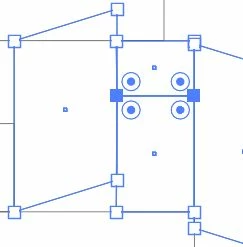
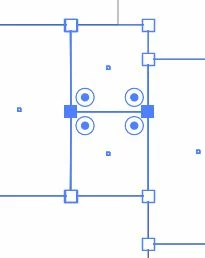
I have a design with many boxes that have points and edges intersecting, one on top of the other. I want to be able to box-select points and move them without selecting any lines.  If I try to click-select, I can't select two points that are stacked one on top of the other, and if I box-select, I get the edges/lines and can't move the points without moving the edges as well.  Is there any modifier key or anything to disable selecting of lines and be able to only select points? Here are images showing the two points selected to move, and what happens if they're moved up. The lines come along. It seems there must be a way. Thank you! 

Correct answer Jacob Bugge

melbendi,


As I (mis)understand it, how about ClickDragging over the (middle of the) two horizontal lines between the two sets of Anchor Points and then move them up?


I know it is just about the opposite of what you ask for, but the sides of the neighbouring rectangles would be left in place.


You could also lock the neighbouring rectangles.


1 reply

Jacob Bugge
Community Expert
Jacob BuggeCommunity ExpertCorrect answer
Community Expert
March 17, 2025

melbendi,


As I (mis)understand it, how about ClickDragging over the (middle of the) two horizontal lines between the two sets of Anchor Points and then move them up?


I know it is just about the opposite of what you ask for, but the sides of the neighbouring rectangles would be left in place.


You could also lock the neighbouring rectangles.


melbendi
melbendiAuthor
Inspiring
March 17, 2025

Thank you, Jacob! Maybe I just need to reverse my thinking a little bit! 😉  This approach with probably work more times than I think.

Jacob Bugge
Community Expert
Community Expert
March 17, 2025

You are welcome, melbendi, and thank you for sharing.