



Can I use paths to subtract or trim within an isolated compound path?
I have a very complex compound path and want to use a path to cut portions of the compound path while it’s isolated.
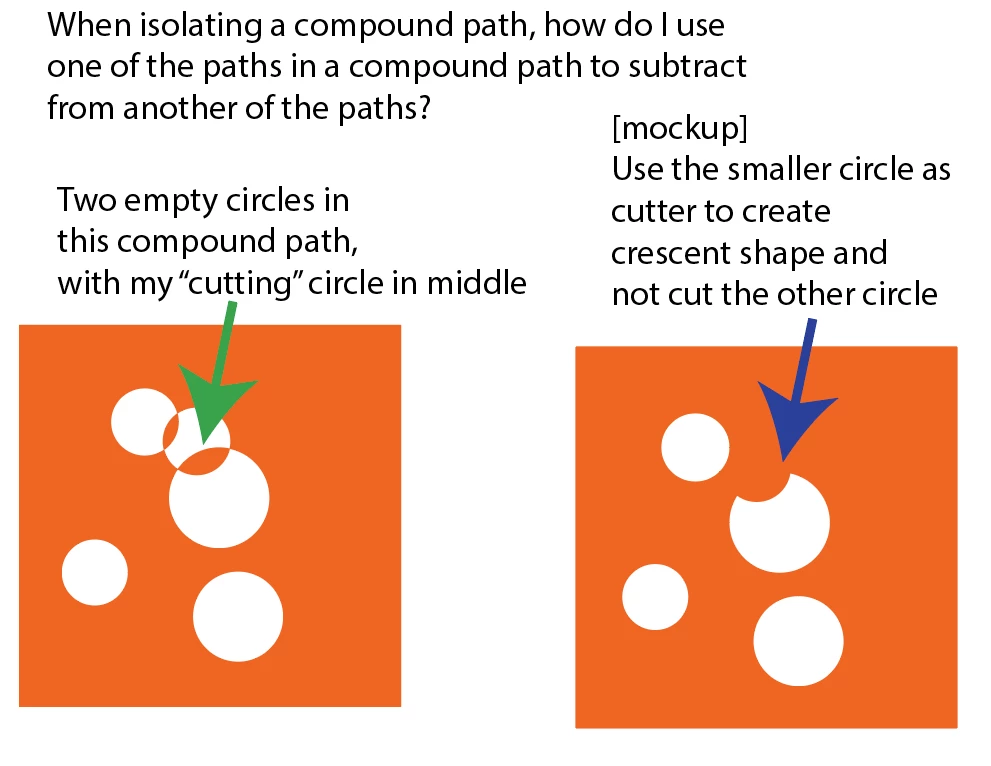
I have not found any of the path finder buttons capable of doing what I want. I’ve included a mockup image that describes my problem.
It’s a square with multiple empty circles within. At some points, I may want to modify just one of those ‘empty’ circles in a very specific way without interfering with the rest of them in the one compound path. How can I use one shape to modify another without interfering with the other overlapping shapes? Keeping in mind this is one compound path that I don’t feel comfortable releasing.
In the mockup on the left you see three circles with one overlapping in the middle. The overlapping circle is a duplicate of one of the other empty circles -- that I created while in isolate compound path. I want the overlapping circle to modify the lower circle without affecting the upper one. The right image shows the result I’d like to achieve, but I’ve been unable to find out how to do this while in ‘isolate compound path’ mode.
 AdChoices