Answered
Can not add artboard by jsx?
code here
var doc = app.activeDocument;

var rect = [-7211, 7411,-7111,7211]

doc.artboards.add(rect);
got error
Exception has occurred: 1200
an Illustrator error occurred: 1095724867 ('AOoC')
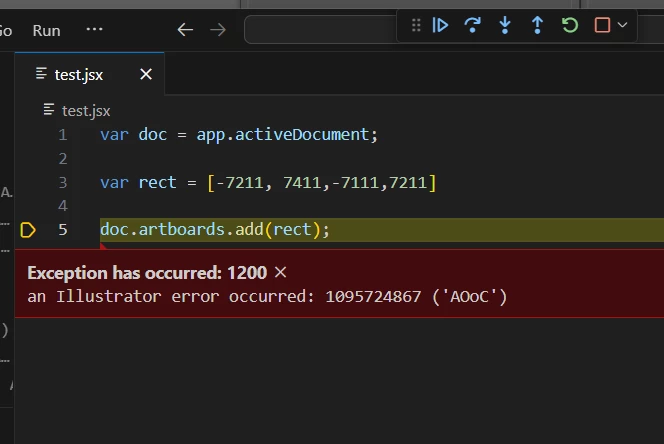

code here
var doc = app.activeDocument;
var rect = [-7211, 7411,-7111,7211]
doc.artboards.add(rect);
got error
sir how can i get the Canvas size by jsx. thank you
There isn't a straightforward way, but I learned this technique from @OMOTI who discovered it and shared it, so thanks to them!
Here it is:
/**
 * Returns bounds of canvas,
 * ie. the largest artboard
 * size possible.
 * @author OMOTI
 * @discussion https://community.adobe.com/t5/illustrator-discussions/the-initial-value-of-mvaluetx-and-mvaluety/m-p/9646654
 * @returns {Array<Number>} - [left, top, right, bottom].
 */
function getCanvasBounds() {
    var tempLayer,
        tempText,
        left,
        top,
        LARGEST_SIZE = 16383;
    if (!app.documents.length) {
        return;
    }
    tempLayer = app.activeDocument.layers.add();
    tempText = tempLayer.textFrames.add();
    left = tempText.matrix.mValueTX;
    top = tempText.matrix.mValueTY;
    tempLayer.remove();
    return new Rect(
        left,
        top,
        left + LARGEST_SIZE,
        top + LARGEST_SIZE
    );
}

// example usage
var rect = getCanvasBounds();

// cover the whole area
app.activeDocument.pathItems.rectangle(rect[1], rect[0], 16383, 16383);
Already have an account? Login
Enter your E-mail address. We'll send you an e-mail with instructions to reset your password.


 AdChoices