
Known Participant
April 13, 2022
Answered

Can someone share script that draw line between centers of two elipses

  • April 13, 2022
  • 2 replies
  • 966 views

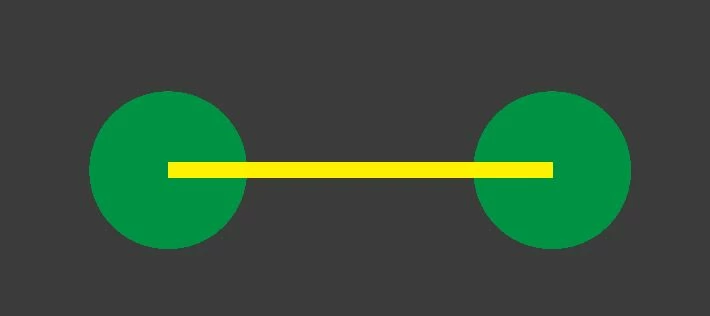
I need a script that draws line (stroke: 1, yellow) between center of two randomly placed <Ellipse> objects on the artboard. Ellipses size is 10x10 and they cannot be symbols. Elipses cannot have different names, there name should be <Ellipse> .


My goal is to select the two green ellipses, run the script and get the line between the centers.


End goal example: 
 

This topic has been closed for replies.
Correct answer femkeblanco
// select 2 ellipses
var s = app.selection;
var path1 = activeDocument.pathItems.add();
path1.setEntirePath([[s[0].left + s[0].width / 2, s[0].top - s[0].height / 2], 
                     [s[1].left + s[1].width / 2, s[1].top - s[1].height / 2]]);
var color1 = new RGBColor;
color1.red = color1.green = 255;
color1.blue = 0;
path1.strokeColor = color1;
path1.strokeWidth = 1;

2 replies

femkeblanco
femkeblancoCorrect answer
Legend
April 13, 2022
// select 2 ellipses
var s = app.selection;
var path1 = activeDocument.pathItems.add();
path1.setEntirePath([[s[0].left + s[0].width / 2, s[0].top - s[0].height / 2], 
                     [s[1].left + s[1].width / 2, s[1].top - s[1].height / 2]]);
var color1 = new RGBColor;
color1.red = color1.green = 255;
color1.blue = 0;
path1.strokeColor = color1;
path1.strokeWidth = 1;
D.S..Author
Known Participant
April 14, 2022

Thank you for the script and your time! Have in mind that something does not work in it. But I already got a solution to my problem from the previous comment.


Thank you again for your time I really appreciate it!

CarlosCanto
Community Expert
Community Expert
April 14, 2022
quote

Have in mind that something does not work in it.


By @D.S..


your top layer must be visible and unlocked to avoid that error

Kurt Gold
Community Expert
Community Expert
April 13, 2022

You may use this action:


Connector 1


Instruction:


- Download and unzip the file
- In the Actions palette, import the action set connector_1.aia
- Select two circles (or any other shape)
- Run the action connector_1


D.S..Author
Known Participant
April 14, 2022

Thank you!

It worked properly besides it makes the line green.

Thank you for the fast response!


Quick question. Do you think the action can be modified for the line to be yellow and below the two selected circles?


Thank you in advance for your time! You are amazing. 🙂

Kurt Gold
Community Expert
Community Expert
April 14, 2022

Yes, that's possible, of course.


See: Connector 2