
Known Participant
April 15, 2022
Answered

Can someone share script that takes text and adds it to an object.

  • April 15, 2022
  • 4 replies
  • 498 views

I do have some figures (in randomly named layer) with random number of edges and colours and random texts (in another randomly named layer) placed on them (text can be on multyple rows). I want the figures to be named as the text on them.

The only certen thing is that the text will aways be placed 100% on the figure.
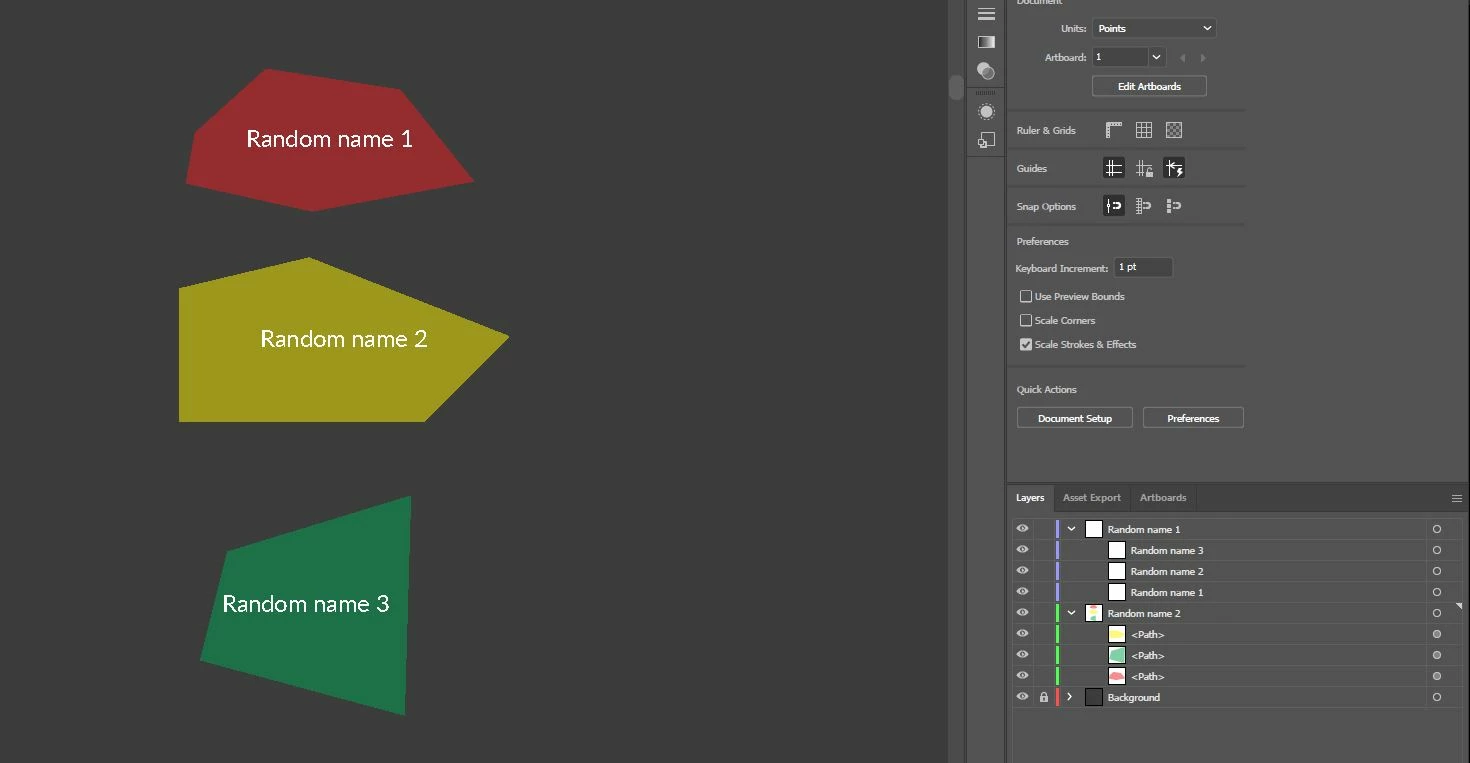
 

Endgoal:

Select the text from one of the layers, then select a figure from the other layer and run the script, after that figure should get the text name (inside the layer).


If it can be automated more as selecting all texts and figures at once and runing the script this would be amazing (if not it can be done one by one).
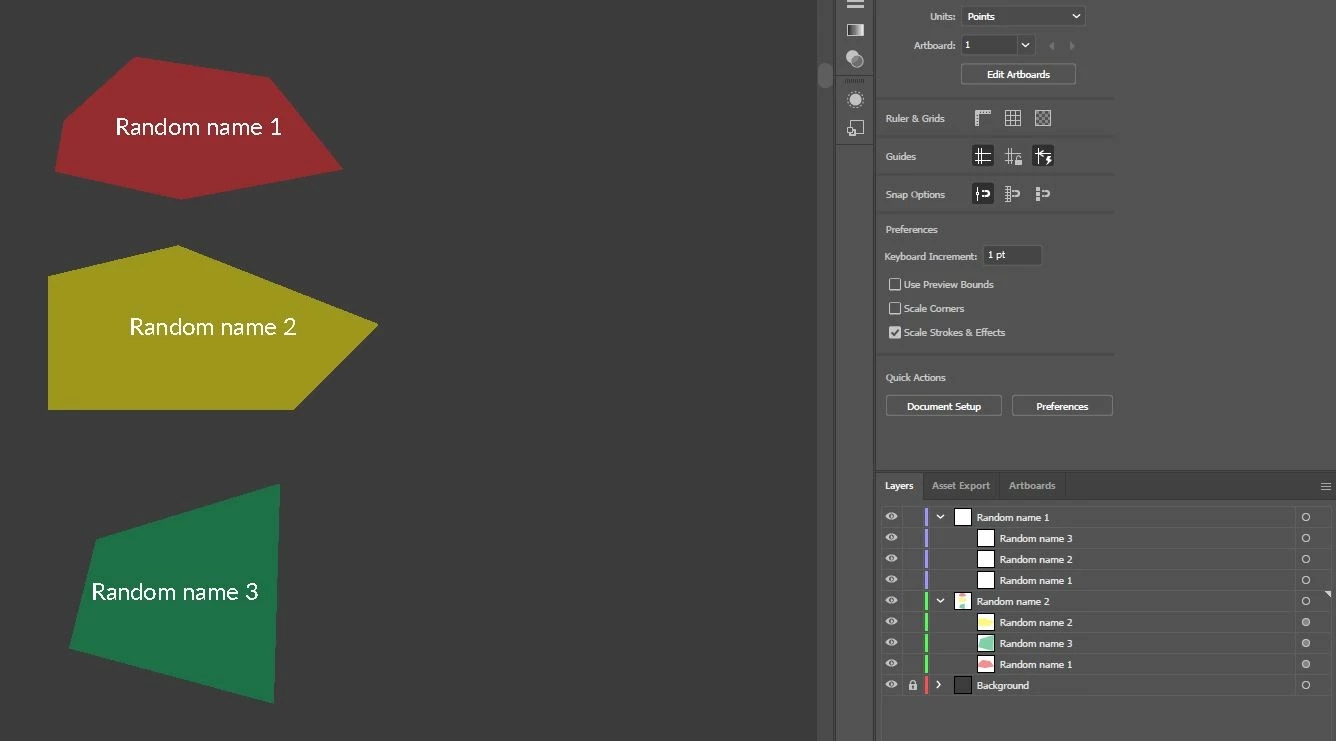
This topic is closed to new replies. Start a new post to keep the conversation going.
Correct answer femkeblanco

This is based on the text being completely within the bounding box of the path. See if it does what you want. (It does not test whether the text is in front or behind the path.)


// select all texts and paths in question
var frames = [];
var paths = [];
for (var i = 0; i < app.selection.length; i++) {
    if (app.selection[i].typename == "TextFrame") {
        frames.push(app.selection[i]);
    } else if (app.selection[i].typename == "PathItem") {
        paths.push(app.selection[i]);
    }
}
for (var i = 0; i < paths.length; i++) {
    for (var j = 0; j < frames.length; j++) {
        var b1 = frames[j].geometricBounds;
        var b2 = paths[i].geometricBounds;
        if ((b1[0] > b2[0] && b1[2] < b2[2]) && 
            (b1[1] < b2[1] && b1[3] > b2[3])) {
            paths[i].name = frames[j].contents;
        }
    }
}


4 replies

femkeblanco
Legend
April 15, 2022
quote

The only certen thing is that the text will aways be placed 100% on the figure.

By @D.S..


It's possible to test whether the text is within the bounding box of the path. Testing whether the text is literally completely within the path may be impractical.

D.S..Author
Known Participant
April 15, 2022

Mmmm my point was that that's the only think I know (not necessery to use it), that the text will be inside the boundrys. I need to select one text (does not mater if it is inside the boundrys or outside) that can be multyple rows


Example 1 (one textbox):

Name
1


Example 2 (one textbox):

Birds
Fly


and select one figure with name <Path> (default one after creating a figure with the pen tool), after running the script I want the figure name to become what is written inside the text box.


Example:

Select
Textbox: Name 1
Shape: <path>


Run the script


Textbox: Name 1
Shape: Name 1


Do you think this is possible?


If you need further explanation please tell me. 🙂 


femkeblanco
femkeblancoCorrect answer
Legend
April 15, 2022

This is based on the text being completely within the bounding box of the path. See if it does what you want. (It does not test whether the text is in front or behind the path.)


// select all texts and paths in question
var frames = [];
var paths = [];
for (var i = 0; i < app.selection.length; i++) {
    if (app.selection[i].typename == "TextFrame") {
        frames.push(app.selection[i]);
    } else if (app.selection[i].typename == "PathItem") {
        paths.push(app.selection[i]);
    }
}
for (var i = 0; i < paths.length; i++) {
    for (var j = 0; j < frames.length; j++) {
        var b1 = frames[j].geometricBounds;
        var b2 = paths[i].geometricBounds;
        if ((b1[0] > b2[0] && b1[2] < b2[2]) && 
            (b1[1] < b2[1] && b1[3] > b2[3])) {
            paths[i].name = frames[j].contents;
        }
    }
}