



Miker2426
Inspiring
Mar 13, 2019 3:51 PM UTC
Answered

Can't align stroke on text.

This used to be SO easy. All I want to do is align my stroke to the outside of my text, but Illustrator won't let me. So I go into my Appearance pallet to see what's going on. On my first attempt to align the stroke, I've applied the stroke and fill under the "Type" attribute. As you can see, aligning the stroke is a no go....
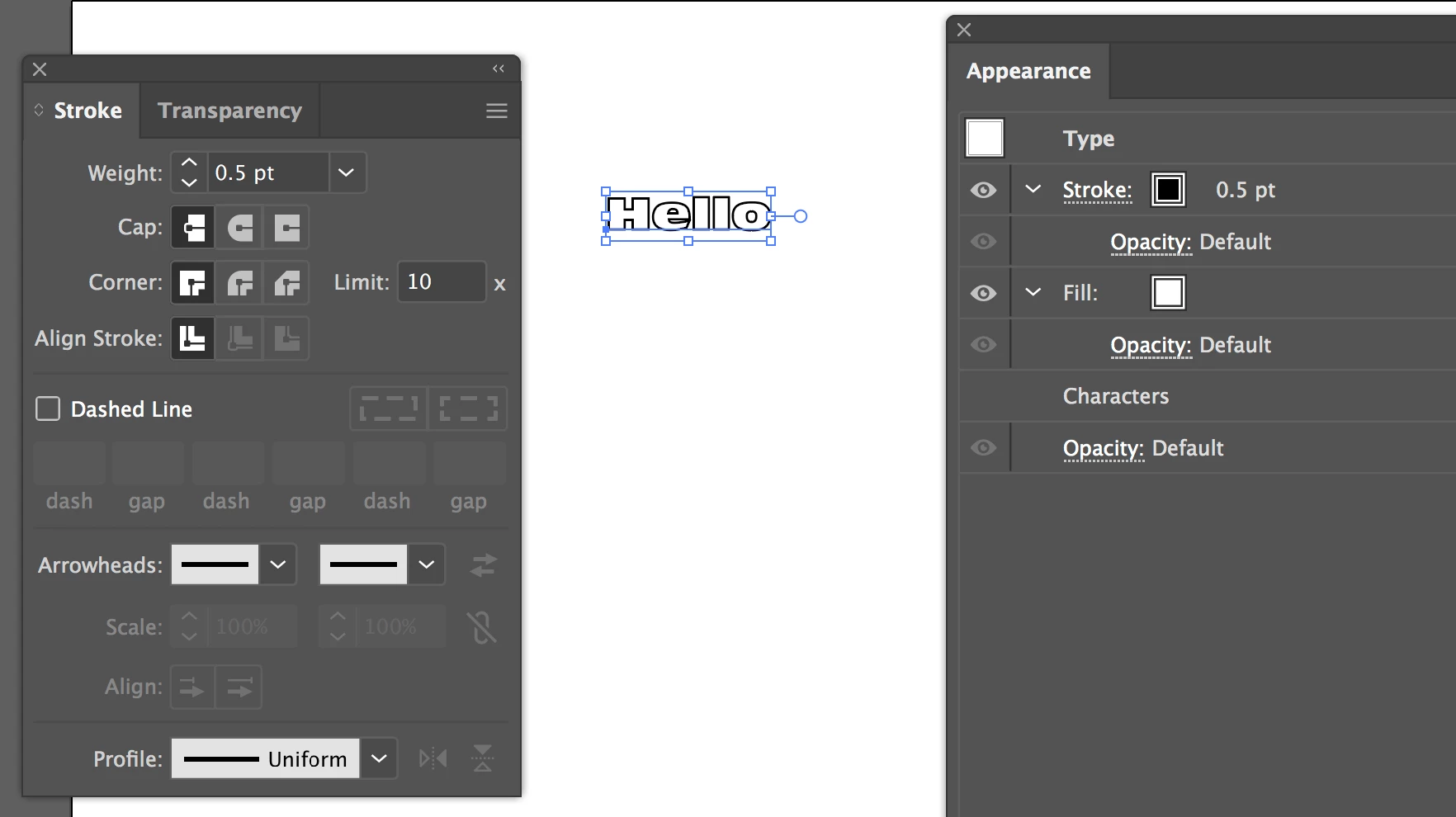
Since the align stroke is greyed out for "Type," I thought adding the fill and stroke to the "Characters" attribute instead would do the trick. It did not. It's not greyed out, like it was on "Type" but clicking on "Align to Outside" does nothing.
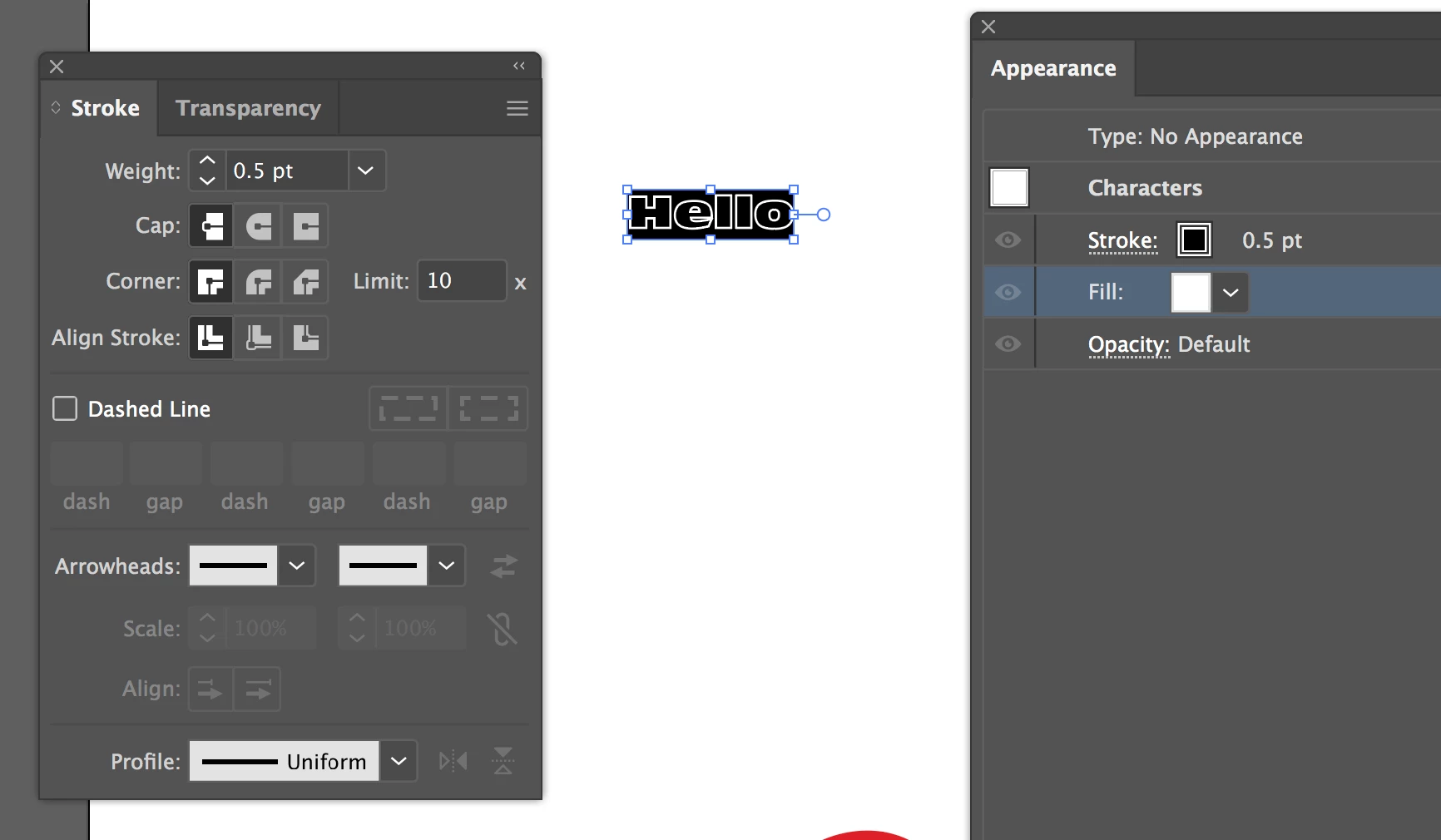
Can someone please help me here? I've tried Googling Type vs Characters in the Appearance panel for Illustrator, but since these terms have LONG been associated with OTHER Illustrator pallets, all I get are unrelated results. I've found nothing. So now, after over 10 years of using Illustrator, I no longer know how to do something simple like align strokes to text (or apply gradients to text for that matter).

Thank you in advance for any answers, light you can shed, or tutorials that can help clear up my confusion.

This topic is closed to new replies. Start a new post to keep the conversation going.
Jeff Witchel, ACI
Jeff Witchel, ACICorrect answer
Community Expert
Mar 13, 2019 11:55 PM UTC

It does not work with editable text.

14 replies

Participant
Nov 26, 2024 3:33 PM UTC

I'm in the same boat.  I have a line of text that has been converted to outlines, yet all of the ones that are compound paths won't let me put the stroke on the outside.  It works on some letters, but not others.  I'm fairly new to Illustrator after working for years in Flexi (I'm in the signage industry), and my god Illustrator is so illogical on SO many levels.  It's ridiculously frustrating to have a simple task take over an hour (of trial and error, dead-end research, and the most basic, unhelpful manual ever) that I could have done in 5 minutes on Flexi.  

Either way, I know this is an old thread, but any help would be great. 

Translate
Doug A Roberts
Community Expert
Community Expert
Nov 26, 2024 3:40 PM UTC

Can you share an example file?

Translate
Participant
Nov 26, 2024 3:45 PM UTC

Actually I found an answer!  So if you go to Pathfinder and use the "Exclude" command on the characters giving you a headache, it will allow the stroke to go to the outside...  How, why... No idea.  But it works!  


I'll attach a screenshot of the dilemna either way, for reference.

Translate
angeloy94437238
Participant
Apr 19, 2021 1:35 AM UTC

This is so frustrating. It baffles me that they cannot just simply add the option to switch stroke alignment on live text. How hard can that be....


Translate
Participant
Jul 1, 2021 2:43 PM UTC

What's particularly irritating is that you can switch stroke alignment on live text in InDesign, but not in Illustrator.

Translate
Legend
Jul 1, 2021 3:42 PM UTC

It can be done via the Appearance Panel. Select Type in the panel, and use Add New Stroke. Then pull the stroke down the panel to under Characters. 


Translate
Jeff Witchel, ACI
Community Expert
Community Expert
Mar 13, 2019 4:26 PM UTC

Here's a video tutorial about adding typographically correct stroke in Illustrator: http://www.jeffwitchel.net/2013/03/adding-typographically-correct-strokes/  

The trick is to add the Stroke to the Type object, not the Characters. This allows you to drag the Stroke under the fill as Doug A Roberts suggests.

Hope this helps!

Translate
Doug A Roberts
Community Expert
Community Expert
Mar 13, 2019 4:18 PM UTC

In what version did this used to be possible?

If I wanted to achieve this, I'd drag the stroke to below the characters entry in the appearance panel.

Translate
Miker2426
Miker2426Author
Inspiring
Mar 13, 2019 11:53 PM UTC

Hi Doug (and Jeff)! First, Thanks for taking the time to answer.

So, I'm not sure I understand your question. Illustrator, for as long as I can remember, has come with buttons on the Stroke pallet that allowed me to align a stoke to one of three positions. Just as well, strokes could be always applied to objects and text, and these features are all in the current version.

I'll admit that both you and Jeff provided a solution to my problem, but didn't really answer my question. Why can't I use the align stroke buttons?

BTW, I wasn't able to move the stroke under the fill. I had move the fill over the stroke. Weird.

Thanks again guys!

Translate
Jeff Witchel, ACI
Community Expert
Jeff Witchel, ACICommunity ExpertCorrect answer
Community Expert
Mar 13, 2019 11:55 PM UTC

It does not work with editable text.

Translate