


Inspiring
May 28, 2026
Question

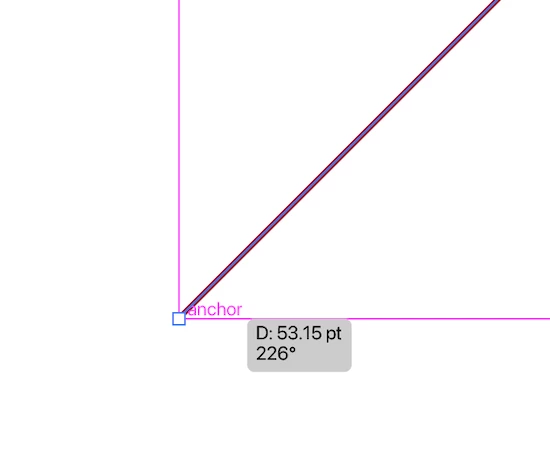
Can't draw a line at 225 degrees in Illustrator

  • May 28, 2026
  • 2 replies
  • 26 views

Using the line tool, I’m finding I can draw one at 224 or 226 degrees, but not 225. I haven’t checked other angles.

If I manually enter 225, it draws a line, but when traced, it’s 226 degrees.

Huh?


    2 replies

    Anubhav M
    Community Manager
    Community Manager
    May 28, 2026

    Hi @turner111,
     

    Sorry to hear you're running into this, and thanks for taking the time to report it in enough detail for me to reproduce it.


    I confirmed the same behavior on my setup, which is helpful: it means it's not specific to your environment and that the product team has a clear case to investigate. I've forwarded the full details to them and will post back here as soon as I have an update on a fix or workaround. There's no need to do anything on your end in the meantime.


    If anything else comes up with Illustrator, please don't hesitate to start a new thread or tag me - happy to help.

    Anubhav

    Ton Frederiks
    Community Expert
    Community Expert
    May 28, 2026

    Did you check the Transform panel? You can enter an angle in the Line Properties section

    turner111Author
    Inspiring
    May 28, 2026

    Hi Tom - yes, as noted above, I entered it manually.

    Have you tried to replicate the issue?

    Ton Frederiks
    Community Expert
    Community Expert
    May 28, 2026

    I can do it when holding down the shift key. Just using the trackpad is too inaccurate.