


Question
Can't Edit Text in a Clipping Mask
Okay... another bug.
In 2017 AI CC, after using a clipping mask with text on the inside, you could edit your text when you double clicked on the clipping group/mask.
Now in AI CC 2018, you can't
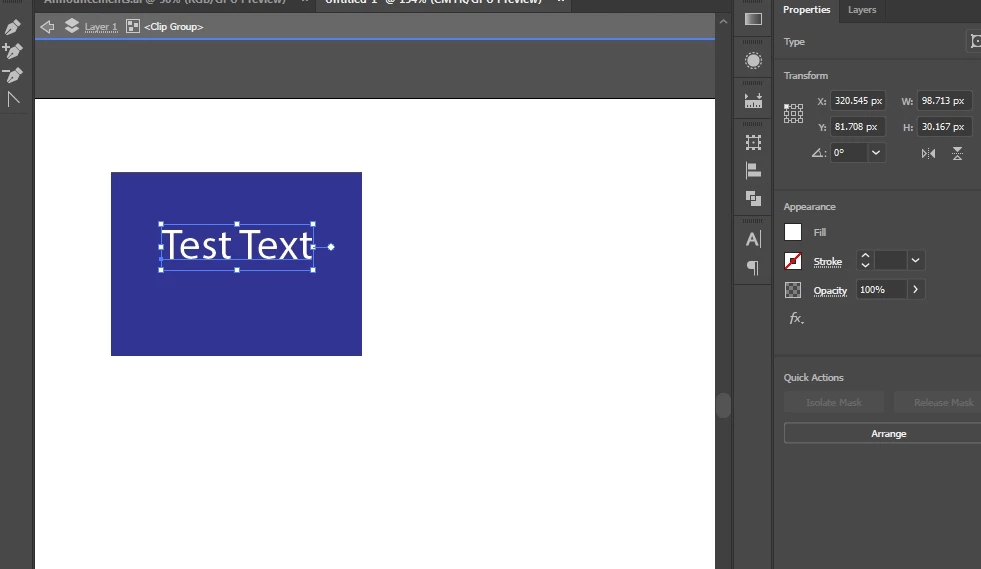
See my screenshot. If text is inside a clipping/group mask, when you try to edit it, the Text properties DO NOT SHOW UP on the Properties Panel.
I can open the separate Character Panel itself, but it is missing half of the setting. Why?
So, to get around this, I have to cut the text out, paste on the main layer, edit it and then cut/paste it back inside my clipping mask.
Or, release the entire mask, make my edits then re-group/mask it afterwards.
C'mon you guys... don't you even check out your work before releasing it. Geeeze.
 AdChoices