Sunnyshinyday
Participant
April 27, 2017
Answered

Can't figure out how to center text

  • April 27, 2017
  • 1 reply
  • 814 views

Ok, I'm a newbie and need some basic help....I opened up a new 8.5x11 document...I click on the text tool and I type the word TESTING, I cannot for the life of me figure out how to get the word TESTING in the center of the page.  I have watched youtube videos and everything talks about aligning objects, well what about just aligning text or a sentence and you just want it to be centered   Any info is appreciated

    This topic has been closed for replies.
    Correct answer barbara_a7746676

    Start by selecting the text with the Selection tool and center aligning the text itself.

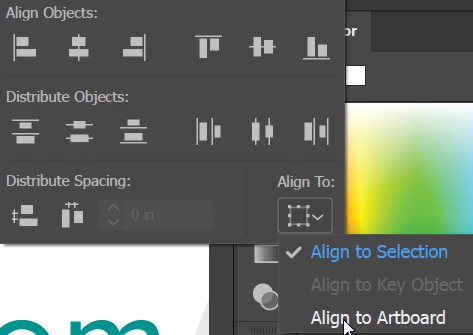
    In the Align panel, choose Align to Artboard.

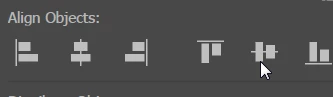
    Then click the Horizontal Align Center or Vertical Align Center icon in the Align panel.

    1 reply

    barbara_a7746676
    Community Expert
    barbara_a7746676Community ExpertCorrect answer
    Community Expert
    April 27, 2017

    Start by selecting the text with the Selection tool and center aligning the text itself.

    In the Align panel, choose Align to Artboard.

    Then click the Horizontal Align Center or Vertical Align Center icon in the Align panel.