
Participant
June 5, 2024
Answered

can't open illustrator old version v22.1

  • June 5, 2024
  • 1 reply
  • 843 views
I recently updated to illustrator v28.5 and I also have a very old version V22.1 installed.
sometimes I need to open the old version, and everything was fine, up until now.
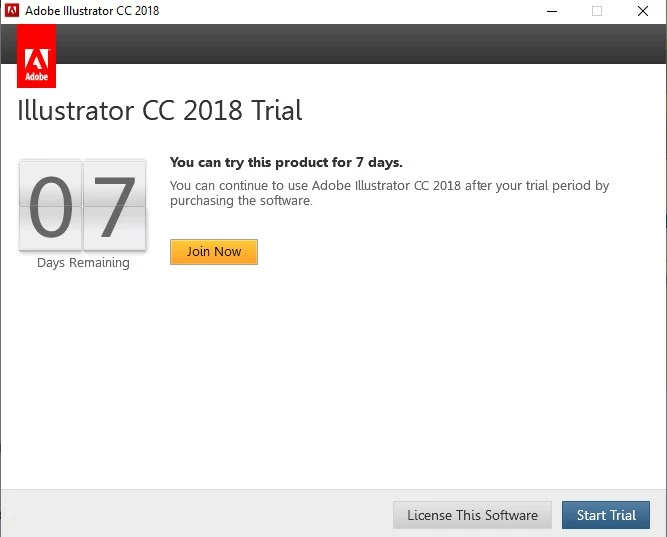
In the  last few days, when I try I keep getting this screen. I also tried to open via creative cloud.
The help center can't assist me


Correct answer Anubhav M
Hi and thank you for your help

I was searching for the error message in the link you gave me but didn't
see it.
What should I do if the error I get is about purchasing the software or
trying a trial ?
I attached a screenshot

Hello @yafitl7346812,

Thanks for confirming that. Kindly try the suggestions shared under the last option labelled n/a (https://adobe.ly/4cb0rAl). Once done, ensure to restart your computer before relaunching Illustrator and let us know if it helps.

Looking forward to hearing from you.


Thanks,

Anubhav

1 reply

Monika Gause
Community Expert
Community Expert
June 5, 2024

You could try this: https://helpx.adobe.com/manage-account/kb/stop-creative-cloud-trial-mode-after-purchase.html


Whatever you do, do not uninstall unless you have a full installer for that version. You will not be able to download older versions again.

Participant
June 18, 2024

Hi, thank you for your reply, I did every step, including the last one and also the manual check for localhost....and still the same problem... don't know what else to do

Anubhav M
Community Manager
Community Manager
June 23, 2024

Hello @yafitl7346812,

I'm sorry to hear about your experience. Would you mind trying the suggestions in this help article (https://adobe.ly/3VAvSx4) and letting us know if they help?

Looking forward to hearing from you.


Thanks,

Anubhav