


Brainiac
February 3, 2021
Answered

Can't save file 'this file cannot be found' error

  • February 3, 2021
  • 52 replies
  • 119363 views

Hi There,


I've been working on a file for a cople of days that's on my desktop. Today I opened the file, made some edits and hit CMD + S and saw this error...
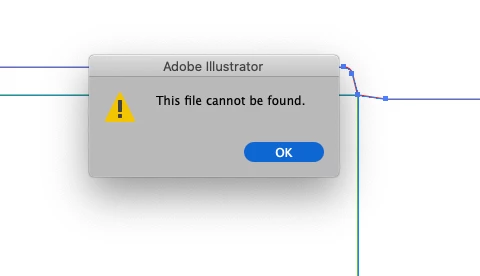
 

Things I've tried...

  1. Copying the art into a new document and saving
  2. Saving the new document to different disks (all local, no servers)
  3. Creating a blank document with nothing in it and saving


Bascially, I can't save anything - has anyone else seen this?

Cheers

Ben

Correct answer maryannr44378043

I had the same issue and instead of double clicking the document, I dragged it down to the Illustrator icon in my Dock and it opened up just fine. I hope I don't have that issue again though. 

52 replies

New Participant
July 3, 2025

Save it to the Creative Cloud first, then open it back up and save it to your computer as an AI doc. This has only happened to me when I had accidentally pulled my doc from the Cloud in the first place. 

New Participant
February 1, 2025

I faced the same issue
I fixed by exporting it as Package
Click on File>Packages

It will export all fonts and save as PDF file whic is edit able 

New Participant
November 27, 2024

EnzolH - this worked for me! Thanks!

New Participant
October 6, 2024

I found solution for Windows, visit task manager and check for "AIrobin" under Illlustrator or in background process, right click and end task...now try to save your file....solved

New Participant
August 22, 2024

Damn this thread is from 3 years ago and I just experienced this the first time today. Adobe needs to fix this. I don't have time to switch color profiles back and forth just to be able to save. Fix the bug Adobe.

New Participant
July 31, 2024

Just adding a note to this, in contrast to what @WEIYI5CEB's fix was, my issue was that I wasn't on my company's VPN. If I'm off VPN, saving a new file results in the error described. If I'm on the VPN, it works just fine. Seems like there are multiple issues that can result in this error, so just wanted to add one for anyone who stumbles across this thread.

New Participant
June 28, 2024

I saw a video somewhere saying that this was related to saving in RGB or CMYK , but that s bullsh.. , I still have the problem and it s been here for ages ! ADOBE please solve that , it s just a bug and it is super annoying!

Monika Gause
Community Expert
June 28, 2024

@Wazone05  schrieb:

I still have the problem 


Whioch version, which system?

Exactly what are trying to save in exactly which format to exactly where?


If you are trying to save to a network: that works for some people, but not for all. 


If you are experiencing this while saving to your internal harddisk, try and turn off "Save in background" in the Illustrator preferences.

New Participant
May 26, 2024

I'm also having the same issue. I see I have to turn my VPN off but I do not want to do that in order to save files.  I have AI 28.5. The only way I can get it to save is switching color modes.

Participating Frequently
April 30, 2024

I can't wait to retire and stop troubleshooting these junky adobe products. totally dispicable. 

Monika Gause
Community Expert
April 30, 2024

@johnlunceford  schrieb:

I can't wait to retire and stop troubleshooting these junky adobe products. totally dispicable. 


Which version, which system?

Exactly what are you trying to save exactly where?

New Participant
December 6, 2023

TL:DR - Pause your VPN

This is absolutely rediculous, but I was experiencing the same issue and after testing and reading this thread, I can confirm a solution.  This issue happens every so often for me using illustrator. While trying to save a file I need to get to the printer, the updated print file would not save.  I tried everything I could think of, including changing the file name so it is a new file, changing where the file would be saved, changing the file format from ai to pdf...  I even tried changing the color space from CMYK to RGB as suggested in this thread.  Then I read a post giving the solution.

I have a VPN on my laptop workstation because I travel frequently for work and it is not safe to use hotel internet unprotected. Putting NordVPN on pause for 5 minutes instantly let me save the file, but pausing my VPN puts my computer and client files (aka my livlihood) at risk.

<rant>
ADOBE. I SHOULD NOT HAVE TO VERIFY MY LOCATION TO YOU TO SAVE FILES TO MY HARD DRIVE. I have been using Adobe products since 1995 and time and time again you add "features" to the platform that inhibit my ability to work, sometimes changing functionality to do the exact opposite of what it has done for decades.  A few versions ago you changed the "constrain proportions" feature from what used to be holding shift and dragging a corner to default to the exact opposite; holding shift BREAKS constrain proportions and dragging the corner without shift constrains automatically.  So the people who have been using the program for decades and need it for work have to either change their engrained workflow or search the web for an obscure fix to turn it back to how it was before.  Even more rediculous... YOU DIDN'T MAKE THE CHANGE ACROSS ALL APPLICATIONS. Meaning the constrain proportions functionality works how it always used to work in Illustrator, InDesign, and the other apps.  THIS IS STUPID. WHY WOULD YOU DO THIS?
</rant>


mattl63375823
Known Participant
December 6, 2023

There is sooo much truth to your rant.


Another thing they changed in Photoshop is let's say I have 15 image files open. I go through the process of saving the original files as optimized pics and no longer need them open. If I close the files one at a time,  I have to click on the X to close it out and then click "yes" to verify" that I don't want to save the original file. This is an easy task if it's one file, but it's very time consuming when it's 10 or 20 or 30, as I often have to do.


To speed up my workflow, I optimize and save everything I need to save and then instead of X-ing out of each file individually,  I x out of Photoshop. Doing so assures it ONLY asks me if I am sure I want to close the file without saving, so it's essentially auto-closing the file and only asking me to verify I don't want to save the file. This saves 50% of the process... until now. I've noticed that after the action of saying NO to the file save multiple times, Photoshop assumes I want to auto close all files without having to say "no save" (which is true) AND that I want to completely shut down Photoshop. So now I have to re-open Photoshop.


It has become abundantly clear that Photoshop is designed by smart engineers who simply don't use the software.

Monika Gause
Community Expert
December 6, 2023

@mattl63375823  schrieb:


It has become abundantly clear that Photoshop is designed by smart engineers who simply don't use the software.


This is the Illustrator forum. You have questions about Photoshop: ask there. You want to complain about Photoshop, do that in the Photoshop forum. There are different teams for the apps.

You want to complain to the Illustrator team, post there: https://illustrator.uservoice.com


If it's about saving files, please read this: https://helpx.adobe.com/illustrator/kb/illustrator-support-networks-removable-media.html  


Also: software engineers are engineers, not designers or pro photographers. You want them to write functioning code, not make pretty pictures. If you do not like the route they take with the app, join the beta program and make your voice heard. This public forum is used 95% by volunteers. 


Ranting doesn't get you anywhere.