meganchi
Legend
August 11, 2017
Question

can't select layers and/or sometimes color swatches from panels

  • August 11, 2017
  • 1 reply
  • 300 views

OK, I run into this often enough that it drives me crazy.

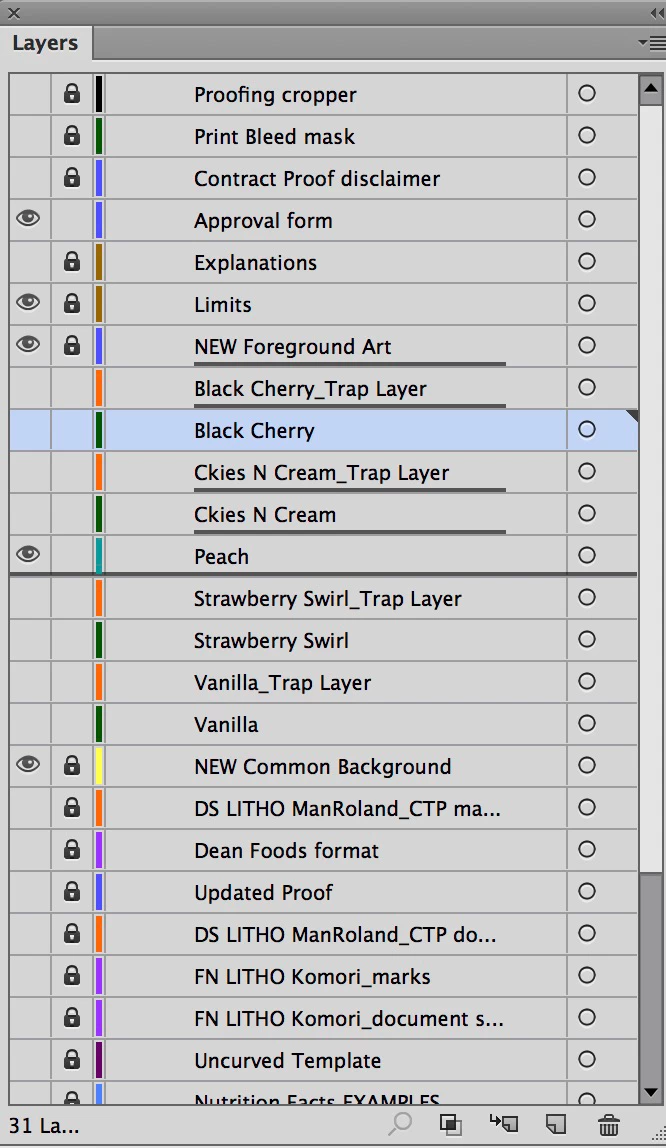
When working within Illustrator, sometimes bolded lines appear between layers. When I try to click on a specific layer name, it selects these bolded lines and will not allow me to select the layer (it is unlocked, by the way).

This also happens on occasion when trying to select a color swatch from my list view of document swatches. The only workaround is to quit and relaunch Illy.

Is this a bug in Creative Cloud?
    This topic has been closed for replies.

    1 reply

    Monika Gause
    Community Expert
    Community Expert
    August 11, 2017

    WHich version on which system?

    meganchi
    meganchiAuthor
    Legend
    August 11, 2017

    This is on CC 2014, Mac OSX 10.11.6. There are several in my department that have run across this same issue, too. We can't figure it out.

    Due to limiations of our rip software/esko plug-ins, we cannot use new CC updates.

    Monika Gause
    Community Expert
    Community Expert
    August 11, 2017

    Can you uninstall the plugins and try if it works?

    There have been issues with ESKO plugins and this just might be one of them.