
Can't snap outside of stroke to a guide
I understand that other people have written topics on this, although the subject matter I've read thus far has been more niche than what I've been looking for.
I'm creating a font in Illustrator, using strokes for each letter. I have guidelines to indicate the tops and bottoms of each character. It's relatively easy to snap the tops and bottoms of characters like these to the guidelines; the stroke ends consist of no caps or arrows and I'm able to snap them right to the guide:
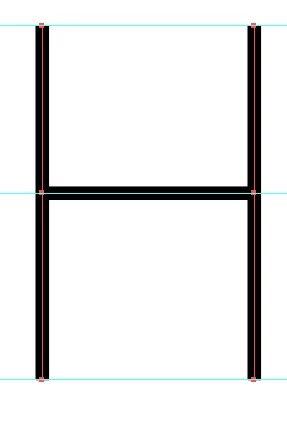
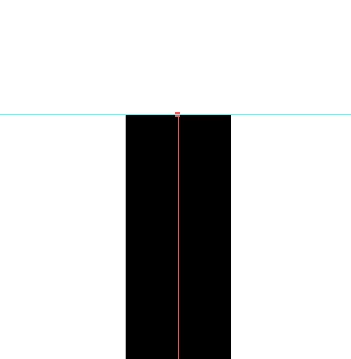
No space lies between the end of the stroke and the guide. This is what I'm looking for.
However, this isn't the case with many other characters, like those with curves or horizontal lines as their tops or bottoms. I've had to carefully and precisely scale the characters up and down to attempt to meet the guideline because I can't get the edge of the stroke to snap to the guideline:
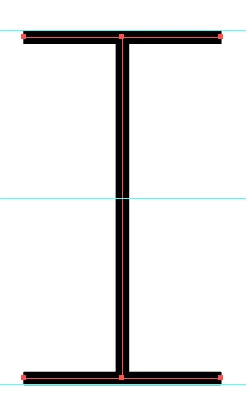
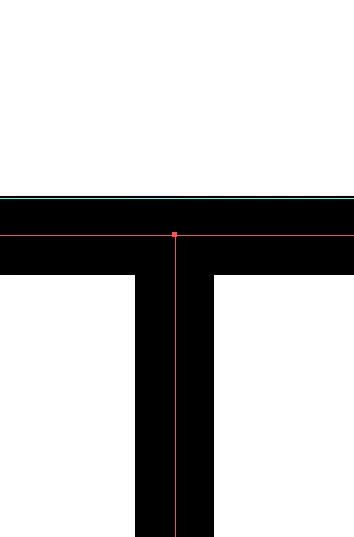
The overlap is small, but it's causing problems in the program I'm using to generate the font.
I know I can convert the strokes to outlines, however this approach presents its own issues: I'm no longer able to maintain an even stroke width between all characters due to scaling, some characters may begin to look disproportionate, and it makes it much more difficult to further modify my characters if I see errors or want to make other various changes.
I feel like I'm not asking for anything too complicated. What should I do?
 AdChoices