
Participating Frequently
July 5, 2023
Question

Can't succeed to apply colors on a gradient - (Illustrator 26.3 Windows)

  • July 5, 2023
  • 2 replies
  • 446 views

Hi everyone !
Glad to post my first issue on the platform.

I ask for your help, cause I fail to find the solution.

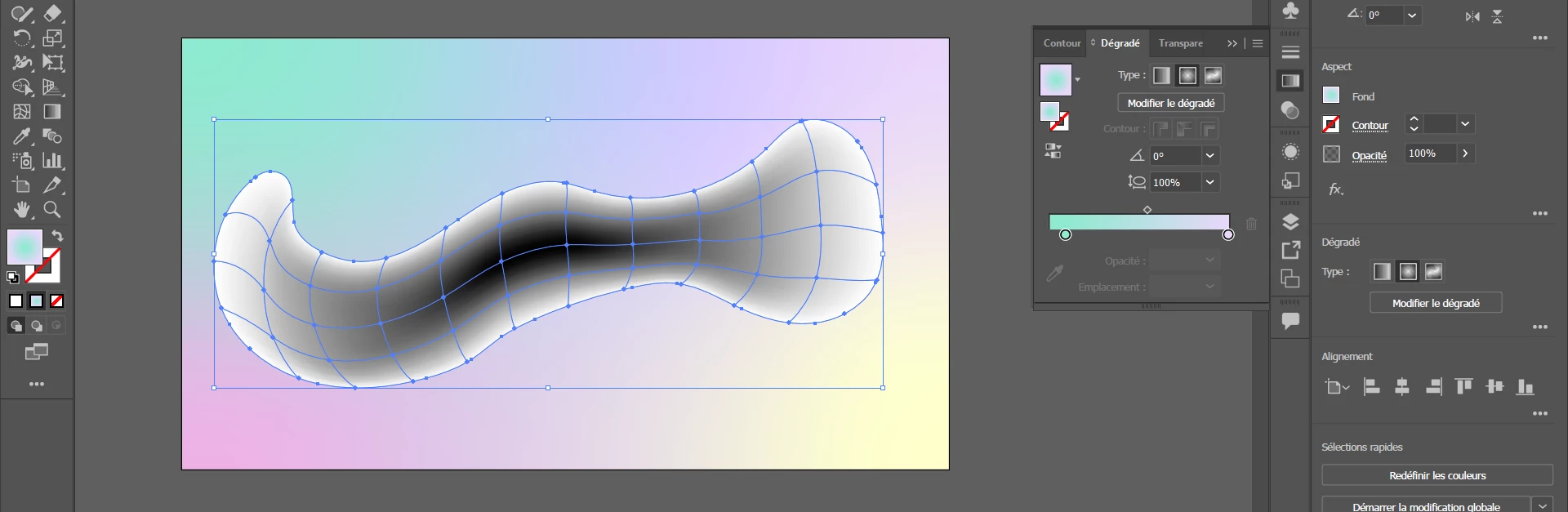
In fact, i created an object (i working on this tutorial where i'm stop at 4 minutes) on which I selected a color, and when I want to "Create a gradient mesh" [Object] the gradient is only black and white. However, my menu shows me that the gradient is a colorful gradient (as you can see on the picture).

I absolutely don't know hot to fix it, so there are a lot of frustration, because i just begening to use this amazing software.

Thanks a lot for your response, and have a wonderfull day 


Simon
(sorry for my bad english)
This topic has been closed for replies.

2 replies

Lukas Engqvist
Community Expert
Community Expert
July 6, 2023

Gradient mesh is not compatible with the gradient tool! (The Gradient panel is not open in the tutorial)
If you have a gradient on original oblect you get black in centre. Don't worry about it, you can select any mesh point and adjust colour and/or opacity at that point. 

Monika Gause
Community Expert
Community Expert
July 5, 2023

Can you please show a screenshot that contains the document title bar and the Layers panel with the object in it and the appearance panel?

Participating Frequently
July 5, 2023

As if ?

Monika Gause
Community Expert
Community Expert
July 5, 2023

There is a special appearance applied to that object. Could you please make the appearance panel longer?