


Participant
April 27, 2025
Answered

Can't transform circle in Illustrator CC

  • April 27, 2025
  • 2 replies
  • 543 views

Hello,

I can't transform a circle or an ellipse.

I have a Bounding Box but instead of arrows (transform tool) it shows "oval" symbol. It is strange. So I can't transform it horisontally to make an ellipse. If there any native way to set it right? Without using a "Free transform tool" and other extras?
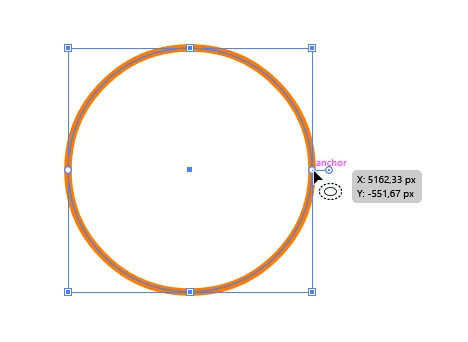

Correct answer Ton Frederiks

That is a very old version. Maybe you can try to convert the circle from a shape into a regular object.

Object > Shape > Expand Shape.

2 replies

Ton Frederiks
Community Expert
Community Expert
April 27, 2025

Which version are you using? I remember something similar from a long time ago, can you show your Preferences General?

ilia_3310Author
Participant
May 5, 2025

Hello this is CC 2015 Win10

I have attached Preferences General

Ton Frederiks
Community Expert
Ton FrederiksCommunity ExpertCorrect answer
Community Expert
May 5, 2025

That is a very old version. Maybe you can try to convert the circle from a shape into a regular object.

Object > Shape > Expand Shape.

Monika Gause
Community Expert
Community Expert
April 27, 2025

And dragging one of those corners doesn't do it? Which tool are you currently using? The selection tool?

ilia_3310Author
Participant
May 5, 2025

Dragging one of those corners works but I need to drag a side point because i need to change width only, and corner could affect also a height accidentially.