
Known Participant
June 12, 2018
Answered

Can you make a dashed line with alternating colors instead of a gap?

  • June 12, 2018
  • 2 replies
  • 8375 views

I know you can trick it to appear like 2 colors, but I also want to work with transparency, which using something along the lines of 2 lines would interfere with how the transparency works.

Part 2 is I'm trying to add 4 lines around the perimeter of the artboard, which seems like it should be easy enough, but I haven't started yet.  I have the artboard rect already defined as variables so it should be easy enough, it looks like adding 4 path items (I don't want a rectangle, as adding a line for each side of the artboard will be optional)  I just don't want to start wrong and have to start over, it should be easy enough?
This topic has been closed for replies.
Correct answer Vee Cel

Part 1: That's a great idea.
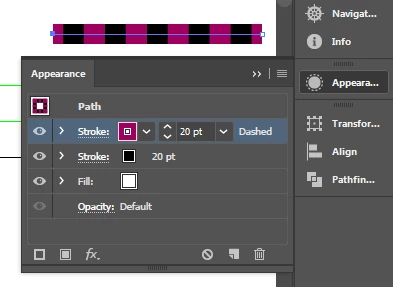
I'm not in front of my home computer so I can't provide a solution with a screenshot but I'm sure that it can work. It can be done with 1 line with two strokes (via Appearance). I believe the key to making it work is to use a gap to create an empty space for the 2nd color.

I'll get home in a couple of hours and upload an example.

I hope that helps answer Part 1. I really don't understand what you're looking for in Part 2. BTW, are you looking for scripting solutions?

2 replies

Vee CelCorrect answer
Inspiring
June 12, 2018

Part 1: That's a great idea.
I'm not in front of my home computer so I can't provide a solution with a screenshot but I'm sure that it can work. It can be done with 1 line with two strokes (via Appearance). I believe the key to making it work is to use a gap to create an empty space for the 2nd color.

I'll get home in a couple of hours and upload an example.

I hope that helps answer Part 1. I really don't understand what you're looking for in Part 2. BTW, are you looking for scripting solutions?

Known Participant
June 14, 2018

Hey thanks, part two was just pointing me in the right direction of how to create this line in a script,


I want to create this line around the outside of my artboard, so 4 of these lines, which would be the length of and aligned to the edge of the artboard, and I haven't ever done that before.  I know I've started creating things inefficiently before, maybe even every time, so I was hoping for a clean and easy way, as opposed to a clunky long way, and hopefully I won't have to start this part over.

pixxxelschubser
Community Expert
Community Expert
June 12, 2018

Please show an example (I do not understand fullfully what you mean)