

yash-lucid
Inspiring
November 5, 2024
Question

Cannot create artboard outside canvas BUG

  • November 5, 2024
  • 2 replies
  • 1165 views

This is a terrible bug - where no more artboards can be duplicated, after a row of 7 fill the horizonal width of the canvas. Even though there is plenty space remaining, AI won't leave a line-break so to speak and start from there, instead somehow it thinks "no more space on right - ERROR"  

(all bottom row arboards were made manually by alt dragging, just for context)
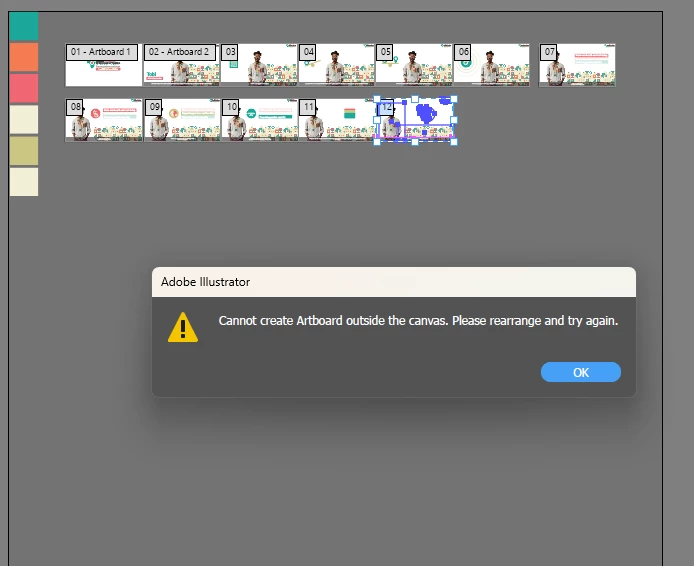
Also I tried to duplicate the ones on a new line, situated to the left, hoping it would continue to duplicate to the right, but I just get the error.


For context I am using the Duplicate Artboard menu item on the Artboard panel


This topic has been closed for replies.

2 replies

Doug A Roberts
Community Expert
Community Expert
November 27, 2024

I feel like this is a bug or oversight. Click 'new artboard' and it'll happily create artboards on a new row after reaching the edge of the canvas, but 'duplicate artboard' can't?

yash-lucid
Inspiring
November 27, 2024

That's correct, new artboard does work, but after the top row is full, duplicate artboard will never work again.

This means if you plan to have more than 7 HD scenes for an animation, in one file for a centralized workflow, the duplicate button is good for 6 pushes.

Anshul_Saini
Community Manager
Community Manager
November 27, 2024

Hi @yash-lucid,


Thank you for bringing this to our attention and for providing detailed context! The behavior you’ve described does seem like an inconsistency, especially since manually creating a new artboard works while duplicating does not work when space is available.


We’ll pass this feedback on to the product team for consideration. In the meantime, you can also upvote and comment on this request in the Illustrator UserVoice forum to help highlight its importance: Duplicate artboard should place the new artboard intelligently.


Your feedback is valuable, and sharing your thoughts there will ensure they reach the right channels for evaluation. Let us know if there’s anything else you’d like assistance with!


Best,

Anshul Saini

Community Expert
November 5, 2024

The canvas goes only so big. In standard mode that maximum is 227" X 227". If 8 of your artboards add up to more than that value then there is no way to get them placed all on the same row.


Large Canvas documents can be as big as 2275" X 2275", but those kinds of documents may be cut to 10% of their normal size when exported outside of Illustrator. Care must be taken working in that mode.

yash-lucid
Inspiring
November 27, 2024

But this limits 7x standard 1920x1080 boards, surely it's normal to need more than 7 boards, while maintaining a basic app function like duplicate?

_scott__
Legend
November 27, 2024

"Normal" is realtive. For the sake of file integrity I tend to prefer more files rather than more artboards. Lose 1 file with 30 artboards.. you've lost 30 designs.