
Chris  P.  Bacon
Inspiring
December 11, 2022
Answered

Cannot divide shape if it was filled with text previously
  • December 11, 2022
  • 2 replies
  • 1321 views

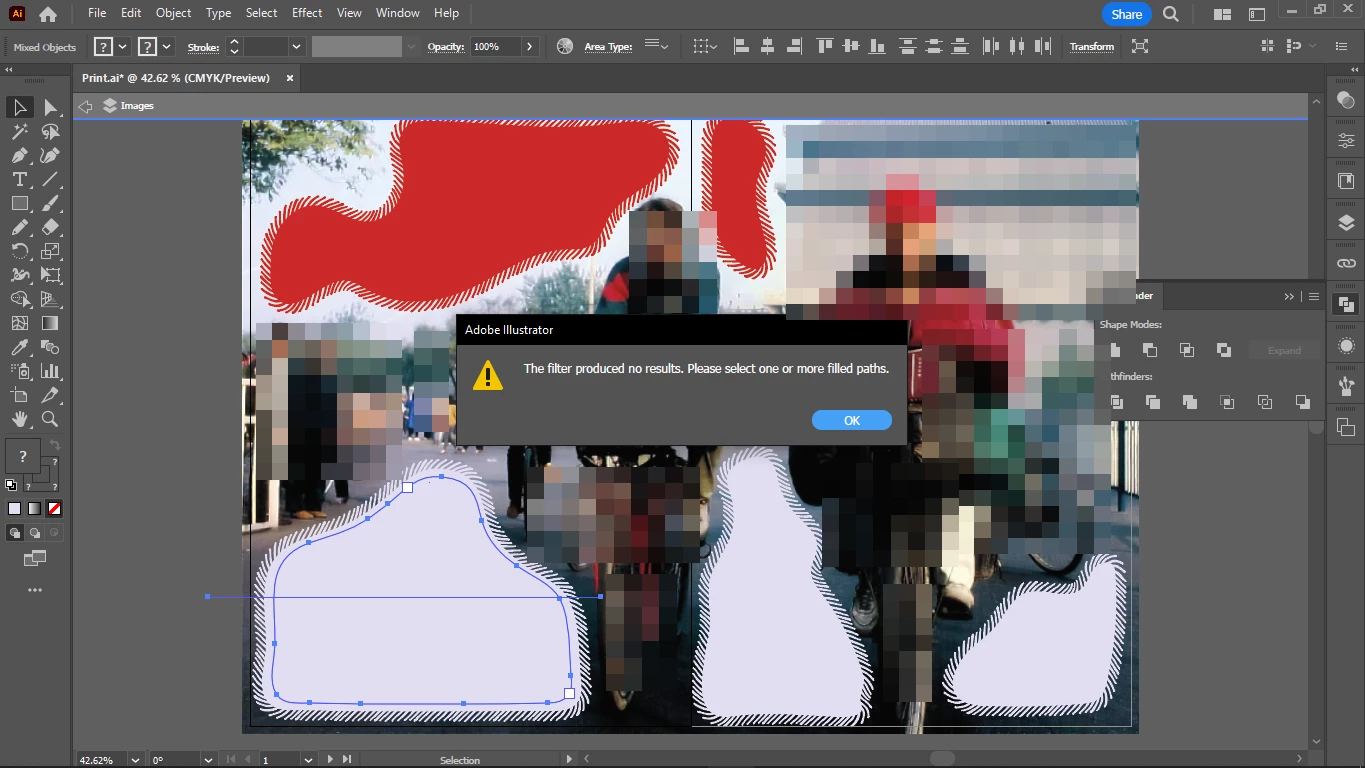
I cannot divide the shape with the line with Pathfinder "divide", gettin this message.

I reconverted the shape into a graphic by giving it a fill color (before it was filled with text).

And Object > Expand appearance is greyed out for the shape.

How do I divide it?

This topic has been closed for replies.
Correct answer Monika Gause

That doesn't work, after I paste it to front, it's still type:


Make sure you select just the path. You can do this by using the group selection tool and clicking on an anchor point.


You might want to study the documentation thoroughly.

2 replies

Kurt Gold
Community Expert
Community Expert
December 11, 2022

Your screenshot shows that the grey filled object is still a type object. That's why you get the warning message.


To convert it to a plain path, you'd have to select its path with the Direct Selection or Group Selection tool, copy and paste it and use that new path for Pathfinder Divide.


Chris  P.  Bacon
Inspiring
December 11, 2022

Thanks, meanwhile figured it was easier just to recreate the path, cause it's an offset of the path below it.

Monika Gause
Community Expert
Community Expert
December 11, 2022

Please show us the Appearance panel for the selected object. Also: which Pathfinder do you use: the panel or the effects?

Chris  P.  Bacon
Inspiring
December 11, 2022