Known Participant
February 27, 2012
Answered

Cannot edit, add or delete a swatch from a User Defined Swatch Library

  • February 27, 2012
  • 2 replies
  • 32418 views

I create a Swatch Library containing core swatch colours used by our company.

The Swatch Library I use is usually found in Window/Swatch libraries/User Defined

I need to add or edit one or two of the swatches, but I cannot do this.

If I drag a swatch into the library window it looks like it will add it as the + symbol shows, but when I let go, the swatch does not appear.

Also, I need to edit a swatch in that library but I cannot do that either.

Also how do you delete a User Defined Library?

What am I doing wrong?

thanks
    This topic has been closed for replies.
    Correct answer Mike_Gondek10189183

    As mentioned they are read only. Not hard to fix though:

    1. Make a new document without any swatches, drag your user defined colors to swatches palette
    2. edit and add your swatches to swatches, close the user defined swatches
    3. Export the swatches and save over your existing user defined swatches

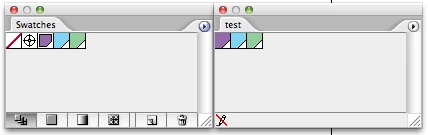
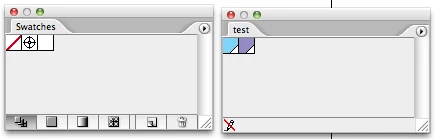
    Notice the pencil with the red slash, and no icons at the bottom of the user defined swatches.

    2 replies

    Mike_Gondek10189183
    Community Expert
    Mike_Gondek10189183Community ExpertCorrect answer
    Community Expert
    August 21, 2012

    As mentioned they are read only. Not hard to fix though:

    1. Make a new document without any swatches, drag your user defined colors to swatches palette
    2. edit and add your swatches to swatches, close the user defined swatches
    3. Export the swatches and save over your existing user defined swatches

    Notice the pencil with the red slash, and no icons at the bottom of the user defined swatches.

    Martin Novev
    Participating Frequently
    August 21, 2012

    Thank you, but I still have a problem. When I copy the swatches to the new document, everything is perfect until I place some content from the old file there. Than, there is a dialag wich asks "The color swath ............ is in conflict with the current document". The only available option is "Merge swatches". And when I click OK, voila, they are read only again. They are spot swatches, but when I remove the check mark the same thing occurs. Is there any solution?

    Mike_Gondek10189183
    Community Expert
    Community Expert
    August 21, 2012

    You are getting the merge dialog, because you have swatches that have the EXACT same name, yet they are defined differently. Illustrator notices this, so Illustrator is nice enough to warn you there is a conflict and wants to merge to tidy up your colors.

    Your old file has the colors defined wrong, so you need to fix that. There are a number oy ways, You could draw some rectangles, fill them with the good swatches, and paste that into the document with the old defintions, you will get the merge command, but the difference is you have good color breakdowns in your clipboard, and merge will use the new values from your clipboard attempted to being added.

    In regards to your readonly. Your swatches palette should never have the pencil with red slash, you may be getting your swathces and user defined palettes confused. If you find you cannot change a global color, there are other reasons such as you may have a placed image with that spot color in it. Will need more information to help you with this part, a screen shot of your swatches would be very helpful.

    Kurt Gold
    Community Expert
    Community Expert
    February 27, 2012
    Martin Novev
    Participating Frequently
    August 21, 2012

    I can't understand how can I solve similar problem. I can't chanfe the name of the colors. I haven't made thus file, where can I fund the library?

    Thanks in advance.