Participant
May 10, 2022
Answered

cannot enable GPU performance

  • May 10, 2022
  • 2 replies
  • 2161 views

Hi, I just brought and AMD laptop with R7-5800H and integrated GPU

I found that I cannot enable GPU performance and it is laggy when I zoom in and zoom out.

How can I enable this option?
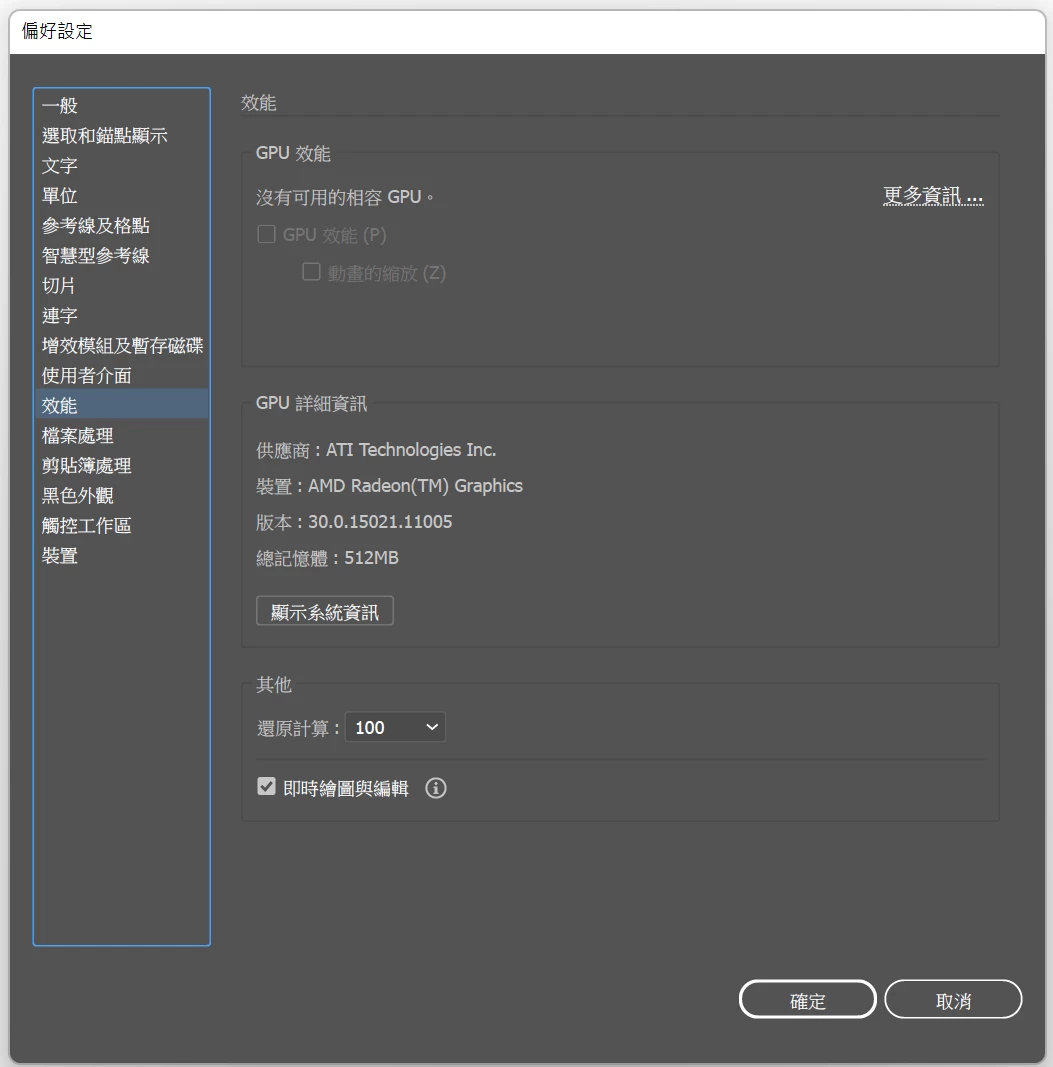
Thanks!

This topic has been closed for replies.
Correct answer chi kaiw10766417

To whom who have same problem,


I find the solution of the problem which I cannot enable GPU performance.

It is because the vram of integrated graphic card setted as 512mb.

When I set the vram to 1024MB and it work totally fine.

2 replies

chi kaiw10766417AuthorCorrect answer
Participant
May 16, 2022

To whom who have same problem,


I find the solution of the problem which I cannot enable GPU performance.

It is because the vram of integrated graphic card setted as 512mb.

When I set the vram to 1024MB and it work totally fine.

Participant
June 4, 2023

Hey, how can i set the vram?

Anubhav M
Community Manager
Community Manager
June 6, 2023

Hello @Patricio30271605ybh9,


Thanks for reaching out. You may try changing the VRAM under the BIOS settings. Kindly contact your system manufacturer for more information.


Feel free to reach out if you have more questions or need assistance. We'd be happy to help.


Thanks,

Anubhav

Anubhav M
Community Manager
Community Manager
May 10, 2022

Hello @chi kaiw10766417,


Sorry to hear about this experience. I would request you try updating the GPU drivers from here (https://www.amd.com/en/support/apu/amd-ryzen-processors/amd-ryzen-7-mobile-processors-radeon-graphics/amd-ryzen-7-5800h) and share your observations with us.


Looking forward to your response.


Thanks,

Anubhav

Participant
May 10, 2022

Hi @Anubhav M 

Thanks for your reply, I have updated the driver to latest verison. Windows is also latest verison. But the GPU option is still grey out.


Thanks!

Anubhav M
Community Manager
Community Manager
May 11, 2022

Hello Chi, sorry to hear that. Kindly re-launch Illustrator after manually deleting the preferences for Illustrator by following these steps and share your observations with us:

  • Close all Adobe applications.
  • Go to Location C:\Users\%USERPROFILE%\AppData\Roaming\Adobe
  • Rename Adobe Illustrator and Adobe Illustrator 26 Settings folders to Adobe Illustrator.old and Adobe Illustrator - 26 Settings.old.
    Disclaimer: Please note that renaming preferences folders will remove all the custom settings, and Illustrator will launch with default settings. You can also take a backup of the folders in case you want to. The location is mentioned above.


Also, try running Illustrator under a different administrator account and check if it helps.


Regards!