Participant
July 8, 2019
Question

Cannot get pixel measurements to display in the Info Panel

  • July 8, 2019
  • 2 replies
  • 274 views

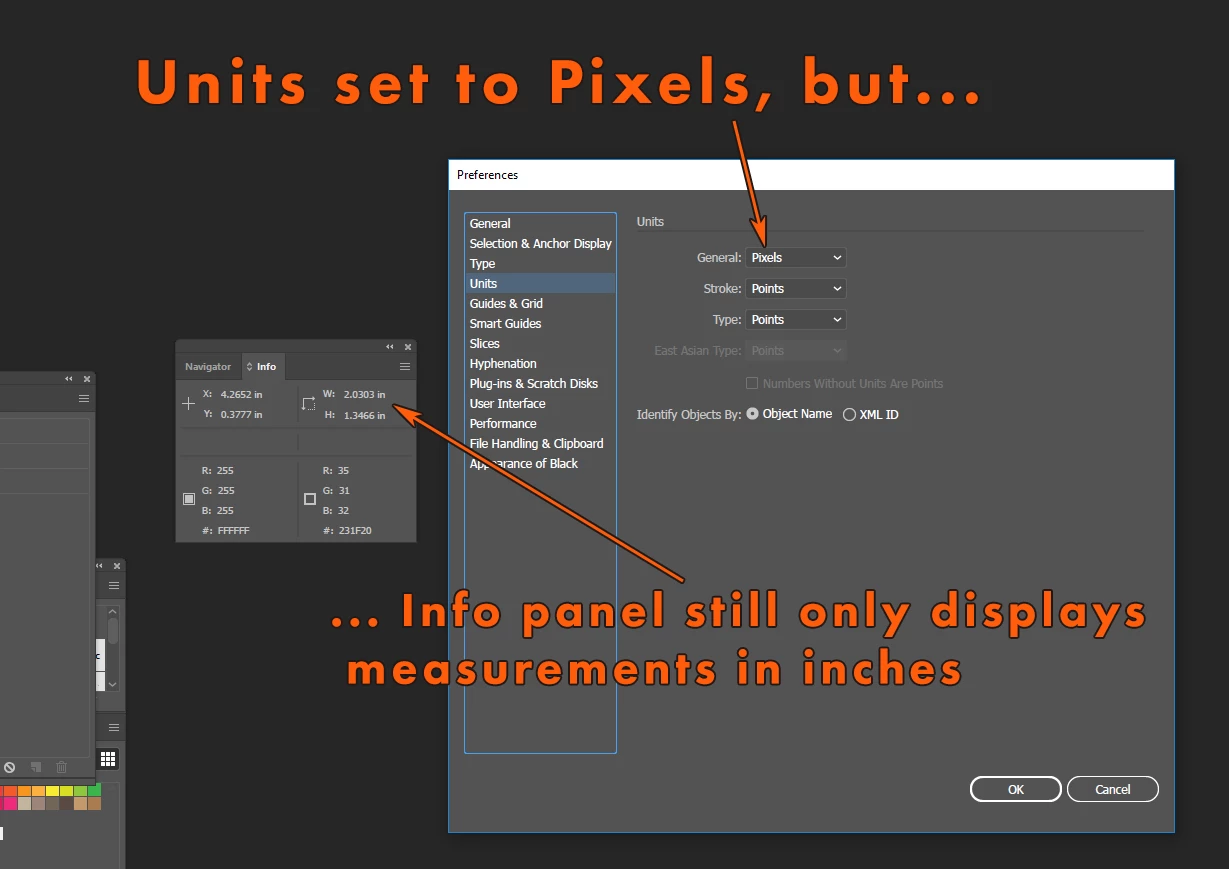
How do I get pixel measurements to display?  I don't work in print, so I have no use for inch measurements but I can't get Illustrator to display the measurements of shapes in pixels.  I've set the Units to Pixels in the Preferences but the Info panel still only displays measurements in inches (see attached).  Thank you.
    This topic has been closed for replies.

    2 replies

    John Mensinger
    Community Expert
    Community Expert
    July 8, 2019

    Yes, units of measure in Illustrator work on sort of a reverse cascade.

    Since your question is about the Info panel, we'll start there:

    • The Info panel displays the unit displayed on the rulers
    • The rulers display the document unit
    • The document unit is set in the New Document dialog
      • (which overrides the unit you set in Preferences)

    While you can certainly change the document unit in the New Document dialog, the various New Document Profiles impose their own defaults, ignoring your setting in Preferences. This renders your setting in Preferences nearly irrelevant. And, in cases when you're in a document you didn't originate, the New Document Profile that was used may be unknown.

    Doug A Roberts
    Community Expert
    Community Expert
    July 8, 2019

    It should change with the setting in 'general'. I checked Windows 10/AI 23.0.3 and it seems fine here.