
Inspiring
February 6, 2021
Answered

Cannot move a selection to another layer. "Send to current layer" is greyed out, what's going on?

  • February 6, 2021
  • 2 replies
  • 3202 views

What am I missing here? I select an object and then the target layer, but when I try to click "Send to current layer" through the right-click menu, I find that it is grayed out. When I drag the selection square from the layers panel and drop it on top of the intended destination layer, the object doesn't move to the target layer. Instead, the original layer simply rearranges to be directly on top of the target layer.
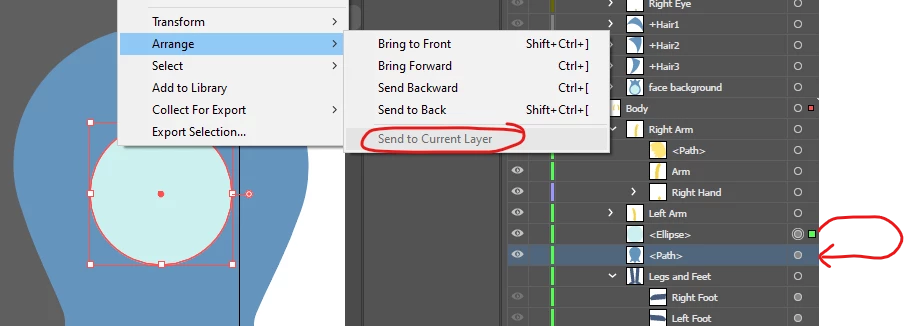
It was working before and I think I was doing it in the same way. Is it a bug or am I doing something wrong?

This topic has been closed for replies.
Correct answer c.pfaffenbichler

Could you be confusing Paths and Layers? 

2 replies

Participant
May 4, 2021

I had this happen too.  Seems like AI only recognizes layers in the top level, not nested layers.  Your previous tip helped me figure that out.  

c.pfaffenbichler
Community Expert
c.pfaffenbichlerCommunity ExpertCorrect answer
Community Expert
February 6, 2021

Could you be confusing Paths and Layers? 

RLoraAuthor
Inspiring
February 6, 2021

You are right! The two items I was trying to bring together were paths. So, I selected them both and then picked "Collect in New Layer" from the Layers' panel options. Problem solved.

Thank you!