
Participant
March 21, 2018
Question

Cannot save illustrator files, Adobe Illustrator cs6

  • March 21, 2018
  • 2 replies
  • 504 views

my problem is that whenever i try to save my logo that i made with adobe illustrator cs6, a message pops up on my screen that looks like this:
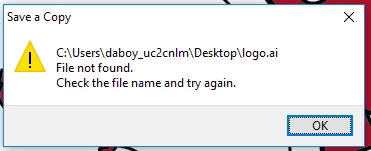
And after this message shows, it will not let me save my file.

This topic has been closed for replies.

2 replies

Srishti Bali
Legend
May 11, 2018

Hi Sherry,

Sorry for the inconvenience. Please try to save a new file to desktop and then open. If it gives the same error, please try resetting preferences:

Close all Adobe applications.

Go to Location :

C:\Users\user\AppData\Roaming\Adobe

Delete or rename  Adobe Illustrator and Adobe Illustrator CS6 Settings folders.

Launch InDesign from CC.

Regards,

Srishti

Steve Werner
Community Expert
Community Expert
March 21, 2018

Moving to Illustrator forum