
Participant
January 1, 2024
Answered

Cannot see description when hovering over icons

  • January 1, 2024
  • 1 reply
  • 944 views

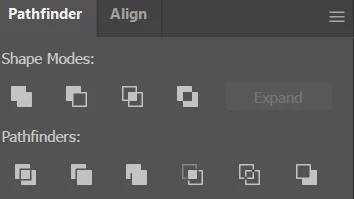
I used to be able to see the description of icons when I hovered over them with my selection tool. For instance, I could hover over the different Pathfinder icons and little pop up descriptions would say "merge", "divide", etc.  Or for instance, when I hover over the Align icons, it would say "horizontal align", "vertical align", etc.  However, I must have pressed something because I can no longer see the pop up descriptions when I hover my selection tool over icons.  Please help.  .  
This topic has been closed for replies.
Correct answer Erica3453453876s3

Yes, "Show Tool Tips" is turned on.  I ended up restarting the program, and everything started working normally again.  My issue was resolved with restart. 

1 reply

Ton Frederiks
Community Expert
Community Expert
January 1, 2024

Is in Preferences "Show Tool Tips" turned on?

Erica3453453876s3AuthorCorrect answer
Participant
January 16, 2024

Yes, "Show Tool Tips" is turned on.  I ended up restarting the program, and everything started working normally again.  My issue was resolved with restart.