
Participant
May 20, 2021
Answered

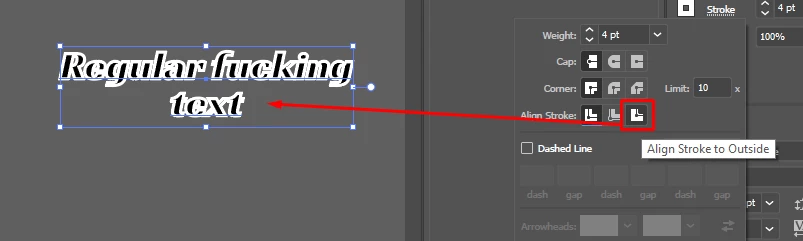
Cant change stroke alignment and appearance panel doesnt work in any way.
  • May 20, 2021
  • 3 replies
  • 3225 views

all i want to do is have it align to the outside. Why does this button not work, it does nothing.

Also the appearance panel is completely broken, it doesnt show ANYTHING.

BIG TEXT SO YOU LISTEN 


I'm going to lose a commission job because of the constant horendous bugs ive been encountering with your software adobe.

Constant bugs and braindead UI choices make your software a chore to use even for the most basic tasks.

The many years ive been using your software has been a nightmare and the experience has been actively worse each year to the point where it feels like im actively fighting just to get any functionality from this.
This topic has been closed for replies.
Correct answer Doug A Roberts

Is this something you have been able to do in the past with a stroke on text objects? As far as I know it has never been possible to use path alignment on text.


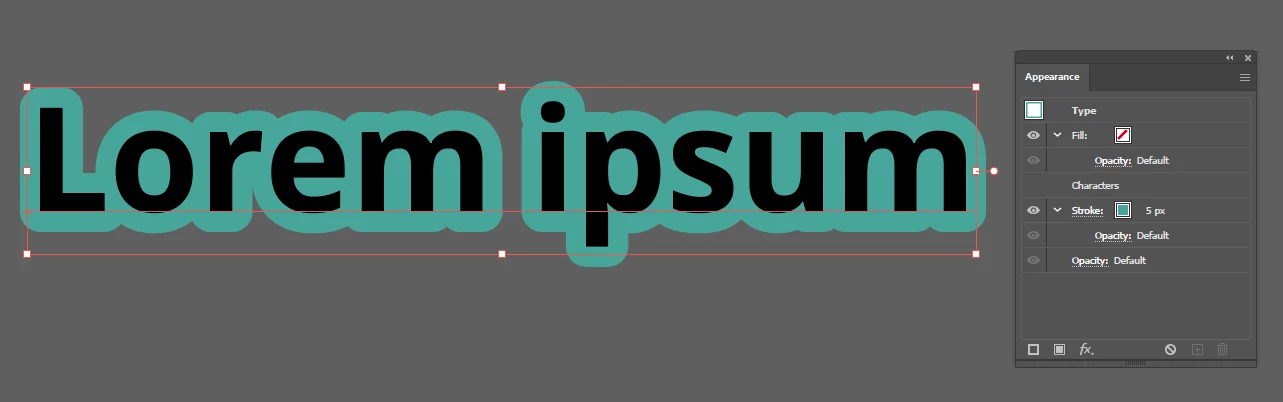
If you want a stroke to appear aligned to the outside you can create a stroke at object level in the appearance panel (select with black arrow instead of type tool), then place it below the characters:


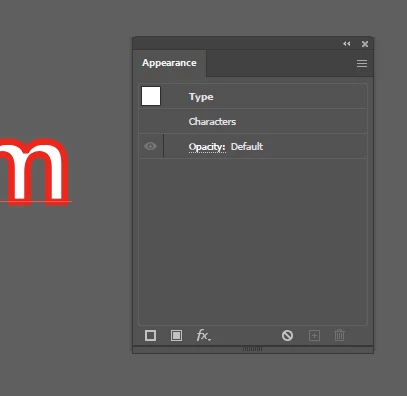
When you say that the appearance panel shows nothing, do you mean literally nothing, or this:


If its the latter, double-click on 'Characters' to see the appearance at the Type level rather than Object level.

If you see literally nothing, please show a screenshot.

3 replies

Doug A Roberts
Community Expert
Doug A RobertsCommunity ExpertCorrect answer
Community Expert
May 20, 2021

Is this something you have been able to do in the past with a stroke on text objects? As far as I know it has never been possible to use path alignment on text.


If you want a stroke to appear aligned to the outside you can create a stroke at object level in the appearance panel (select with black arrow instead of type tool), then place it below the characters:


When you say that the appearance panel shows nothing, do you mean literally nothing, or this:


If its the latter, double-click on 'Characters' to see the appearance at the Type level rather than Object level.

If you see literally nothing, please show a screenshot.

Ton Frederiks
Community Expert
Community Expert
May 20, 2021

Select the text object with the selection pointer.

Add a new stroke in the Appearance panel.

Drag the stroke item below the characters item in the Appearance panel.

Adjust the stroke width.

c.pfaffenbichler
Community Expert
Community Expert
May 20, 2021

This is primatily a user Forum, so if you want to shout at the Illustrator team or at Adobe it is not the ideal place. 


Could you please post screenshots with ALL the pertinent Panels visible. 

Live text has limited Stroke options, have you tried using Type > Create Outline (cmd-shift-O) to work around that? 

c.pfaffenbichler
Community Expert
Community Expert
May 20, 2021

If you need to maintain editable text using Symbols would provide an alternative. 


Edit: Come to think of it applying the Stroke to the text and then »Add New Fill« may work out just as well.