Participant
September 16, 2017
Answered

CC Libraries not syncing..
  • September 16, 2017
  • 5 replies
  • 11202 views

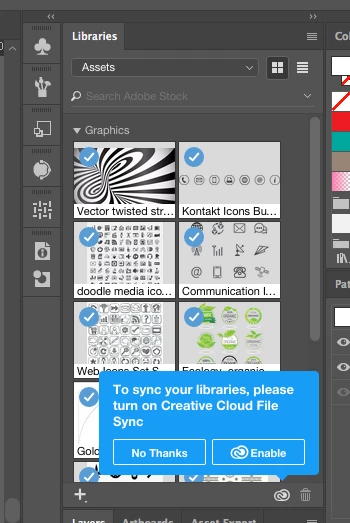
When I license and image in Adobe Stock and save to my Assets library through my browser it doesnt sync to my Ai. This warning comes up and clicking enable has no effect. Please help!!

    This topic has been closed for replies.
    Correct answer Theresa J

    Are you still having this problem? I believe there has been recent problems with the Creative Cloud servers. I had similar problems last night. I gave up and went to bed. This morning I had to sign out of my Creative Cloud desktop application and then sign back in. Signing back in triggered a resync. That took awhile, but eventually everything came back.

    5 replies

    Participant
    May 2, 2022

    The same issue happens to me but I did notice that taking any action that triggers the libraries to update will make the images to show up in the library. For Example: I deleted an image from a library and all the sudden all the images I licensend from Adobe stock started to show again. You can always restart the application but we should not have to do that.  At Adobe, please add a Sync button under the Libraries menu. Thanks!

    Participant
    May 10, 2022

    I'm having the same issue. I have signed out and quit the applications and the CC assets still have not synced when I go to use them on my InDesign desktop app. A sync button would be very helpful.

    Theresa J
    Community Expert
    Theresa JCommunity ExpertCorrect answer
    Community Expert
    September 21, 2017

    Are you still having this problem? I believe there has been recent problems with the Creative Cloud servers. I had similar problems last night. I gave up and went to bed. This morning I had to sign out of my Creative Cloud desktop application and then sign back in. Signing back in triggered a resync. That took awhile, but eventually everything came back.

    Srishti Bali
    Community Manager
    Community Manager
    September 20, 2017

    Hi isaacm,

    As per your query CC libraries are working fine on Illustrator but not on Browser. When you add a picture to assets it shows on library panel on application but not on the browser. Is that correct? If yes please try a different browser and sign out and sign in with Adobe ID

    If it still does not work, please try steps in the below-mentioned link:

    Solution to the issue: Adobe Creative Cloud Libraries panel doesn't load in desktop products

    Please update the discussion if the issue is resolved or if you have any further query.

    Regards

    Srishti

    marliton
    Community Expert
    Community Expert
    September 16, 2017

    Hi. Try that:

    1. If Create Cloud App is not open, open it and check if is sync after that

    2. If Create Cloud App is open, close it and open again and check if is sync after that

    3. Try removing the preferences files and and check if is sync after that. You can see the instructions here: Can I delete my Creative Cloud preferences and start again?

    4. Try reinstalling the Create Cloud App and check if is sync after that.  You can see the instructions here: Uninstall the Adobe Creative Cloud desktop application

    Marlon Ceballos
    Larry G. Schneider
    Community Expert
    Community Expert
    September 16, 2017

    Is your AI Creative Cloud management app running when this is happening?