

Mike-Pike
Participating Frequently
June 6, 2024
Answered

CC Library Thumbnails Randomly Having White Backgrounds on Graphics

  • June 6, 2024
  • 2 replies
  • 936 views

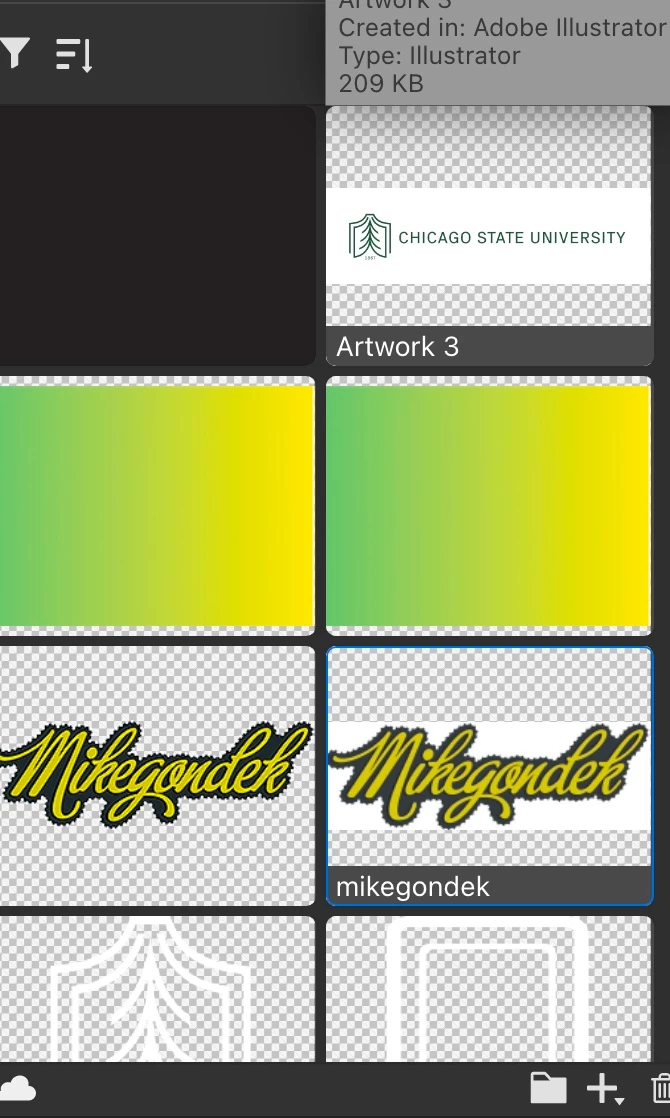
I am trying to understand why, when I add new vectors or graphics via Illustrator to my CC Library, some thumbnails randomly display with a white background.


...and if there's a way to display all of these without the white background. Using the 'Show Transparency Grid' option still shows the white background behind the graphic.

Correct answer Mike_Gondek10189183

Good question!


I think it is a bug in illustrator. I option dragged my logo (which was done years ago shows transparency correctly) to canvas to get the vector shapes. Then I dropped the same artwork back in and the transparency is white where bounding box is. Seems like the older items I did years ago are good, but anything about 2 years or less showing white around bounding box.


2 replies

Participant
September 11, 2024

Not sure if this will help anyone, but I have found a workaround for this bizarre bug: If you export the illustrator asset as an svg, you can then open the creative cloud app and upload the svg file into your library, and it will show with the transparent background as expected. Extra steps? Yes. Annoying? Yes. Is it worth the time, if you're like me, and the random white background is driving you nuts and essentially hiding your white logos? Also yes. 


P.S. Dear Adobe, please fix this bug so we can get back to the more efficient "drag into the library" method ❤️


Mike-Pike
Mike-PikeAuthor
Participating Frequently
September 11, 2024

@AWinters Thank you for this. I live out of CC Library and it's such a challenge no matter the naming convention to figure out which white asset I'm using.

Mike_Gondek10189183
Community Expert
Mike_Gondek10189183Community ExpertCorrect answer
Community Expert
June 7, 2024

Good question!


I think it is a bug in illustrator. I option dragged my logo (which was done years ago shows transparency correctly) to canvas to get the vector shapes. Then I dropped the same artwork back in and the transparency is white where bounding box is. Seems like the older items I did years ago are good, but anything about 2 years or less showing white around bounding box.


Mike-Pike
Mike-PikeAuthor
Participating Frequently
June 7, 2024

@Mike_Gondek10189183Thank you very much for your response and insight. Over the past few months, this issue has become more noticeable, especially with our white artworks, making it somewhat inconvenient.

Barbara25100005rd9d
Participating Frequently
August 28, 2024

do we know how to fix this?