
Inspiring
May 4, 2022
Answered

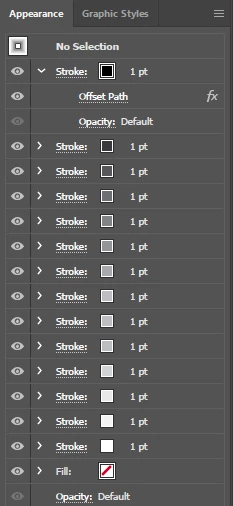
Change Multiple Offset Stroke Color Gradually
  • May 4, 2022
  • 2 replies
  • 609 views

I'm trying to add multiple strokes gradually with offset decreament from black to white or vice versa on appearance menu. Years ago thanks to Qwertyfly he had written a great script as above,

#target illustrator
//-------------------------------------------------------------------  
// Offset Path in apperence panel  
// Script by Qwertyfly  
// contact tristan@qwertyfly.com  
// version 0.1 beta  
//-------------------------------------------------------------------  
var doc = app.activeDocument;

mySelection = app.activeDocument.selection; 
//number of offset paths  
var Qty = 20;
  
  
//amount to offset  -
var Offset = -1;  
var round = 1;  
   
//units to offest in  
var Unit = "pt";   
  
  
//time to wait in milliseconds before sending keys.  
// more time is slower but more stable  
// I was able to run this with it set to 0, but a little bit of a pause is a good idea.  
var wait = 10;  

//-------------------------------------------------------------------  
function FillDialog_Windows(distance){  
    var VB = [  
        'WScript.Sleep ' + wait + '',  
        'Set WshShell = WScript.CreateObject("WScript.Shell")',  
        'WshShell.SendKeys "' + distance + '"',
        'WshShell.SendKeys "{TAB}"' , 
        'WshShell.SendKeys "{DOWN}"' , 
        'WshShell.SendKeys "{TAB}"' , 
        'WshShell.SendKeys "1"',
        'WshShell.SendKeys "{ENTER}"'  
        ].join('\n');  
    var VBgo = new File('~/go.vbs');  
    VBgo.open('w');  
    VBgo.write(VB);  
    VBgo.close();  
    VBgo.execute();  
}


function MakeStroke(offset){  
app.executeMenuCommand('Adobe New Stroke Shortcut');  
FillDialog_Windows(offset);  
app.executeMenuCommand('Live Offset Path');
}  

var color1 = new CMYKColor();
color1.cyan = 0;
color1.magenta = 0;
color1.yellow = 0;
color1.black = 0;

for(var i = 1; i<Qty+1; i++){  
    MakeStroke(i*Offset + Unit);
     //doc.pathItems[i].strokeColor = color1;
    //doc.strokeColor = [color1.cyan,color1.magenta,color1.yellow,color1.black+10];

}  

Now I would like to change each stroke color gradually from black to white. But I cannot access the stroke. Could anyone please help me?

Thank you.

This topic has been closed for replies.
Correct answer femkeblanco
// offset path in apperence panel (modified)
// created by Qwertyfly 
// contact tristan@qwertyfly.com
// modified by Femke Blanco, 05/05/2022
// https://community.adobe.com/t5/illustrator-discussions/change-multiple-offset-stroke-color-gradually/td-p/12922695
// instructions:  select path
var doc = app.activeDocument;
mySelection = app.activeDocument.selection;
var Qty = 20;
var Offset = -1;
var Unit = "pt";
var wait = 10;
function FillDialog_Windows(distance){
    var VB = [
        'WScript.Sleep ' + wait + '',
        'Set WshShell = WScript.CreateObject("WScript.Shell")',
        'WshShell.SendKeys "' + distance + '"',
        'WshShell.SendKeys "{TAB}"',
        'WshShell.SendKeys "{DOWN}"',
        'WshShell.SendKeys "{TAB}"',
        'WshShell.SendKeys "1"',
        'WshShell.SendKeys "{ENTER}"'
        ].join('\n');
    var VBgo = new File('~/go.vbs');
    VBgo.open('w');
    VBgo.write(VB);
    VBgo.close();
    VBgo.execute();
}
var color1 = new CMYKColor();
color1.cyan = 0;
color1.magenta = 0;
color1.yellow = 0;
color1.black = 0;
mySelection[0].strokeColor = color1;
function MakeStroke(offset, addend){
    app.executeMenuCommand('Adobe New Stroke Shortcut');
    mySelection[0].strokeColor.black += addend;
    app.redraw();
    FillDialog_Windows(offset);
    app.executeMenuCommand('Live Offset Path');
}
for(var i = 1; i < Qty + 1; i++){
    MakeStroke(i * Offset + Unit, ((i - 1) * (100 / Qty)));
}

2 replies

femkeblanco
femkeblancoCorrect answer
Legend
May 4, 2022
// offset path in apperence panel (modified)
// created by Qwertyfly 
// contact tristan@qwertyfly.com
// modified by Femke Blanco, 05/05/2022
// https://community.adobe.com/t5/illustrator-discussions/change-multiple-offset-stroke-color-gradually/td-p/12922695
// instructions:  select path
var doc = app.activeDocument;
mySelection = app.activeDocument.selection;
var Qty = 20;
var Offset = -1;
var Unit = "pt";
var wait = 10;
function FillDialog_Windows(distance){
    var VB = [
        'WScript.Sleep ' + wait + '',
        'Set WshShell = WScript.CreateObject("WScript.Shell")',
        'WshShell.SendKeys "' + distance + '"',
        'WshShell.SendKeys "{TAB}"',
        'WshShell.SendKeys "{DOWN}"',
        'WshShell.SendKeys "{TAB}"',
        'WshShell.SendKeys "1"',
        'WshShell.SendKeys "{ENTER}"'
        ].join('\n');
    var VBgo = new File('~/go.vbs');
    VBgo.open('w');
    VBgo.write(VB);
    VBgo.close();
    VBgo.execute();
}
var color1 = new CMYKColor();
color1.cyan = 0;
color1.magenta = 0;
color1.yellow = 0;
color1.black = 0;
mySelection[0].strokeColor = color1;
function MakeStroke(offset, addend){
    app.executeMenuCommand('Adobe New Stroke Shortcut');
    mySelection[0].strokeColor.black += addend;
    app.redraw();
    FillDialog_Windows(offset);
    app.executeMenuCommand('Live Offset Path');
}
for(var i = 1; i < Qty + 1; i++){
    MakeStroke(i * Offset + Unit, ((i - 1) * (100 / Qty)));
}
Inspiring
May 5, 2022

Thank you very much Femke Blanco, it works like a charm!

m1b
Community Expert
Community Expert
May 4, 2022

Hi @arteangelus, ExtendScript doesn't give us access to multiple strokes in Appearance. Quertyfly's solution is using UI scripting to complete dialogs that the script invokes. However, it is Windows only so we need a Windows user to troubleshoot this (I'm MacOS). What version of Windows are you running?


Another idea: would it be possible for you to manually create a Graphic Style (once) and just apply that via script? eg

var doc = app.activeDocument,
    myItem = doc.selection[0],
    myStyle = doc.graphicStyles.getByName('Test');

myStyle.applyTo(myItem);

- Mark

Inspiring
May 5, 2022

Thank you also for your answer, It's also a good idea but I was going to make 100 steps so Femke Blanco' s script saved my life.