


Known Participant
August 29, 2026
Kysymys

Change the link dimensions to mm in the Links panel

  • August 29, 2026
  • 5 kommenttia
  • 21 katselukerrat

Hello all

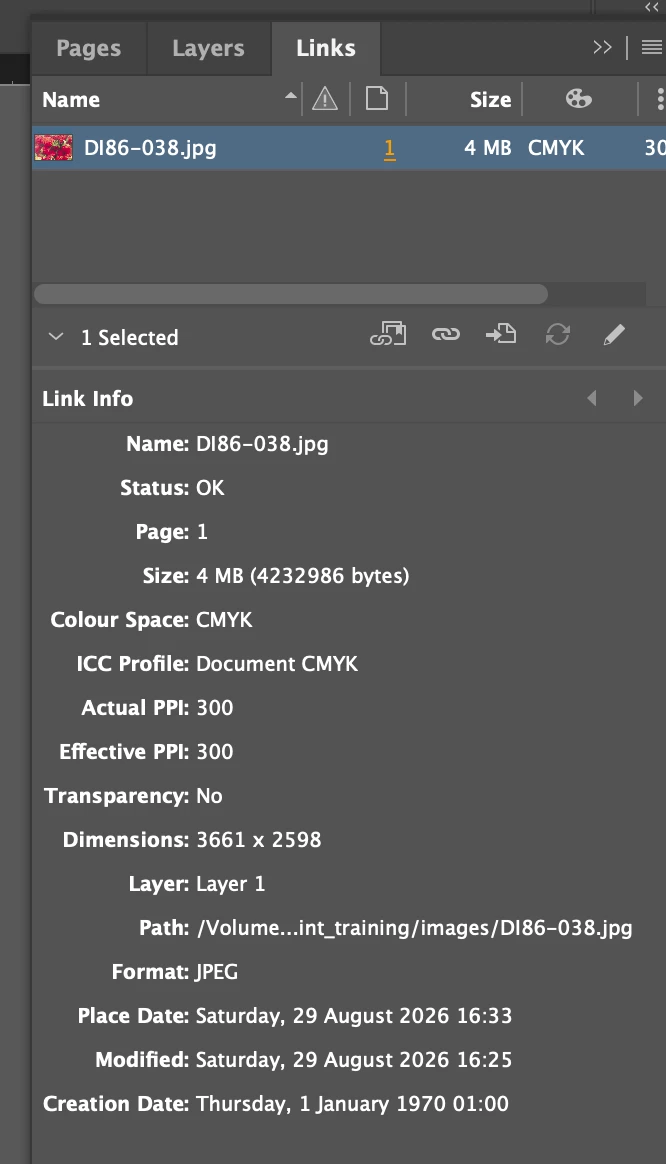
I would like the image dimensions in the Links panel to be listed in mm.

Is this possible?

I have changed the ruler settings to mm and checked that the Units and Increments are set to mm.

But still the links panel listed as pixels.
 

    5 kommenttia

    Happy_coderKirjoittaja
    Known Participant
    August 29, 2026

    Sure, you can always do that I guess.
    Just be nice to have the physical dimensions in the panel, along with the other information you can view easily.

    Thanks.

    Ton Frederiks
    Community Expert
    Community Expert
    August 29, 2026

    @Happy_coder You may want to make a feature request here:

    https://illustrator.uservoice.com/

    The Transform panel can show the dimensions in the current unit.

    Dave Creamer of IDEAS
    Community Expert
    Community Expert
    August 29, 2026

    Are you referring to the PPI being in inches or the pixel dimensions?

    David Creamer: Community Expert (ACI and ACE 1995-2023)
    Happy_coderKirjoittaja
    Known Participant
    August 29, 2026

    Hello David

    Sorry not clear. Was referring to the dimensions. 

    If you are working on a print document, I figured it would be more useful for the dimensions to be in mm as opposed to pixels (as above).
    Is this possible?
    Do you think it would be useful?
    Thanks for your reply.

    Dave Creamer of IDEAS
    Community Expert
    Community Expert
    August 29, 2026

    Could you just click on the image frame?

    David Creamer: Community Expert (ACI and ACE 1995-2023)
