


Inspiring
July 24, 2025
Question

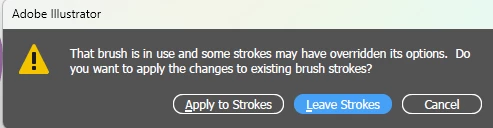
Changing brush size triggers a popup

  • July 24, 2025
  • 1 reply
  • 127 views

I would like this popup have always Leave Strokes setting and not give me popup. It is really annoyin when trying to draw with graphic tablet and some object is selected during brush size change via shortcut.


Maybe someone knows some hack in Adobe settings file.
 

1 reply

creative explorer
Community Expert
Community Expert
July 24, 2025

@Sorontar Unfortunately, that's a feature! There is no direct preference setting in Adobe Illustrator to permanently choose "Leave Strokes" and prevent that specific popup from appearing when changing brush size. A slight trick is press Control Shift A (Windows) to deselect everything before 'Modifying the Brush!' If no strokes are selected that use the brush you're about to modify, Illustrator won't ask what to do with "existing brush strokes" because, from its perspective, there are no selected existing strokes to conflict with.

m
Ton Frederiks
Community Expert
Community Expert
July 25, 2025

Even if no objects are selected, changing the brush will give you a warning.