This topic has been closed for replies.
Correct answer Silly-V

I bring the solution to all your problems in this simple easy-to-read* script snippet!

#target illustrator

function test(){

    var SymbolSampleScript = {

        displayProps : function (item){

            var msg = [];

            for(var all in item){

                try{

                    msg.push(all + " : " + item[all]);

                } catch(e){

                    msg.push(all + " : " + e);

                }

            }

            return msg.join("\n");

        },

        getPropListFromArray : function (srcArr, prop){

            var arr = [];

            for(var i = 0; i < srcArr.length; i++){

                arr.push(srcArr[prop]);

            };

            return arr;

        },

        SymbolChanger : {

            chooseSymbolDialog : function(){

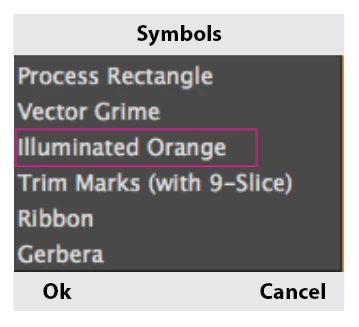
                var w = new Window('dialog', 'choose symbol');

                var list = w.add("listbox", undefined, SymbolSampleScript.getPropListFromArray(app.activeDocument.symbols, "name"));

                list.size = [150, 200];

                var g_btn = w.add("group");

                var btn_ok = g_btn.add("button", undefined, "Ok");

                var btn_ccl = g_btn.add("button", undefined, "Cancel");

                btn_ok.onClick = function(){

                    if(SymbolSampleScript.SymbolChanger.validate(list)){

                        w.close();

                    } else {

                        return;

                    }

                }

                if(w.show() == 2){

                    return null;

                } else {

                    return {

                        selectedSymbol : list.selection.text

                    };

                }

            },

            validate : function(list){

                if(list.selection != null){

                    return true;

                } else {

                    alert("Please select an item from the listbox.");

                }

                return false;

            }

        },

        main : function(){

            var doc = app.activeDocument;

            var s = doc.selection;

            if(s != null && s.length > 0 && s[0].typename == "SymbolItem"){

                var userInput = this.SymbolChanger.chooseSymbolDialog();

                if(userInput != null){

                    s[0].symbol = doc.symbols.getByName(userInput.selectedSymbol);

                } else {

                    alert("Cancelled");

                }

            } else {

                alert("Please select one symbol instance on an artboard in your document.");

            }

        }

    };

    SymbolSampleScript.main();

};

test();

*relatively-speaking

2 replies

Silly-V
Silly-VCorrect answer
Legend
March 14, 2016

I bring the solution to all your problems in this simple easy-to-read* script snippet!

#target illustrator

function test(){

    var SymbolSampleScript = {

        displayProps : function (item){

            var msg = [];

            for(var all in item){

                try{

                    msg.push(all + " : " + item[all]);

                } catch(e){

                    msg.push(all + " : " + e);

                }

            }

            return msg.join("\n");

        },

        getPropListFromArray : function (srcArr, prop){

            var arr = [];

            for(var i = 0; i < srcArr.length; i++){

                arr.push(srcArr[prop]);

            };

            return arr;

        },

        SymbolChanger : {

            chooseSymbolDialog : function(){

                var w = new Window('dialog', 'choose symbol');

                var list = w.add("listbox", undefined, SymbolSampleScript.getPropListFromArray(app.activeDocument.symbols, "name"));

                list.size = [150, 200];

                var g_btn = w.add("group");

                var btn_ok = g_btn.add("button", undefined, "Ok");

                var btn_ccl = g_btn.add("button", undefined, "Cancel");

                btn_ok.onClick = function(){

                    if(SymbolSampleScript.SymbolChanger.validate(list)){

                        w.close();

                    } else {

                        return;

                    }

                }

                if(w.show() == 2){

                    return null;

                } else {

                    return {

                        selectedSymbol : list.selection.text

                    };

                }

            },

            validate : function(list){

                if(list.selection != null){

                    return true;

                } else {

                    alert("Please select an item from the listbox.");

                }

                return false;

            }

        },

        main : function(){

            var doc = app.activeDocument;

            var s = doc.selection;

            if(s != null && s.length > 0 && s[0].typename == "SymbolItem"){

                var userInput = this.SymbolChanger.chooseSymbolDialog();

                if(userInput != null){

                    s[0].symbol = doc.symbols.getByName(userInput.selectedSymbol);

                } else {

                    alert("Cancelled");

                }

            } else {

                alert("Please select one symbol instance on an artboard in your document.");

            }

        }

    };

    SymbolSampleScript.main();

};

test();

*relatively-speaking

CarlosCanto
Community Expert
Community Expert
March 15, 2016

I love simple easy to read solutions

karthickm50893796
Inspiring
March 14, 2016

Can any one help me!!

Monika Gause
Community Expert
Community Expert
March 14, 2016

Please ask a question and then someone might be able to help you.

CarlosCanto
Community Expert
Community Expert
March 14, 2016

Your crystal ball is not working Monika?