
pixxxelschubser
Community Expert
Community Expert
December 19, 2011
Question

check the blending Mode of path item (stroke or fill color)

  • December 19, 2011
  • 1 reply
  • 1152 views

To check the blending Mode of a path item I use this:

if (app.activeDocument.pathItems[0].blendingMode != BlendModes.NORMAL ) {

    alert("Not Normal") }

How can I test, if the stroke and/or the fill Color of the path item having another blending Mode than normal (the path item itself is in blending Mode normal)?

Here a simple example for this:
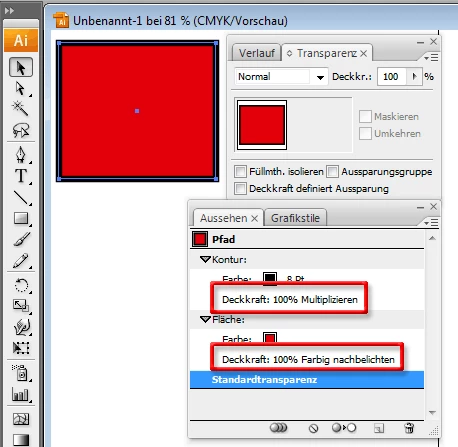
Has anyone a useful idea?

(And sorry for my terrible english)

This topic has been closed for replies.

1 reply

pixxxelschubser
Community Expert
Community Expert
December 21, 2011

Hmm ...

Means not answer, that there is no answer?

CarlosCanto
Community Expert
Community Expert
December 21, 2011

yeah, usually no asnwers mean no one has come up with a solution. There's nothing in the documentation about it.

Inspiring
December 21, 2011

Im going to agree with Carlos… No reply only means I don't know of away… Your English is better than my German is it? By the looks of things you pallete is the 'Apperance' one and script has no access to multi-fills or strokes on objects… I can only do the same as what you already have… sorry