
Dumble_dad
Inspiring
September 12, 2013
Answered

Choosing RGB color in Illustrator (swatches and sliders remain in CMYK)

  • September 12, 2013
  • 3 replies
  • 45899 views

I'm making a simple template to laser cut. The laser cutter acts as a printer and you choose the power, speed, etc. for each colour that is in the document. I only want to cut, so I only have RGB red lines at 0.001 pt thickness. Or at least that was the plan. One of the shapes in my template has come out a different red (the swatches were CMYK despite the document colour mode being RGB). I would now like to select all the paths in the document and make them all RGB red. However, when I open the colour panel from the dock the sliders are CMYK, again this is despite the document colour mode being RGB:
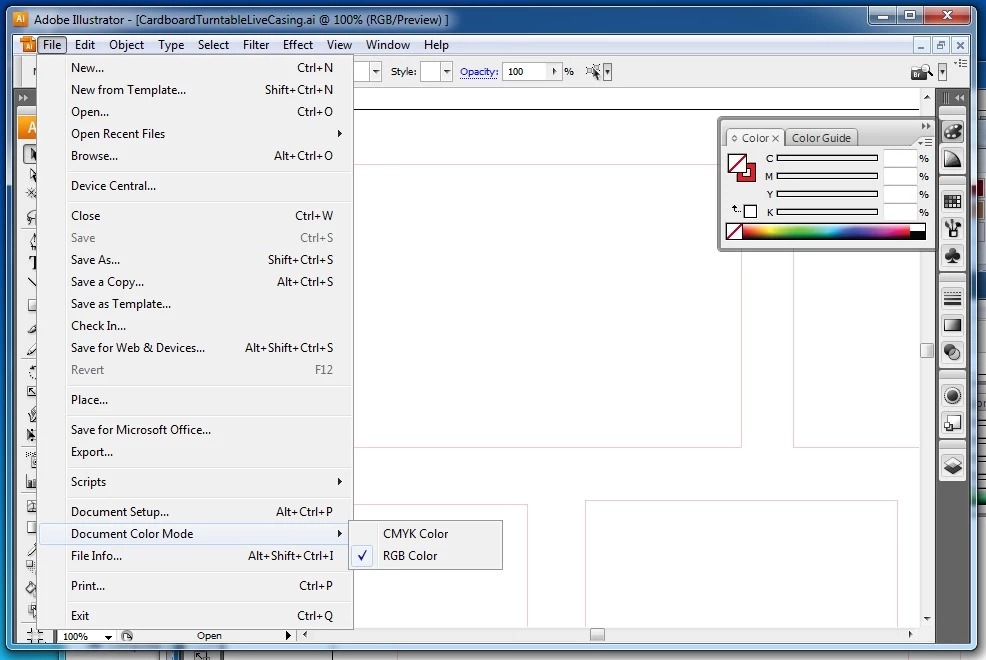
How do I change all the paths to be RGB red?

How do I stop Illustrator offering me CMYK options and swatches and offering RGB instead?

Message was edited by: Dumble_dad adding missing words

This topic has been closed for replies.
Correct answer Jacob Bugge

Dumble-dad,

I changed the panel to RGB, but now it is only offering me the K slider!

If you have ticked RGB and got Grayscale, there must be something wrong, quite possibly in your preferences.

Here is a general list of things to try when strangeness strikes (you may have tried/done some of them already) and see whether it helps (the following is a general list of things you may try when the issue is not in a specific file; 3) and 4) are specifically aimed at possibly corrupt preferences):

1) Close down Illy and open again;

2) Restart the computer (you may do that up to 3 times);

3) Close down Illy and press Ctrl+Alt+Shift/Cmd+Option+Shift during startup (easy but irreversible);

4) Move the folder with Illy closed (more tedious but also more thorough and reversible);

5) Look through and try out the relevant among the Other options (Item 7) is a list of usual suspects among other applications that may disturb and confuse Illy);

Even more seriously, you may:

6) Uninstall, run the Cleaner Tool if you have CS3/CS4/CS5/CS6, and reinstall.

http://www.adobe.com/support/contact/cscleanertool.html

3 replies

Participant
February 22, 2017

i had the same problem and just found the solution, for illustrator cc go to the top of the colour window next to the double arrows you use to close click on the three lines these lets you choose what type of selection you want from RGB to CMYK to Grayscale and more.

Monika Gause
Community Expert
Community Expert
September 12, 2013

To avoid the situation in the future:

Always choose the document color mode by selecting a correct new document profile in "New document" dialog box. Don't set "Print" document profile to RGB or vice versa.

Dumble_dad
Inspiring
September 12, 2013

Monika - if you get it wrong at the "New Document" stage how do you fix it later?

Jacob Bugge
Community Expert
Community Expert
September 12, 2013

Dumble-dad,

... if you get it wrong at the "New Document" stage how do you fix it later?

You can always use File>Document Color Mode to switch to RGB (or CMYK).

Jacob Bugge
Community Expert
Community Expert
September 12, 2013

Dumble-dad,

You should be able to change to RGB through the flyout (the right arrow(s) in the upper right corner of the Color palette.

If all your paths are (to be) filled, you should be able to select everything and tick the Fill Color at the bottom of the Toolbox, then tick the RGB red.

If you only want to fill certain paths with the red, you can use Select>Same or Select>Object, and then tick the relevant common feature.

Dumble_dad
Inspiring
September 12, 2013

I'm still stuck. Following Jacob's advice I changed the panel to RGB, but now it is only offering me the K slider!

How do I change the colour of this path to RGB red?

Jacob Bugge
Community Expert
Jacob BuggeCommunity ExpertCorrect answer
Community Expert
September 12, 2013

Dumble-dad,

I changed the panel to RGB, but now it is only offering me the K slider!

If you have ticked RGB and got Grayscale, there must be something wrong, quite possibly in your preferences.

Here is a general list of things to try when strangeness strikes (you may have tried/done some of them already) and see whether it helps (the following is a general list of things you may try when the issue is not in a specific file; 3) and 4) are specifically aimed at possibly corrupt preferences):

1) Close down Illy and open again;

2) Restart the computer (you may do that up to 3 times);

3) Close down Illy and press Ctrl+Alt+Shift/Cmd+Option+Shift during startup (easy but irreversible);

4) Move the folder with Illy closed (more tedious but also more thorough and reversible);

5) Look through and try out the relevant among the Other options (Item 7) is a list of usual suspects among other applications that may disturb and confuse Illy);

Even more seriously, you may:

6) Uninstall, run the Cleaner Tool if you have CS3/CS4/CS5/CS6, and reinstall.

http://www.adobe.com/support/contact/cscleanertool.html