
Inspiring
January 27, 2024
Answered

Click and drag to change font attributes

  • January 27, 2024
  • 3 replies
  • 749 views

Hi, 

I'm using the most recent version of Illustrator for Windows and I feel like you used to be able to click and drag in the kerning dialogue box number slor to change it within the character panel when you had two text characters selected. Was this removed or did I dream it up? 
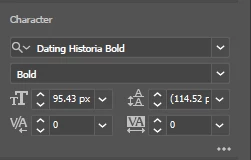


Wouldn't your cursor change to two opposing arrows when you hovered over the symbol of each?

Correct answer Ton Frederiks

I can see those sliders in Photoshop. In Illustrator you place the cursor between 2 characters and enter the value.

3 replies

Participant
January 17, 2025

No, you're not dreaming, you definetaly could and I have the same issue.


Before when text was selected I could click and hold on the "V/A"-icon and just drag my cursor left or right to increase or decrease the kerning, and now it doesn't work. 

Came on here to check if there was a solution, it was such a nice feature, made adjusting the kerning so simple as I could just slide however fast I wanted to set it perfect


Any fixes?

Monika Gause
Community Expert
Community Expert
January 17, 2025

@Tobias28206226zgj0  schrieb:

Before when text was selected I could click and hold on the "V/A"-icon and just drag my cursor left or right to increase or decrease the kerning, and now it doesn't


In which version were you able to do that?


What works is hovering in the field and using the scroll wheel or the touchpad

Participant
January 20, 2025

It turns out I was dreaming as well, sorry about that. That feature is in Photoshop when editing text, not in Illustrator. Thanks for the reply though, and the tip about scrolling.


I do find it strange that small features like that are not the same across all applications. It gets quickly into your muscle memory and clutters workflow a little bit when switching between different apps.

Ton Frederiks
Community Expert
Ton FrederiksCommunity ExpertCorrect answer
Community Expert
January 27, 2024

I can see those sliders in Photoshop. In Illustrator you place the cursor between 2 characters and enter the value.

Inspiring
January 29, 2024

i think I got it confused. 🙂

Ton Frederiks
Community Expert
Community Expert
January 29, 2024

Happens to all of us.

Community Expert
January 27, 2024

I can't recall ever seeing a slider bar to manually adjust kerning or tracking values of a text object in Adobe Illustrator. It's a decent idea though, given we have sliders to adjust axis values for Variable Fonts.