


Participant
Oct 31, 2026 8:57 PM UTC
Question

Clip mask files turned into jpg files

I was working on a 32 pages calendar yesterday, I opened it today and all the files I clipped mask turned into an image file. There’s nothing to release. This is the first time it happened to me. I saved it in .ai and pdf, both files seems to magically turned my files into image file. Any idea why and can I undo it?
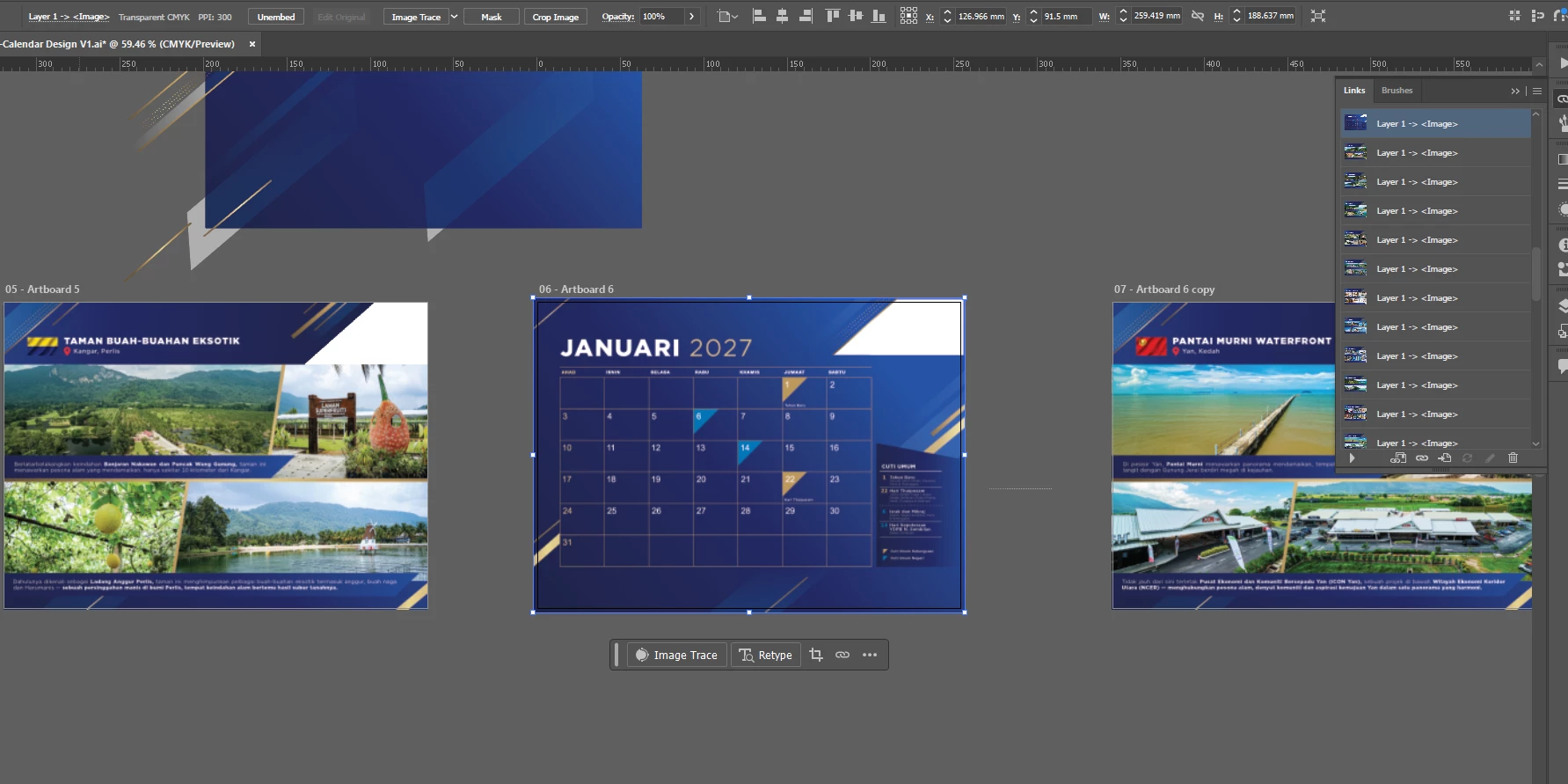
 

    6 replies

    Community Expert
    Nov 3, 2026 6:46 AM UTC

    That's very strange, and looking at your screenshot, it does appear that at least the selected calendar page has become a single embedded raster image rather than the original editable artwork.

    The control bar shows a 300 PPI CMYK image, and the Links panel lists multiple image objects. That doesn't necessarily mean they're JPEGs, though.

    Monika may be right about Illustrator losing the native editing information, but I'd be curious about something else. Even if Illustrator falls back to the PDF portion of the file, that doesn't necessarily mean everything should be rasterised.

    A few questions:

    • Were you working exclusively in the AI file, or did you reopen the PDF at any stage?

    • When you saved the PDF, was Preserve Illustrator Editing Capabilities enabled?

    • Are all 32 pages now individual images, including the text and calendar numbers?

    • Did you use any flattening or rasterising operations before saving?

    • What version of Illustrator are you using, and where were the files saved?

    I'd also check whether you have an earlier version available through your backup or cloud storage's version history.

    Unfortunately, if the artwork really has been rasterised and the original editable objects are no longer present, releasing a clipping mask won't recover them.


    -----
    Another possibility is that the artwork was rasterised during PDF creation, particularly if transparency flattening was involved.

    When saving to certain PDF formats, such as PDF/X-1a, Illustrator has to flatten transparency because those formats don't support live transparency. Depending on the complexity of the artwork, overlapping objects, transparency effects and clipping masks, parts of the design can be converted into raster images rather than remaining editable vectors.

    However, flattening doesn't normally turn an entire page into one image, and clipping masks alone shouldn't cause this. Your screenshot shows what appears to be a complete calendar page embedded as a 300 PPI image, so I'd be interested to know which PDF preset you used and whether you reopened the original AI file or the exported PDF.


    Translate
    Monika Gause
    Community Expert
    Community Expert
    Nov 3, 2026 7:37 AM UTC

    It looks like there are transparency blend modes involved. This most of the time leads into reasterization in the PDF.

    Translate
    Community Expert
    Nov 5, 2026 4:21 AM UTC

    This is one reason why I prefer using the default Illustrator PDF preset (and leave the preserve Illustrator editing capability setting checked) when saving PDF files for either large format printing work or saving PDF files where the artwork may be re-used or edited further. File sizes will be larger, but the vector-based objects with advanced fills and/or transparency effects will be more likely retained in vector form.

    Translate
    Monika Gause
    Community Expert
    Community Expert
    Oct 31, 2026 10:35 PM UTC

    What happened in the Layers panel? Are there too many clipping masks?


    If so, your file could have been corrupted while saving and no longer has an AI part, only contains the PDF. 

    This may have been caused by the option “Save in background” in the preferences. You’d better turn it off. But that will not recover the files.

    Translate
    FrhKamalAuthor
    Participant
    Nov 4, 2026 2:18 PM UTC

    Most of the pages are clipped mask. Should i disable the save in background? But this is the first time it happened. 

    This one?


    Translate
    Monika Gause
    Community Expert
    Community Expert
    Nov 4, 2026 2:52 PM UTC

    Yes, that one. Disable it.

    Translate