Participant
May 8, 2020
Answered

Clipping mask create fine outlines

  • May 8, 2020
  • 4 replies
  • 4523 views

Hi I tried to figure out how to cope with this issue but couldn’t really find any solutions.

Basically whenever I fill dark background colour in the clipping mask and put bright elements on top, or the opposite-bright background and dark elements, it creates fine outline along the clipping mask area just like the picture I’ve attached here. 
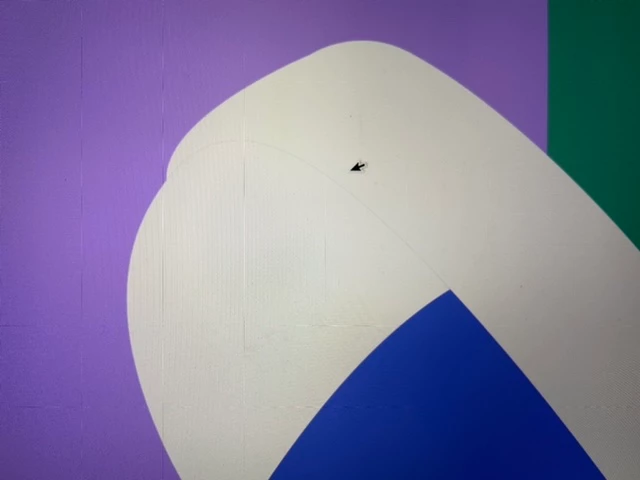
I’m currently adding a thin line on the outlines bit it’s really time-consuming. I’ve tried manipulate preference settings but they didn’t do anything.

I hope there’s anyone can help me on this issue 😞 
This topic has been closed for replies.
Correct answer Ton Frederiks

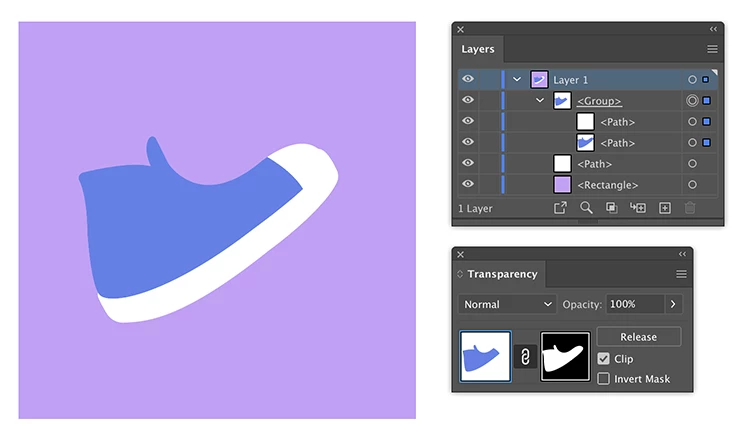
Here is what I did:

and here is the Illustrator file to see how I did it:

https://shared-assets.adobe.com/link/cb24aa62-5126-4442-6c1a-127e72fdd912

4 replies

manal shanableh
Legend
May 10, 2020

i see that yoyu can use shape builder tool, not clipping mask/


please check the file, what i did and suggest.


https://drive.google.com/open?id=1AaHsF57AUHPMWUCieXTfROljBPGlk2iK

DanikimAuthor
Participant
May 12, 2020

Thanks for getting back to me! I prefer using mask rather than shape builder tool because it isn't appropriate for my artwork as it's not easy to manipulate and edit. But thanks for your kind reply : )

Ton Frederiks
Community Expert
Ton FrederiksCommunity ExpertCorrect answer
Community Expert
May 9, 2020

Here is what I did:

and here is the Illustrator file to see how I did it:

https://shared-assets.adobe.com/link/cb24aa62-5126-4442-6c1a-127e72fdd912

DanikimAuthor
Participant
May 12, 2020

Thank you very much that works!! Now I'm free from headache 🙂

Ton Frederiks
Community Expert
Community Expert
May 12, 2020

Good to hear that helped (also with your headache 🙂   )

Ton Frederiks
Community Expert
Community Expert
May 8, 2020

Try to use an Opacity mask instead of a clipping mask.

You can use the same shape you wanted to use for clipping mask, fill it with white, no stroke.

Group what you want to mask.

Select the group together with the white object above.

In the Transparency panel click the Make Mask button.

Make sure Clip is checked and Invert Mask is unchecked.

DanikimAuthor
Participant
May 9, 2020

Hi, thanks for the comment.

I've tried that and played it around but it seems still happening.

Would you be able to have a look at my file, please?

mask-test.ai 

manal shanableh
Legend
May 8, 2020

is the mask coumpond path?? if yes, try befor compound path to unite from pathfinder.

DanikimAuthor
Participant
May 9, 2020

No, I've used clipping mask using command+7