Sturm359
Inspiring
March 24, 2016
Answered

Clipping mask interferes with position?

  • March 24, 2016
  • 1 reply
  • 891 views

I've got a script that takes a piece of artwork and groups it with a rectangle that represents the maximum size for the artwork. It then takes that group--let's call it artGroup--and pastes it into another document, lining it up with another rectangle of the exact same size in that document. We'll call this rectangle in the target document targetArea.

Now, normally this is not a problem. I simply set artGroup's position to the same as targetArea's position, thusly:

artGroup.position = targetArea.position;

This works in most cases. The rectangles in both artGroup and targetArea line up precisely. Now, I'm aware that .position is actually the coordinates of the top-left corner of the object in question. Since both rectangles are exactly the same dimensions, this is usually not a problem. But there are times when the artwork has a clipping path and the objects inside the clipping path are too big for the "maximum size" rectangle (thus, the need for us to clip it to a smaller area).

When such artwork is placed by my script, it reads artGroup.position as the absolute top-left corner, including the large artwork inside the clipping path. This makes the artwork off-center, as you can see here:
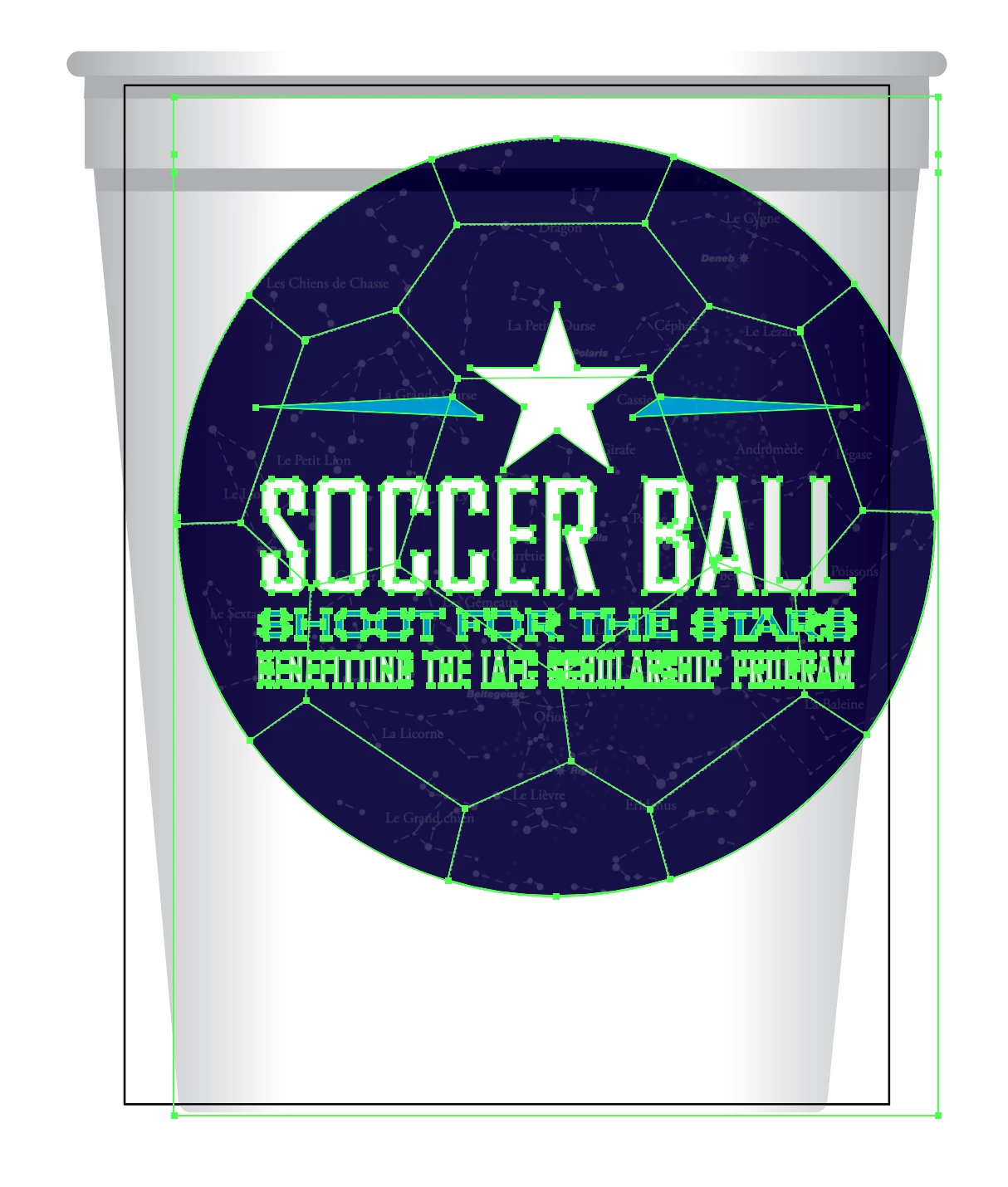
As far as I can tell, I cannot use .geometricBounds, either, as it also includes the clipped artwork. What can I do?

This topic has been closed for replies.
Correct answer Silly-V

Really quickly size up your active or temp-made artboard to the selection (which is going to be your clipping bounds) and take measurements of that artboard. Then you can re-fit the used artboard back to its place, or if it was a temp artboard, delete it.

1 reply

Silly-V
Silly-VCorrect answer
Legend
March 24, 2016

Really quickly size up your active or temp-made artboard to the selection (which is going to be your clipping bounds) and take measurements of that artboard. Then you can re-fit the used artboard back to its place, or if it was a temp artboard, delete it.

Sturm359
Sturm359Author
Inspiring
April 1, 2016

Finally got around to this one again after putting out some other fires.

The selection you see in the image in my initial post was just to make the rectangle that doesn't have a stroke nor fill visible, so you could see how offset it was from the target rectangle (the one with the black stroke). When the script is running, it won't actually be "selecting" anything.

I could make it do so, sure, but how would that help? AFAIK, there is no way to get the current selection's bounds, position, size, etc. It doesn't exist as a class instance with properties and methods.

I went ahead and tried your suggestion anyway, and had the script create a temporary artboard at the same coordinates as the artGroup's .geometricBounds. As expected, however, it was larger than that blank rectangle (well, either of them, really, since they are the same size), because the clipped artwork was affecting the artGroup's .geometricBounds. Any other ideas?

Silly-V
Legend
April 1, 2016

No, you'd use the Fit to Artwork Bounds command to fit the new artboard to the selection.