
Inspiring
July 20, 2024
Answered

Clipping Mask wont work Illustrator

  • July 20, 2024
  • 2 replies
  • 1797 views

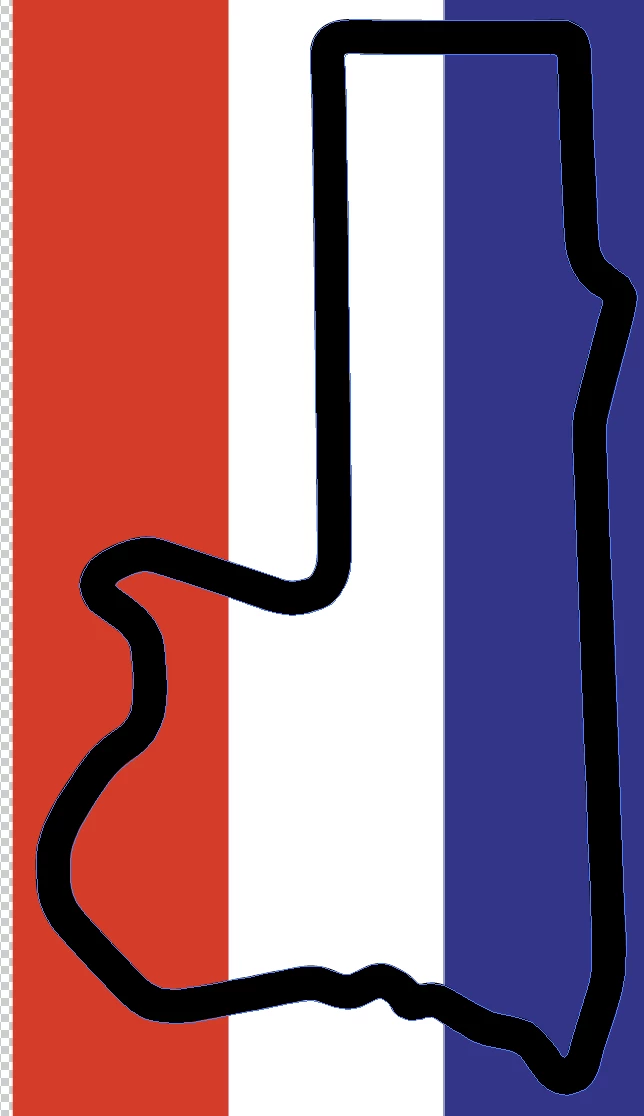
Hi all, I have watched countless video's on this, it never works for me, my shapes are too complex. Obviously, I want the flag to fill the black outline. I have expanded the black outline many times, I have made it a compound path etc etc blah blah blah. The flag is a png, have tried Ai file also. I have followed all the videos to the T and they don't work for me. It appears to be a very difficult thing which only some achieve, Any tips would be awesome, thanks.
 

This topic has been closed for replies.
Correct answer Bec Mac

Bec Mac,


You can try to find a vector representation of the border, or try to draw it with the Pen Tool, or try different settings for the Image Tracing, especially choosing Stroke instead of Fill.


yeah tried that but no luck, but yes another good solution

2 replies

Monika Gause
Community Expert
Community Expert
July 20, 2024

You have image traced a line and then you want to use it as a mask?

Take the direct selection tool, click exactly on the inner path of that compound path and then hit delete until it is gone. Then try again with your mask.

Bec MacAuthor
Inspiring
July 21, 2024

Thanks very much that worked perfectly, then all I had to do was outline the shape with a black stroke/weight!

Monika Gause
Community Expert
Community Expert
July 21, 2024

Glad you could solve it!

Jacob Bugge
Community Expert
Community Expert
July 20, 2024

Bec Mac,


Just use a closed path, then the actual path (regardless of stroke or no stroke, just the spine is the works) will form the boundary of the visible part of the underlying artwork selected with it; if you outline, the clipping path will become the resulting Compound, and only the parts inside it will be visible.


And remember to also select the artwork to be clipped.


If the path is too complex, redraw it or simplify it, you can use Object>Path>Simplify (choose Path then Simplify in the Object dropdown).


Bec MacAuthor
Inspiring
July 20, 2024

thanks, yeah i did all the above previously, and tho there is no spine I had to image trace then I simplified it. And tried just image tracing.  and yes it becomes the compound, without me making it a compound path. confused. can't believe I'll have to redraw this???. not sure how all these videos say it works when it clearly does not, or is far too complex for Ai to handle

Jacob Bugge
Community Expert
Community Expert
July 20, 2024

Bec Mac,


You can try to find a vector representation of the border, or try to draw it with the Pen Tool, or try different settings for the Image Tracing, especially choosing Stroke instead of Fill.