
Inspiring
August 18, 2021
Answered

Collect For Export... as Multiple Assets

  • August 18, 2021
  • 3 replies
  • 1104 views

What is the purpose of this menu item? I had thought I could select multiple paths and this would add them to the asset export panel to be exported as individual files.... it doesn't. In fact I cannot tell the difference between what it does and the other option "as Single Asset".


In the same way, in the asset export panel clicking the "Generate Multiple Assets From The Selection" button also just adds all selected paths as a single asset to export...


Am I missing something? The only way I can get it to work is open the asset export panel, then select one path, click the "Generate a Single Asset from the Selection" button, and repeat for each path to export as a separate file.
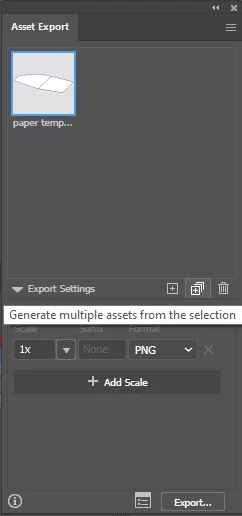


Thanks

This topic has been closed for replies.
Correct answer iethis

Sadly, they are not grouped either. They are just paths in the same artboard.


I tried in a different document and it works fine... must be just something weird going on with the document I was working on.

3 replies

Kurt Gold
Community Expert
Community Expert
August 18, 2021

Probably your objects are located in a sublayer.


Unfortunately sublayers are treated like groups in this context.


Ton Frederiks
Community Expert
Community Expert
August 18, 2021

Make sure they are not grouped. Here the blue and green ovals are grouped and act as a single asset.

iethisAuthorCorrect answer
Inspiring
August 18, 2021

Sadly, they are not grouped either. They are just paths in the same artboard.


I tried in a different document and it works fine... must be just something weird going on with the document I was working on.

Ton Frederiks
Community Expert
Community Expert
August 18, 2021

Something weird can always happen, sometimes copying the content and pasting into a new document helps to solve the problem.

Ton Frederiks
Community Expert
Community Expert
August 18, 2021
iethisAuthor
Inspiring
August 18, 2021

Hi


Thanks for the reply, but no, it doesn't answer the question. It seems to suggest that Collect for Export > As Multiple Assets is supposed to work as I thought - but it doesn't as noted in my original post.


After playing around - it does seem to work as expected if the objects are on different artboards - but if you select two layers or paths on the same artboard it combines them into one asset - even if you use the multiple asset option.