MahaMN
Dec 18, 2022 9:02 PM UTC
Question

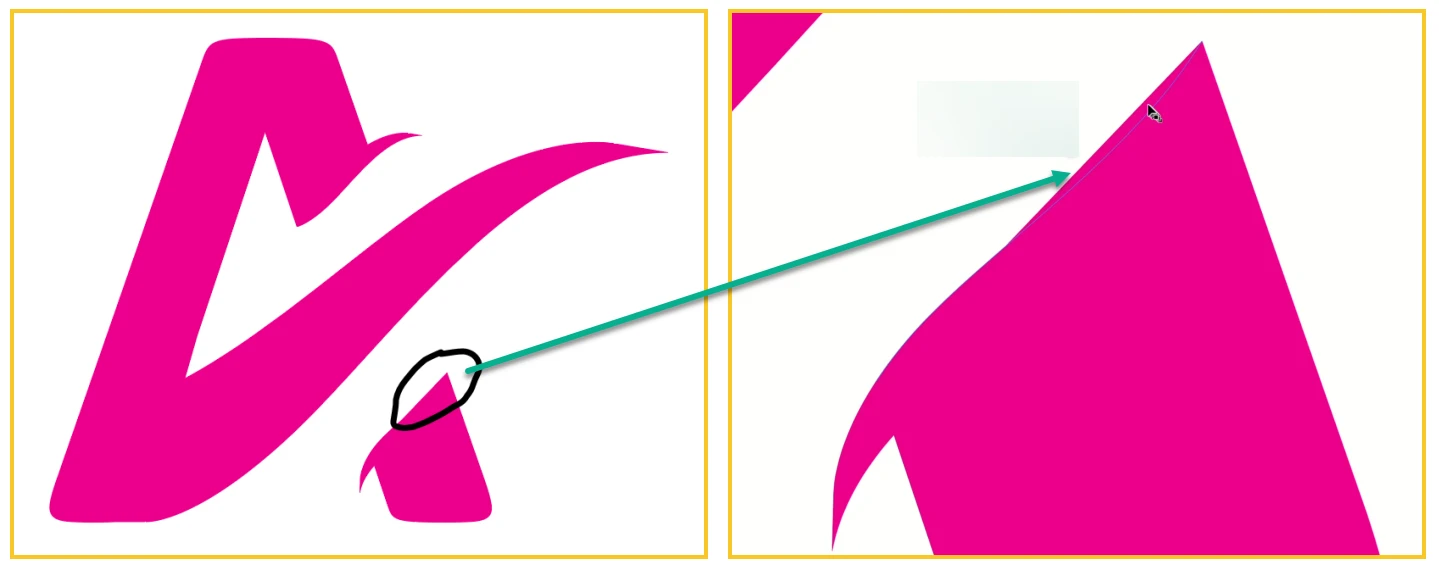
Color crosses the border

What is the reason for color crosses the border?
 

This topic is closed to new replies. Start a new post to keep the conversation going.

10 replies

pixxxelschubser
Community Expert
Community Expert
Dec 19, 2022 4:07 AM UTC

Addititional: Please show a screenshot

  1. with the path selected an the Layers Panel visible,
  2. with Attribute Panel (Documentinformation: Object ?Is the path open or closed???)
  3. and with Appearance Panel


Move the (clicked, selected) path a little to the side.
Are there perhaps two or more paths directly above each other?


Translate
MahaMN
MahaMNAuthor
Dec 19, 2022 11:39 AM UTC

Thanks.


As a beginner I am not familiar enough to gothrough with all above mentioned steps. But by using Shape Builder Tool I got rid of this problem. 


Translate
Ton Frederiks
Community Expert
Community Expert
Dec 19, 2022 11:43 AM UTC

Good to hear you solved it. The Shape Builder tool solution looks like you have an open path.

Translate
Ton Frederiks
Community Expert
Community Expert
Dec 18, 2022 9:15 PM UTC

Maybe a GPU Preview problem? Try Cmd or Ctrl E to switch to CPU Preview.

Translate
MahaMN
MahaMNAuthor
Dec 18, 2022 9:59 PM UTC

I couldn't see any differences.

GPU Preview

Translate
Ton Frederiks
Community Expert
Community Expert
Dec 18, 2022 11:05 PM UTC

I cannot see it in your movie because you are zoomed out.

How about a screenshot like the first one comparing both Previews?

Translate
