


Participant
Nov 25, 2022 6:33 AM UTC
Answered

Color discripancy between "View on CPU" and "View on GPU" on a Mac with M1 Max chip

I'm now running AI on a macbook pro 16" (2021) with M1 Max chip.
Mac OS: Ventura 13.0

Memory: 64GB
Adobe Illustrator v27.0.1


I have a big color problem between CPU/GPU previews.
Also, Between Photoshop/Illustrator&Indesign too.
In GPU preview, all colors become dull, whiter and inaccurate.
I didn't have this issue before the latest updates.
I tried to reinstall an older version, but the problem persists.
I am having the problem on both indesign and illustrator.
Do you have a solution to make indesign and illustrator see colors clearly in GPU preview like photoshop?

This topic is closed to new replies. Start a new post to keep the conversation going.
Anshul_Saini
Anshul_SainiCorrect answer
Community Manager
Nov 25, 2022 12:57 PM UTC

Hi @iamhyona,


Thanks for reaching out and sharing the details. As Monika said, this is a known issue.

We have investigated, and it has been found reproducible on our end on Apple Silicon running on macOS Ventura only.
However, it works fine on macOS Monterey on Apple Silicon. Seems like a new change brought up by Apple.
This is acknowledged and will be worked on by developers in future updates.


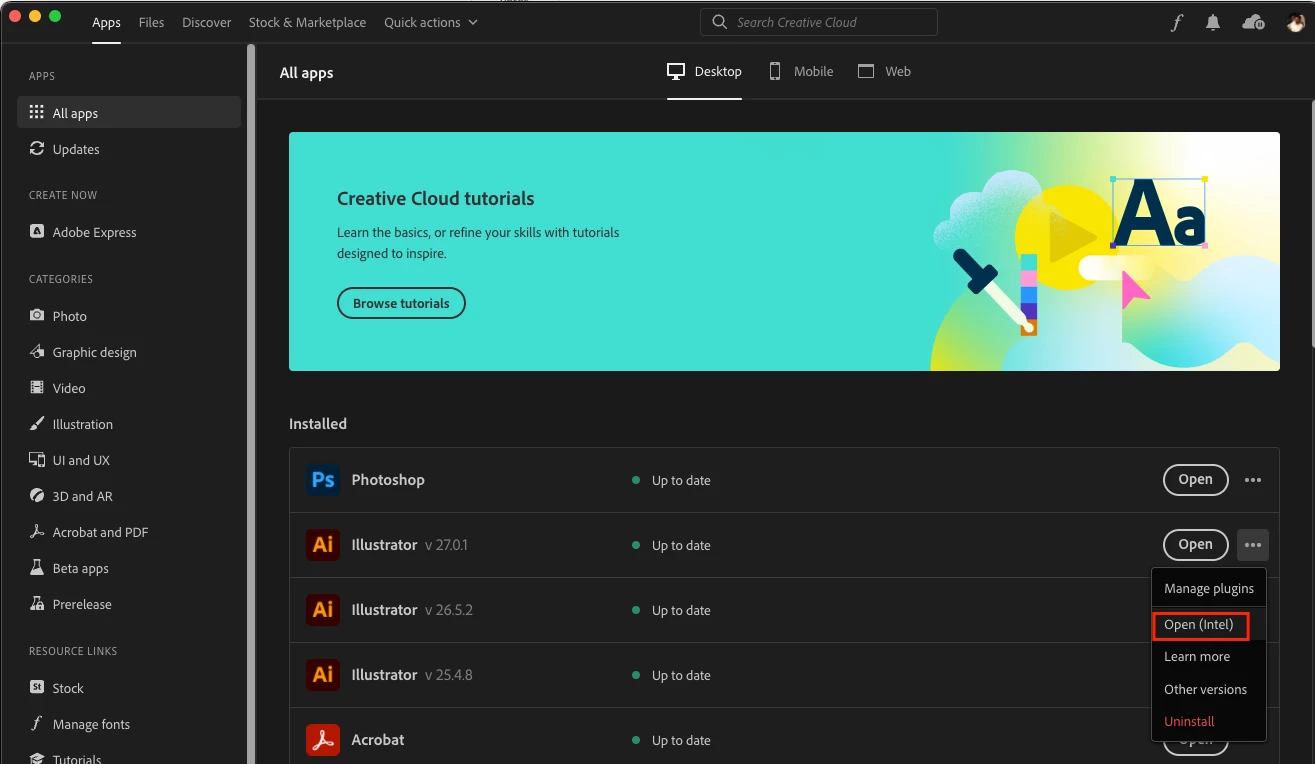
Currently, workarounds to this are to use CPU preview from the View Menu or run the app under rosetta/ Intel or roll back to macOS Monterey.


Please check this UserVoice and upvote it to get related updates to the issue: https://illustrator.uservoice.com/forums/601447-illustrator-desktop-bugs/suggestions/45876907-macos-...


Thanks,

Anshul Saini

17 replies

Emmanuel van der Sloot
Participant
Dec 20, 2022 9:54 AM UTC

Hi,

I just updated to the latest Mac OS (Ventura 13.1) and the problem seems to be fixed. There is no longer a difference between CPU/GPU previews in Illustrator and Indesign.

Translate
iamhyonaAuthor
Participant
Dec 20, 2022 10:19 AM UTC

I still look different. (For reference, I updated both Mac OS and Illustrator to the latest date of 20/12/22.)

Translate
Anshul_Saini
Community Manager
Community Manager
Dec 26, 2022 9:09 PM UTC

Hi @iamhyona,


Thanks for checking & updating us. I am unable to replicate the issue on the Macbook Pro 16" M1 Max screen after upgrading to macOS v13.1. Would you mind confirming if this is happening on your Macbook's inbuilt screen or external monitor(s)?


Thanks,

Anshul Saini

Translate
Anshul_Saini
Community Manager
Anshul_SainiCommunity ManagerCorrect answer
Community Manager
Nov 25, 2022 12:57 PM UTC

Hi @iamhyona,


Thanks for reaching out and sharing the details. As Monika said, this is a known issue.

We have investigated, and it has been found reproducible on our end on Apple Silicon running on macOS Ventura only.
However, it works fine on macOS Monterey on Apple Silicon. Seems like a new change brought up by Apple.
This is acknowledged and will be worked on by developers in future updates.


Currently, workarounds to this are to use CPU preview from the View Menu or run the app under rosetta/ Intel or roll back to macOS Monterey.


Please check this UserVoice and upvote it to get related updates to the issue: https://illustrator.uservoice.com/forums/601447-illustrator-desktop-bugs/suggestions/45876907-macos-...


Thanks,

Anshul Saini

Translate
iamhyonaAuthor
Participant
Nov 25, 2022 1:06 PM UTC

Thank you for your reply. I'll wait until this problem is fixed. I hope developers solve it as soon as possible. have a good day!

Translate
Monika Gause
Community Expert
Community Expert
Nov 25, 2022 10:02 AM UTC
iamhyonaAuthor
Participant
Nov 25, 2022 10:42 AM UTC

Does this problem still not have a solution?
Do I have to wait for Adobe to fix this issue and release an update?

Translate
Doug A Roberts
Community Expert
Community Expert
Nov 25, 2022 11:53 AM UTC

No and yes.

Translate