


Participant
September 11, 2020
Answered

Color gradient halftone

  • September 11, 2020
  • 3 replies
  • 973 views

Does anybody know how to do a color gradient halftone in Illustrator? I can do a B/W halftone and I know how to color it with a solid color, but I want to color it with a gradient with 2 or 3 colors. Is that possible or am I just wasting my time?
This topic has been closed for replies.
Correct answer Ton Frederiks

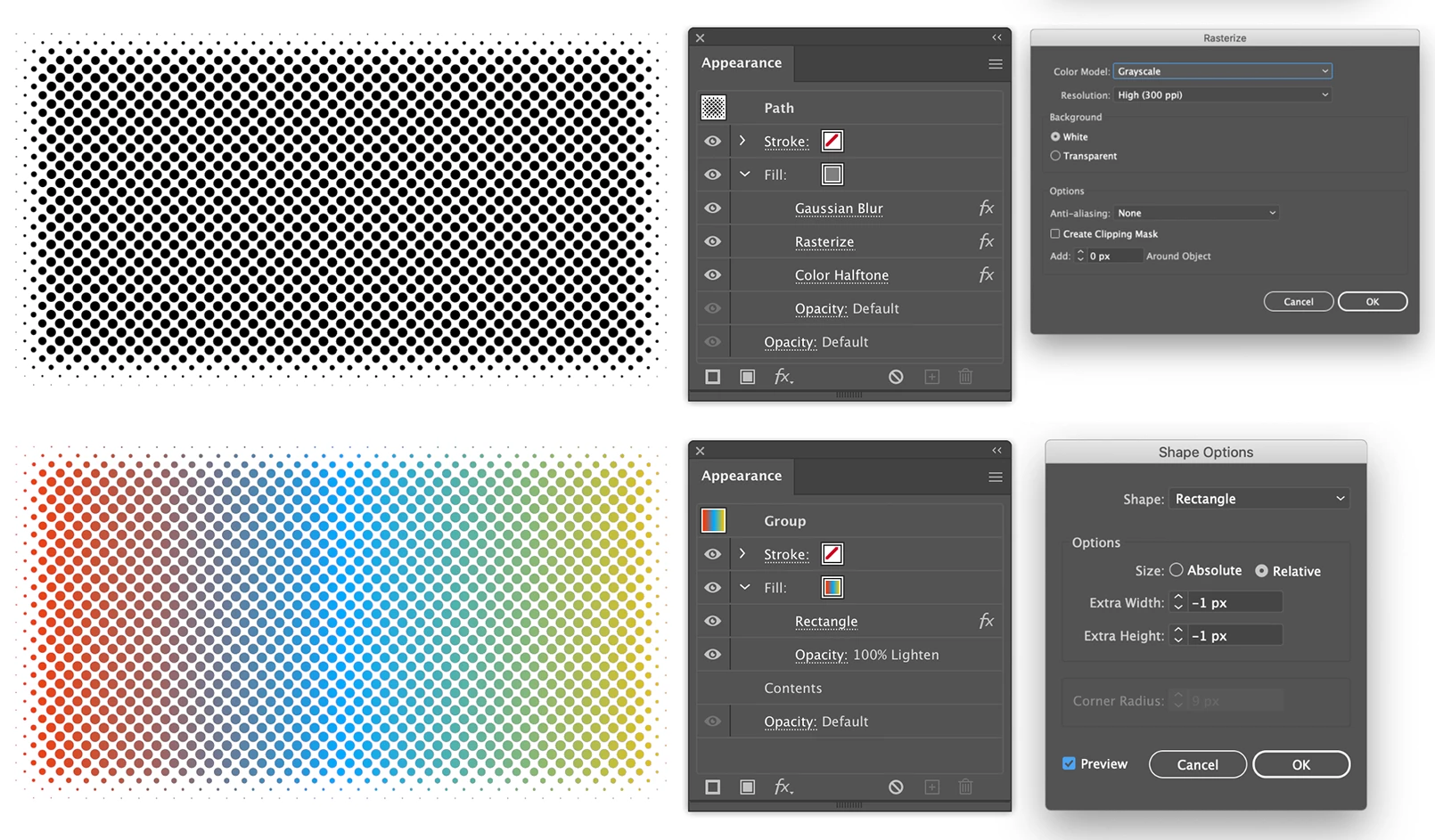
If this is the effect you are after, I would create the halftone first, group the result and apply the gradient to the group with a lighten mode. The shape can be modified afterwards, all the effects are live. You can also apply it to text.


3 replies

Ton Frederiks
Community Expert
Community Expert
September 14, 2020

The method I gave only works with RGB documents.

A simpler method would be to work with an Opacity mask, that works in both RGB and CMYK.

After creating the halftone, put a rectangle filled with a gradient behind it and click Make Mask in the Transparency panel. Check both Clip and Invert mask.

Ton Frederiks
Community Expert
Ton FrederiksCommunity ExpertCorrect answer
Community Expert
September 11, 2020

If this is the effect you are after, I would create the halftone first, group the result and apply the gradient to the group with a lighten mode. The shape can be modified afterwards, all the effects are live. You can also apply it to text.


Participant
September 12, 2020

This really helped thank you! There's still this transparent line around the top and left edge though. Any way I can fix that? It stays in the same spot when I scale and move the halftone. 

Ton Frederiks
Community Expert
Community Expert
September 12, 2020

Good to hear that helped! 

When I created the example, I saw a little line, I got rid of it by giving the rectangle effect a -1 px width. Maybe experimenting with the extra width option helps.

ceyhun_akgun
Legend
September 11, 2020

You can still create the TINT value of a color marked globally in the swatches panel. You can add them to the Gradient panel. I guess you want to do that.

Graphic Designer Educator / PrePress Consultant