Participant
January 31, 2025
Answered

Color Issue

  • January 31, 2025
  • 3 replies
  • 783 views

Hello,

I'm having an issue with my colors. And no, it's not a color management skill issue. My original file displays the colors I used. When I duplicate the same file, my colors suddenly change. They go from vibrant to dull. I made sure my colors were correct. Same RGB/HEX values. Both files are set to RGB. What kind of sorcery is this, Adobe? I haven't tried to export. I'm hoping the colors look the same. Regardless, this issue is annoying. Please see the images below. Same color, same RGB/HEX, set to RGB. All I want is for the colors to match. AGAIN, it's not a color management skill issue. It's an Adobe issue. Let me know what's going on here.


Thank you,

Unhappy Adobe Subscriber

 

Correct answer Ton Frederiks

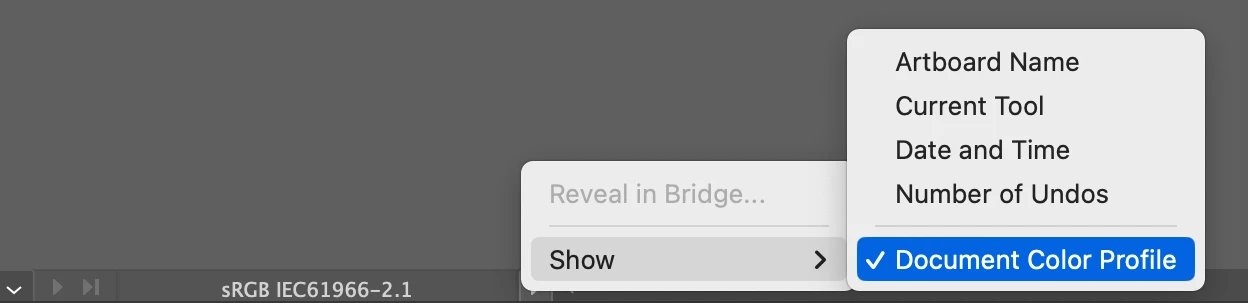
Do both files have the same Document Color Profile?

You can check that using Edit > Assign Profile... or turning the show profile option on at the bottom of your window.

3 replies

Ton Frederiks
Community Expert
Ton FrederiksCommunity ExpertCorrect answer
Community Expert
January 31, 2025

Do both files have the same Document Color Profile?

You can check that using Edit > Assign Profile... or turning the show profile option on at the bottom of your window.

Participant
January 31, 2025

Thank you! That worked. I duplicated the original file, though. Why did it change on its own?

Ton Frederiks
Community Expert
Community Expert
January 31, 2025

Unfortunately sometimes the Document Color Profile can change silently when creating a new file by opening an image, or by dragging a screendump or dragging a file from Photoshop to an Illustrator document.

Monika Gause
Community Expert
Community Expert
January 31, 2025

What are we looking at?

The objects in Illustrator?

The file placed in a layout?

The file in a content management system?

Participant
January 31, 2025

You are looking at colors.

This is posted in the Illustrator forum. So yes, vector-colored objects in Illustrator.

The file is a simple vector AI file.

This is Illustrator. So, this is an Illustrator file with vector objects. Nothing is linked or embedded.

Monika Gause
Community Expert
Community Expert
January 31, 2025
quote


This is posted in the Illustrator forum.


By @carefree_forest3687


That's why it's so important to show the complete interface in a screenshot.

I know that this is the Illustrator forum, thank you very much.


Based on my experience in this forum, screenshots posted in this forum can be anything.

Jacob Bugge
Community Expert
Community Expert
January 31, 2025

carefree,


At a first glance it looks (a bit) like a an RGB/CMYK Color Mode issue.


Participant
January 31, 2025

It's not, unfortunately. As I said, the file was duplicated. Both files are identical. Both are set to RGB with RGB/HEX values.


Thanks!

Jacob Bugge
Community Expert
Community Expert
January 31, 2025

Pondering.